Alice Zimbra is a free and secure email service that lets you communicate with your contacts, manage your calendar, store your files, and much more. To access your Alice Zimbra account , you need to follow a few simple steps, which we'll explain in this article.
How do I log in to my Alice Zimbra account?
To log in to your Alice Zimbra account, you need to go to the official website of the service: Alice Zimbra .
On the homepage, you must enter your email address and password in the corresponding fields, then click on the “ Log in ” button.
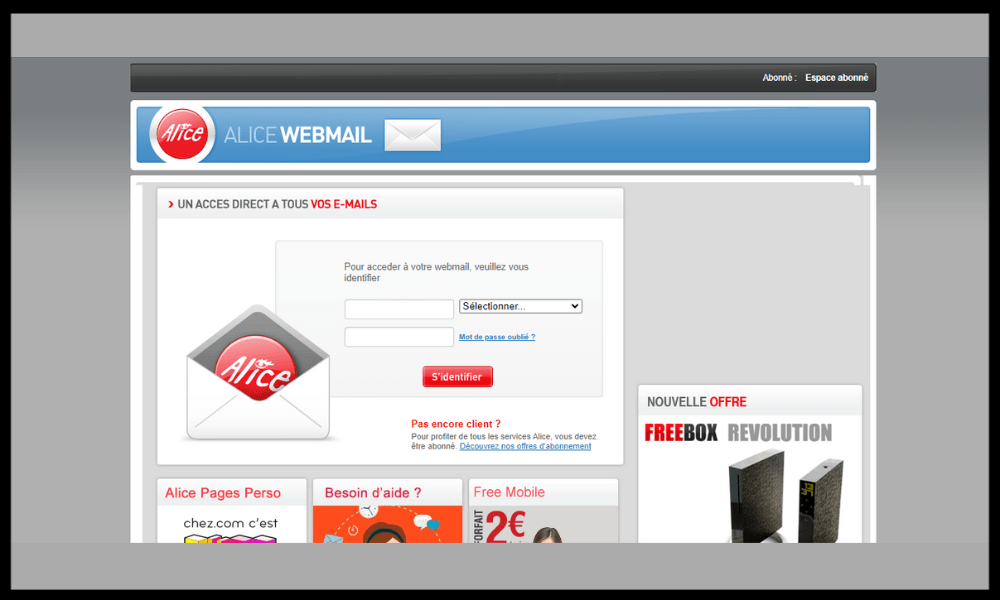
If you have forgotten your password, you can click on the “ Forgot your password? ” link and follow the instructions to reset it.
Once logged into your Alice Zimbra account , you can access your inbox, sent messages, drafts, deleted messages, etc. You can also use the tabs at the top of the screen to access other service features, such as calendar, contacts, tasks, documents, etc.

Here's a quick video tutorial on how to connect to Zimbra Email :
What are the advantages of Alice Zimbra?
Alice Zimbra offers several advantages over other email services. Here are some of the main ones:
- Alice Zimbra is free and unlimited for Alice ADSL or Alice Fibre customers.
- Alice Zimbra offers a simple and intuitive interface that adapts to all screens and all devices.
- Alice Zimbra allows you to synchronize your data with your mobile devices , thanks to the Alice Mail application or the IMAP or POP3 configuration.
- Alice Zimbra offers effective collaboration tools , such as document sharing, shared calendar, mailing lists, etc.
- Alice Zimbra guarantees the security and confidentiality of user data , thanks to SSL encryption and compliance with GDPR standards.
FAQ
What is Alice Zimbra?
Alice Zimbra is an email service launched in 2007 by the Telecom Italia group , which also owns the Alice brand. Like Zimbra Free , Alice Zimbra uses Zimbra technology , an open-source collaboration platform developed by Zimbra Inc. Zimbra offers advanced features such as synchronization with mobile devices, document sharing, calendar, tasks, contacts, and more.
Alice Zimbra is a free service for Alice ADSL or Alice Fibre customers who have an email address ending in @aliceadsl.fr or @alice.fr. Users can create up to 10 different email accounts and enjoy unlimited storage space . Alice Zimbra is accessible from any web browser or via a dedicated app for smartphones and tablets.
How do I create an Alice Zimbra account?

To create an Alice Zimbra account, you must be an Alice ADSL or Alice Fibre customer and have a landline number. Then, go to the website and click on the “ Create your account ” link. You will need to enter your phone number, last name, first name, date of birth, and choose an email address ending in @aliceadsl.fr or @alice.fr. You will then receive a confirmation email with your temporary password.
How do I change my Alice Zimbra password?
To change your Alice Zimbra password, log in to your account and click the gear icon in the top right corner. This will take you to your account settings . Next, click the “ Change Password ” link and enter your old password, your new password, and its confirmation. Finally, click the “ Save ” button to confirm the change.
How do I delete my Alice Zimbra account?
If you wish to delete your Alice Zimbra account, you must contact Alice customer service at 10 13 (free call from an Alice landline) or 08 92 70 10 13 (€0.34/min from another operator). You will need to provide your phone number, email address, and password. The advisor will then proceed to close your Alice Zimbra account and delete all your data.
How do I forward my Alice Zimbra messages to another email address?
If you want to forward your Alice Zimbra messages to another email address , you can use the automatic forwarding feature . To do this, log in to your account and click the gear icon in the top right corner. This will take you to your account settings.
Next, click the “ Forwarding ” link and check the “ Enable forwarding ” box. Then, enter the email address to which you want to forward your messages and click the “ Save ” button. All messages you receive in your Alice Zimbra account will then be automatically forwarded to the email address you provided.
How to resolve connection problems with your Alice Zimbra account?
If you are having trouble logging into your Alice Zimbra account , you can check the following points:
- Make sure your internet connection is working properly and that you don't have any network problems.
- Check that you have entered your email address and password correctly, without typos or capitalization errors.
- Check that you have not activated offline mode or airplane mode on your browser or mobile device.
- Check that you have not blocked cookies or pop-ups on your browser or mobile device.
- Check that you have not installed any software or extension that could interfere with the operation of the service, such as an antivirus, firewall, ad blocker, etc.
- Try clearing the cache and cookies from your browser or mobile device, then restarting the service.
- Try using a different browser or mobile device to access the service.
- Contact Alice's customer service if the problem persists.
How do I add a signature to my emails on Alice Zimbra?
- Log in to your account.
- Click on the gear icon in the top right corner to access your account settings.
- Click on the “ Signatures ” link in the left menu.
- Under the heading “ Signatures ” on the main page, fill in the following information:

- Give your signature a name (for example, “ Personal Signature ”).
- Create the signature you want to use in the text box. You can add text, images, links, etc.
- Indicate that the newly created signature should be used in new messages, replies, and forwards.
- Click the “ Save ” button in the top left corner to confirm the changes.
Your signature will now be automatically inserted into all emails you send from Alice Zimbra.
Conclusion
Alice Zimbra is an email service that offers Alice ADSL and Alice Fibre customers a simple and convenient way to communicate and collaborate. To log in to your Alice Zimbra account, simply go to webmail.aliceadsl.fr and enter your credentials. Alice Zimbra has many features that make managing email and other personal data easy.