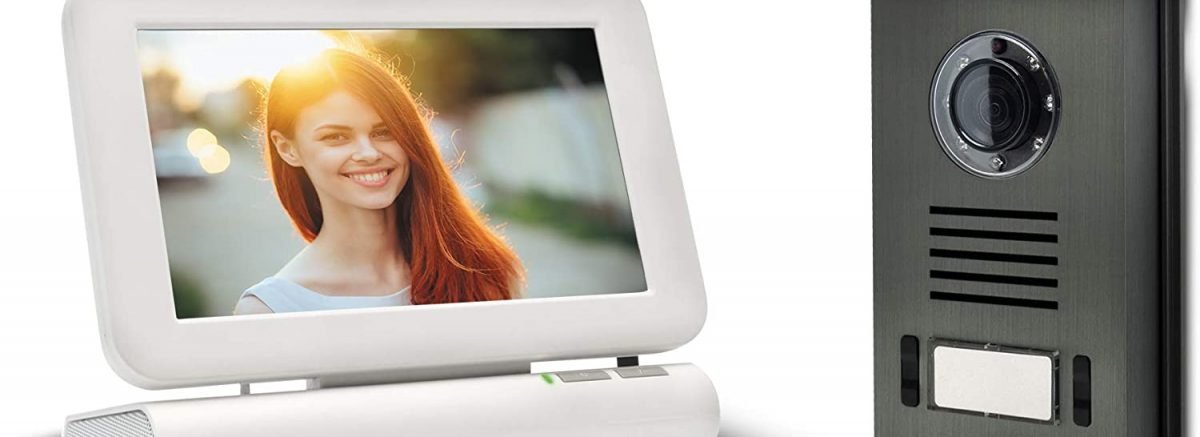
The videophone, also known as the video intercom, is a product that has become more widespread in recent years thanks to falling prices, but also thanks to the technology being more accessible to the general public.
Wireless video intercoms have played a major role in the spread of this technology. The absence of wires, along with the battery-powered search function for the outdoor unit, has greatly simplified installation. You no longer need to be a computer engineer to install your wireless video intercom.
In this article, we'll introduce you to the Extel Lesli wireless video intercom. Whether you need extra security or simply want to see who's at your door, the Extel wireless video intercom is the security device for you!

Extel Lesli Wireless Video Intercom: Technical Specifications
The Extel video intercom's wireless system operates using radio waves with GFSK digital modulation. This type of modulation is compatible with analog components, which are significantly less expensive than digital components, explaining the low price of this Extel video intercom.
The Extel Lesli wireless video intercom features an anti-interference system. This type of system is essential for the proper functioning of your wireless video intercom. The anti-interference system ensures a constant connection between the outdoor unit and the monitor, even in severe weather conditions.
The Extel Lesli wireless video intercom has a range of 300 meters in open field. Unlike other wired video intercoms whose range does not exceed 120 meters, this wireless intercom allows you to double the distance between the outdoor unit and the monitor, but only in open field conditions. Be aware that the range is drastically reduced if you have concrete walls that block the wireless system's radio waves.
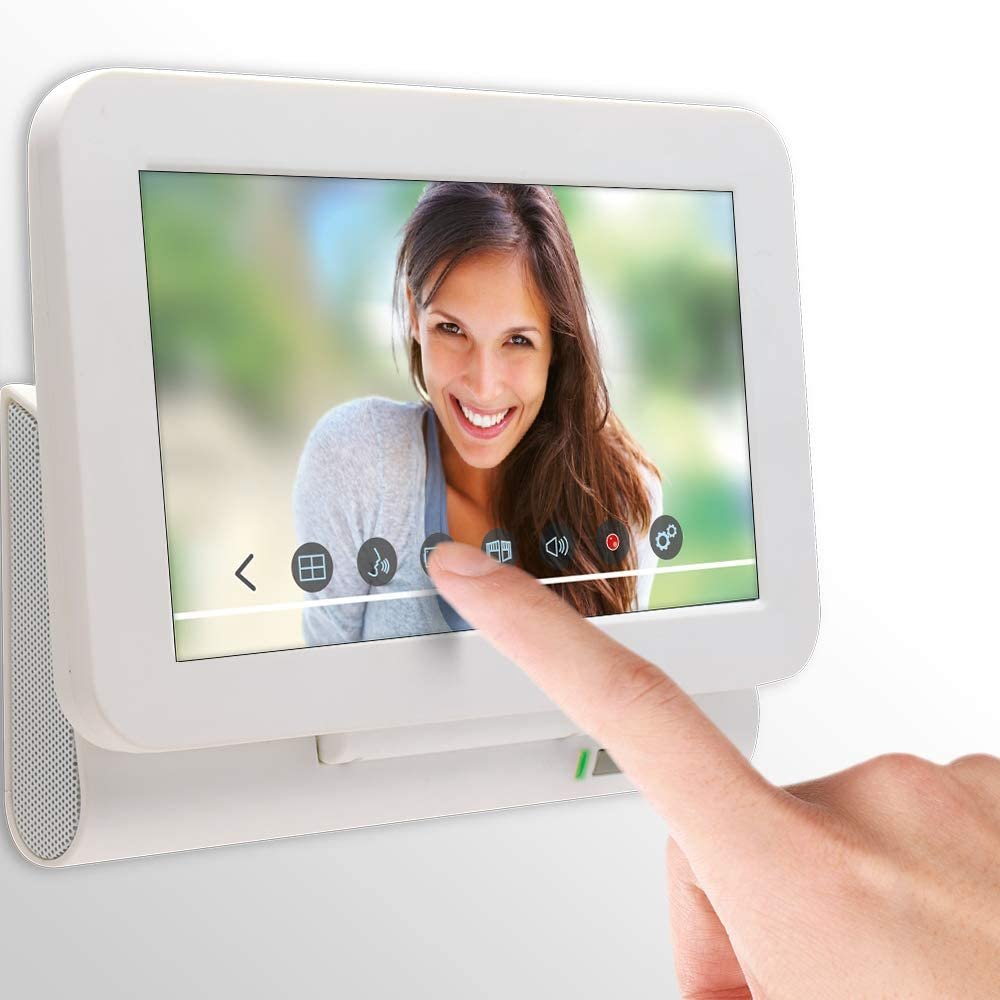
The Extel Lesli wireless video intercom also features an 18-centimeter diagonal monitor. The Lesli monitor's most significant advantage is its internal rechargeable battery, offering 2 hours of operating time and 6 hours of standby time. Ensure the monitor's temperature does not exceed 40°C or fall below 10°C.
The Extel wireless video intercom monitor is power supply by a 230V/5V 1A adapter. Several customers report that the adapter wire can easily break; if this happens to you, make sure to respect the polarity, otherwise you will experience sound and image malfunctions.
An electronic control unit is supplied with the Extel Lesli wireless video intercom. This unit must be connected to the outdoor station via a 6-wire cable, so it needs to be installed near the station. The video intercom control unit provides the connection to the monitor via an antenna, and also power supply to the outdoor station via the battery compartment. It also includes a terminal block for connecting the gate opener and another terminal block for connecting the electric strike or lock.
Extel Lesli Wireless Video Intercom: Installation Guide

Before starting the installation, choose the locations for the outdoor unit and the electrical box. The chosen location must have good air circulation to prevent the box from overheating.
It is also preferable to install the case and the board away from the rain, even if both have rain protection, several customers have complained that the protection was not effective enough.
During installation, it is advisable to:
- Never use rechargeable batteries
- Never insert the batteries before the installation is complete
- Run the cables from the skate and the control box through a protective sheath
- Place the antenna away from any source of interference (metal, tree, obstacle),
- Place the antenna at a height greater than 1.60 meters from the ground
- Never use any antenna other than the one supplied with the Extel wireless video intercom
- Remove the batteries if the device is powered by an external source
If you are installing the Extel wireless video intercom yourself and think you might need more instructions, here is a video:
Extel Lesli Wireless Video Intercom: How to Use
Using the Extel wireless video intercom is quite simple and is done mainly via the monitor's software.
However, some more or less useful information can help you make better use of your wireless video intercom:
- You have one minute to answer a call
- A call lasts by default one minute, which you can extend
- You can end the call before the end of the minute (the image remains frozen)
- If a visitor calls and you have an SD card, a recording will automatically start for one minute (useful for knowing who your visitors are while you're away)
- If you have connected your video intercom to an electric strike or lock, it can only be opened once during a call
- To operate an automated gate system, an external power supply is required
- You will need to obtain a micro SD card (it is not supplied with the video intercom).
Extel Lesli Wireless Video Intercom: Optional Accessories

The Extel wireless video intercom is sufficient on its own, but you can buy other accessories for more advanced use.
You can use it with the Extel wireless video intercom:
- Three additional surveillance cameras,
- An electric strike plate,
- An electric lock,
- A gate motor,
- An external power supply n 12V~ WETR14602 SER.R1.
To ensure optimal use of these accessories, it is recommended that you purchase Extel products.
Extel Lesli Wireless Video Intercom: Warranty
The Extel wireless video intercom is guaranteed for two years. However, as with all warranties, certain guidelines must be followed to avoid voiding your warranty:
- Do not open the device
- Do not use outside repairers
- Protect the monitor in case of return,
- Follow the instructions in the user manual supplied with the Extel wireless video intercom.
All instructions to comply with the warranty conditions are clearly specified in the video intercom user manual.
You will also find solutions to the most common breakdowns that you can fix yourself.
Extel Lesli Wireless Video Intercom: Customer Reviews
Only 55% of customers of the Extel 300m wireless video intercom with an 18cm screen have a positive review of the product. This fact alone might dissuade you from buying this Extel video intercom, but you can rest assured knowing that the majority of negative reviews date from before 2018, the release date of the latest version of the product.
The fact that this cheap Extel video intercom offers advanced options that are very rare for such a low price may also be a reason for you to buy it.
Key features:
- Cheap,
- Easy to install,
- Intuitive software,
- Touch screen,
- Wireless with a long range,
- Power Supply via battery (optional external power supply ).
Weak points:
- Fragile materials,
- Low weather resistance,
- Reduced range in case of obstruction.
In conclusion, the Extel Lesli wireless video intercom isn't a perfect product, but its value for money makes it a smart investment, especially since the after-sales service, according to most customers, is excellent. So even if you encounter any problems (provided you follow the warranty guidelines), you'll have access to all the support you need to ensure the Extel Lesli wireless video intercom functions properly.