Do you love Instagram, but not Reels? Those short, creative videos that pop up all over your profile and news feed?
Do you find them too intrusive, too noisy, or too distracting? Do you want to remove them, whether to hide them temporarily or to eliminate them permanently?
In this article, we show you how to remove reels on Instagram!
Good to know : Since August 2023, Instagram reels have a maximum duration of 10 minutes.
How do I hide reels on Instagram?
If you simply want to hide reels on Instagram, meaning you no longer see them in your news feed or on the Explore tab, but without deleting them from your profile, there are two possible methods:
- The first method is to disable the sound of the reels. To do this, simply click on the speaker icon in the bottom right corner of the video while watching it. This way, you won't be bothered by the sound of the reels, but you can still see them if you wish.
- The second method involves hiding the reels of a specific account. To do this, go to the profile of the account in question, click on the three dots in the top right corner, and then select the “Hide”

You will then have the option to hide stories, reels, or both. If you choose to hide reels, you will no longer see videos from this account in your news feed or in the Explore tab, but you will still be able to view them by going directly to their profile.
If you hide Reels and still see some videos appearing in your feed, it might be an Instagram bug. Refresh your page; the problem may be resolved!
Another article that might interest you : How to hide your subscriptions on Instagram?
How do I delete reels on Instagram?
If you want to delete reels on Instagram, meaning to permanently remove them from your profile and the platform, there is only one possible method:
Go to your profile, click on the Reels tab (theclapboard icon), then select the Reel you want to delete. Next, click on the three dots in the bottom right corner of the video, then choose the "Delete" option. You will need to confirm your choice by clicking "Delete" a second time.
Warning, this action is irreversible: once you have deleted a reel, you cannot recover it.
Here's a video that explains in detail how to delete reels on Instagram:
How do I remove reels on Instagram if I don't have the "Hide" option?
If you don't see the "Hide" option to hide Reels from a specific account, it might be because you don't have the latest version of the Instagram app. To fix this, update your app by following these steps:
- Open the Play Store if you have an Android device or theApp Store if you have an iOS device.
- Search for the Instagram app and tap on it.
- If you see the “ Update ” button , tap it to download and install the latest version of the application.
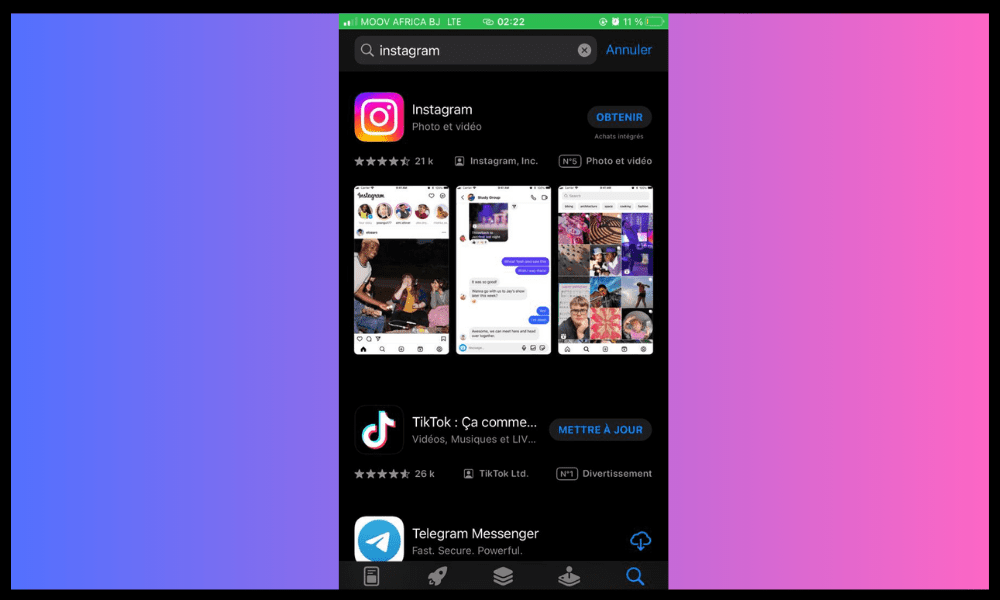
- If you do not see the “Update”, it means you already have the latest version of the application.
- Open the Instagram app again and check if you have the “Hide” option to hide reels from a specific account.
How do I disable the autoplay of Reels?
When you're browsing Instagram, you might come across Reels that start playing automatically as soon as you see them on your screen. This can be annoying, especially if you don't want to watch these videos or if you want to save your mobile data.
To disable automatic playback of Reels, you need to:
- Go to the Instagram app settings
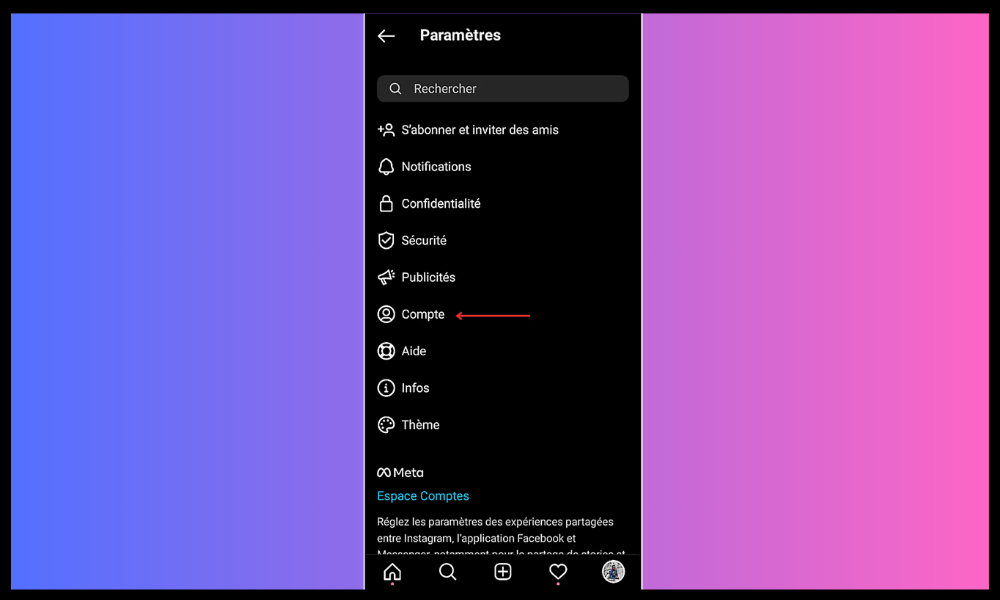
- Select “Account” then “Cellular Data Usage”
- Enable the “ Use less data ” option
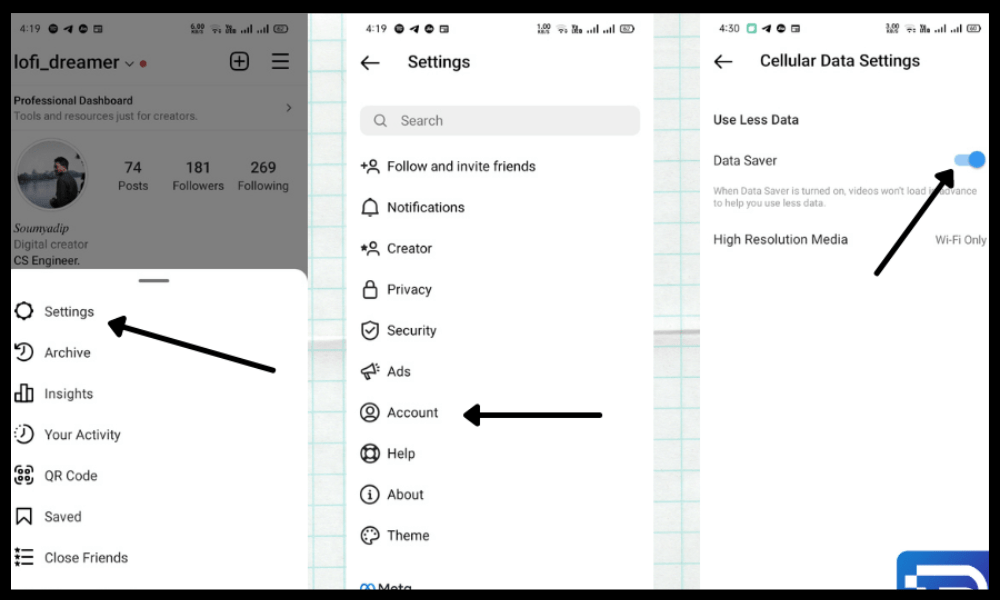
By doing this, you will prevent Reels from loading automatically when you are connected to 4G or 5G. You will need to press the "Play" button to start the video manually. If you are connected to Wi-Fi, Reels will still load automatically.

How do I prevent other users from remixing my Reels?
Remix is a feature that allows an Instagram user to create a Reel using another Reel as a source. This allows for duets, reactions, or parodies. Remix is similar to duet on TikTok.
If you don't want your Reels to be used for remixes by other users, you must:
- Go to your profile and click on the Reels icon
- Select the Reel you want to protect
- Tap the three dots in the bottom right corner of the video
- Select “Reel Settings” from the menu that appears
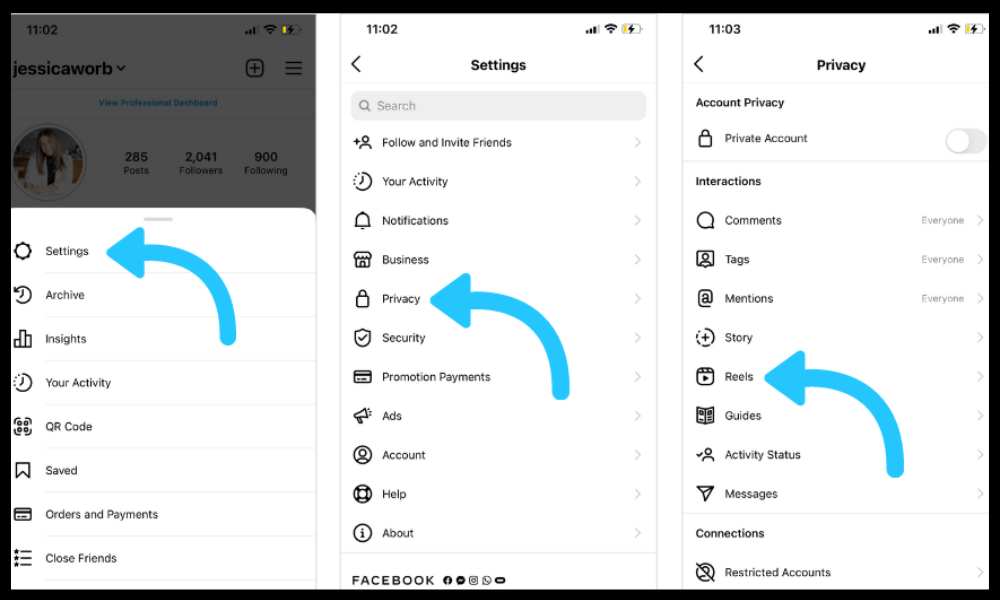
- Disable the “ Allow remixes ” option
By doing this, you will prevent other users from using your Reel to create remixes. You can always enable or disable this option at any time.
Why remove reels on Instagram?
- To better focus on relevant content : your news feed or Explore tab will be clearer and less cluttered if you eliminate reels that don't interest you.
- To make your profile more consistent and attractive : your brand image or style will be more harmonious and easier to read if you remove reels that are not in line with them.
- To optimize engagement and visibility : your audience will be more receptive and more loyal if you broadcast content that they like and that meets their expectations.
- To preserve your privacy and credibility : your privacy or reputation will be better protected if you delete reels that may be compromising or embarrassing.
What are the disadvantages of removing reels on Instagram?
- You may miss opportunities for visibility and engagement with your subscribers or with new users.
- You may miss out on interesting, entertaining, or inspiring contentfrom other accounts.
- You can deprive yourself of a creative and fun tool to express your personality, talent, or humor.
- You can go against the current trend of short and dynamic videos on social media.
What is the difference between Reels and Stories on Instagram?
Reels and Stories are two Instagram features that allow you to share videos. However, there are several differences between them:
- Reels can last up to 10 minutes, while Stories cannot exceed 60 seconds.
- Reels can be edited with more varied and creative sound and visual effects than Stories
- Reels can be shared in the news feed, the Explore , or the bottom bar of the screen, while Stories are only visible in the top bar of the screen or on the user's profile.
- Reels remain indefinitely on the user's profile, while Stories disappear after 24 hours (unless they are added to Highlights).
In conclusion
Removing Reels on Instagram is an option that depends on your needs and preferences. If you don't like Reels or feel they don't offer you anything, you can hide or delete . However, in this case, you might not be able to react to Instagram posts if you've removed Reels, as they are part of the platform's interactive features.
If, on the other hand, you enjoy Reels or want to take advantage of their benefits, you can keep them or create more. In any case, it's important to stay attuned to your audience and your Instagram strategy, and to adapt to the platform's evolution.