

Wi-Fi Direct is a technology that allows two devices to connect directly to each other via Wi-Fi, without the need for a router or access point. This feature is especially useful for sharing files, photos, and videos between two Samsung devices. In this article, we'll show you how to enable Wi-Fi Direct on your Samsung device and how to use it to share files with other devices.
Step 1: Check if your Samsung device is compatible with Wi-Fi Direct

Before you begin, make sure your Samsung device is compatible with Wi-Fi Direct. Most recent Samsung smartphones and tablets have this feature, but it's always a good idea to check. To do this, go to your device's settings, then to the " Connections " or " Network & Internet " section. If you see a " Wi-Fi Direct " option there, your device is compatible.
Step 2: Enable Wi-Fi Direct on your Samsung device
To enable Wi-Fi Direct on your Samsung device, follow these steps:
- Open your device settings.
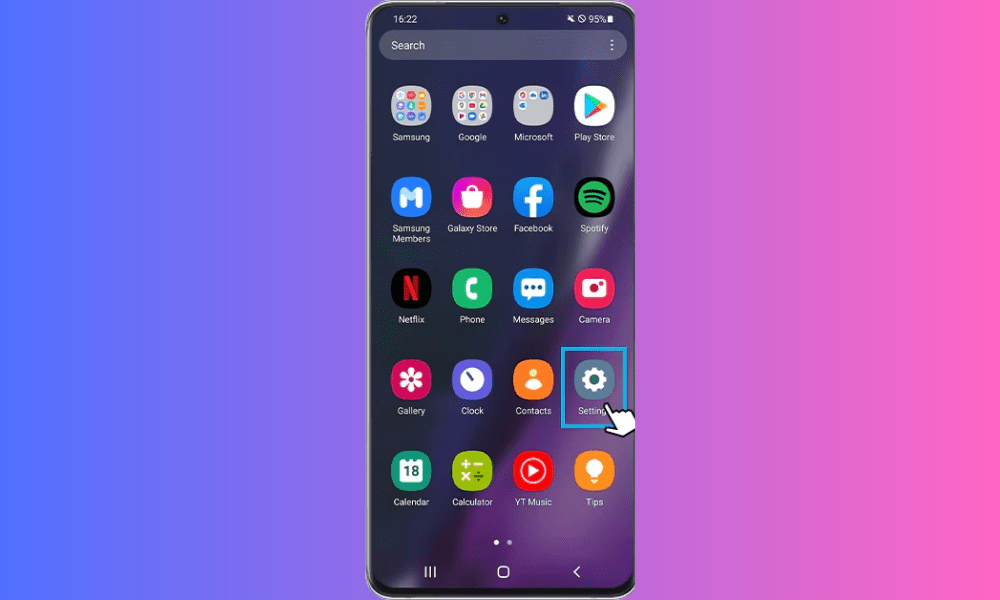
- Go to the “Connections” or “Network and Internet” section.
- Select “Wi-Fi”.
- Tap the three dots in the top right corner of the screen to open the menu.
- Select “Wi-Fi Direct”.
Your device will then begin searching for nearby Wi-Fi Direct compatible devices.
Step 3: Connect to another device via Wi-Fi Direct

Once you have enabled Wi-Fi Direct on your Samsung device, you can connect to another compatible device. To do so, follow these steps:
- Make sure the other device is also equipped with Wi-Fi Direct technology and is turned on.
- On your Samsung device, go to the Wi-Fi Direct settings (as described in step 2).
- Select the device you wish to connect to from the list of available devices.
- Follow the on-screen instructions to establish the connection.
Once the connection is established, you can start sharing files between the two devices via Wi-Fi Direct.
Samsung phone features
Here is a summary table of the main features of a Samsung phone compatible with Wi-Fi Direct:
| Characteristic | Description |
|---|---|
| Operating system | Android |
| Android version | 4.0 or higher |
| Wireless technology | Wi-Fi Direct |
| Connectivity | Wi-Fi 802.11 a/b/g/n/ac |
FAQ
What is Wi-Fi Direct?
Wi-Fi Direct is a technology that allows two devices to connect directly to each other via a Wi-Fi connection, without the need for a router or access point.
How can I check if my Samsung device is compatible with Wi-Fi Direct?
To check if your Samsung device is compatible with Wi-Fi Direct, go to your device's settings, then to the " Connections " or " Network & Internet " section. If you see a " Wi-Fi Direct " option in this section, it means your device is compatible.
Can I share files between a Samsung device and an iPhone via Wi-Fi Direct?
No, it's not possible to share files between a Samsung device and an iPhone via Wi-Fi Direct, as iPhones don't support this technology. If you have an iPhone, you can use NFC (Near Field Communication), which is also a wireless technology that allowsdata exchange between two compatible devices over short distances.
What is the difference between Wi-Fi Direct and Bluetooth?
Wi-Fi Direct and Bluetooth are two wireless technologies that allow devices to connect to each other. The main difference between the two technologies lies in their range and data transfer speed. Wi-Fi Direct has a greater range and a faster data transfer speed than Bluetooth.
Can I use Wi-Fi Direct to connect to the Internet?
No, Wi-Fi Direct cannot be used to connect to the internet. This technology only allows two devices to connect directly to each other.
What is the range of the Wi-Fi Direct connection?

The range of a Wi-Fi Direct connection depends on several factors, such as environmental interference and physical obstacles. Generally, the range of a Wi-Fi Direct connection can reach several tens of meters.
Can I use Wi-Fi Direct to play multiplayer games on my phone?
Yes, you can use Wi-Fi Direct to play multiplayer games on your phone if the game in question supports this technology.
What are the advantages of using Wi-Fi Direct compared to Bluetooth?
The advantages of using Wi-Fi Direct over Bluetooth include greater range and faster data transfer speeds. This technology is particularly useful for sharing large files between two devices.
Can I use Wi-Fi Direct to stream content to my TV?
Yes, you can use Wi-Fi Direct to stream content to your TV if it is equipped with this technology.
How do I disable Wi-Fi Direct on my Samsung device?

To disable Wi-Fi Direct on your Samsung device, follow the same steps as to enable this feature (as described in step 3), then select “Disable” from the menu.
Can I use multiple devices at the same time with Wi-Fi Direct?
Yes, you can use multiple devices at the same time with Wi-Fi Direct if all devices are equipped with this technology and if you have established a connection between them.
What is the data transfer speed via Wi-Fi Direct?
Data transfer speeds via Wi-Fi Direct depend on several factors, such as signal quality and environmental interference. Generally, transfer speeds can reach several tens of megabits per second.
Is Wi-Fi Direct secure?
Yes, Wi-Fi Direct is a secure technology that uses encryption methods to protect data exchanged between devices.
Conclusion
Enabling Wi-Fi Direct on a Samsung device is quick and easy. This technology allows you to easily share files between two devices without needing a router or access point. Follow the steps in this article to enable Wi-Fi Direct on your Samsung device and start sharing files with other devices with ease.


