
Do you enjoy watching movies or series online, but are demanding when it comes to quality? You may have heard of WebDL, a digital video format that offers optimal quality , close to that of Blu-ray. But what exactly is WebDL? What are its advantages and disadvantages? How do you find and use it? In this article, we'll explain everything you need to know about WebDL, the high-quality digital video format.
What is web dl and why choose it?
Web DL is a video format that offers exceptional quality because it originates from an official digital source, such as Netflix, Amazon Prime Video, or iTunes. It is a faithful copy of the original file, without alteration or compression. Web DL therefore provides impeccable picture and sound quality, comparable to Blu-ray.
Web download is an ideal format for discerning internet users who want to download or watch videos online without sacrificing quality. It allows for an immersive viewing experience that respects the creators' vision. Web download is also faster to obtain than a Blu-ray or DVD, as there's no need to wait for the physical release of the film or series.
Web downloading does have some drawbacks. It requires a stable and fast internet connection for downloading or streaming. It also consumes a lot of storage space due to its large file size. Furthermore, it can be difficult to find because it is often protected by anti-piracy measures.
How to use web dl?
Web downloads are available on several websites and platforms that offer online content. Some are legal and require payment, such as Netflix, Amazon Prime Video, and iTunes. Others are illegal and free, such as Torrent9, Zone Téléchargement, and LibertyVF. Caution is advised with these latter sites, as they may contain viruses or malware.
To use web download services, you generally need to register on the chosen website or platform and download the video file corresponding to the movie or series you want to watch. You then need to use a media player compatible with the file format, such as VLC, Media Player Classic, or Kodi.
It's also possible to watch web videos via streaming without having to download them. To do this, you need to use a web browser that supports the file format, such as Chrome, Firefox, or Safari. You also need an extension or plugin that allows you to play online videos, such as Video DownloadHelper or Stream Video Downloader.

>>> To enjoy unparalleled visual quality: choose from the best OLED screens
How to check the quality of a web download?
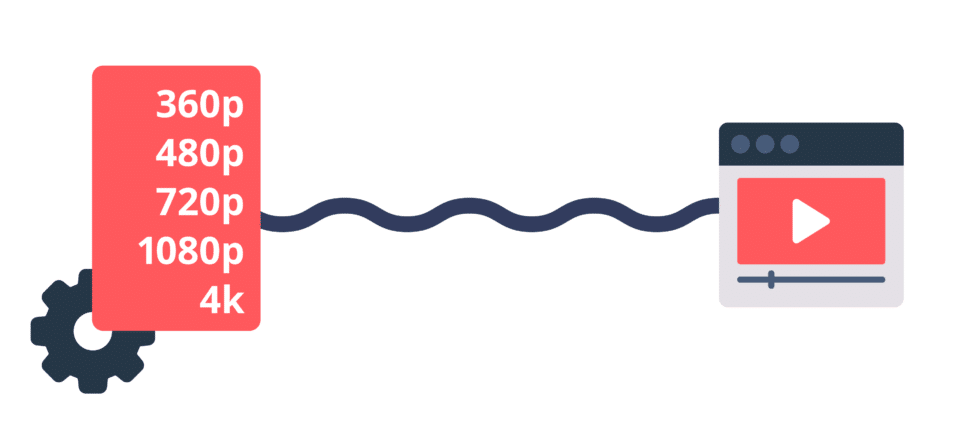
The quality of a web download depends on several criteria, such as resolution, bitrate, and the codec used. Here's how to check them before downloading
to download or watch a video via web download:
Resolution indicates the number of pixels that make up the image. The higher the resolution, the sharper and more detailed the image. Web content can have different resolutions, such as 720p, 1080p, or 4K. To choose the right resolution for your screen, you need to consider its size and viewing distance. For example, for a 40-inch screen located 2 meters from the viewer, a 1080p resolution is sufficient.
– Bitrate indicates the amount of data transferred per second. The higher it is, the smoother and more faithful the image and sound will be to the source. Web downloads generally have a high bitrate, which can vary depending on the resolution and codec used. For example, a 1080p web download might have a bitrate of 5 to 10 Mbps, while a 4K web download might have a bitrate of 15 to 25 Mbps.
The codec indicates the compression and decompression format of the video file. Several codecs exist, such as H.264, H.265, and VP9. The codec affects both the quality and the file size. Some codecs are more efficient than others because they allow for a smaller file size without sacrificing quality. For example, H.265 is more efficient than H.264 because it can halve the file size while maintaining the same quality.
To verify these criteria, simply check the video file information before downloading or streaming it. You can also use software like MediaInfo or GSpot to obtain more detailed information.
– What are the advantages and disadvantages of web download?
The advantages of web download are:
- Optimal image and sound quality
- A faithfulness to the original source
- Rapid availability after the release of the film or series
The disadvantages of web downloading are:
- A stable and fast internet connection is required
- A significant amount of storage space is needed
- Difficulty in finding legal sources
Comparative table between web download and other digital video formats:
| Format | Source | Quality | Benefits | Disadvantages |
| Web dl | Official streaming | High | Faithful to the original | Hard to find |
| Web rip | Official streaming or not | Average | Available soon | It has defects |
| BDRip | Blu-ray | High | Compatible with most devices | Requires physical support |
| DVDRip | DVD | Average | Easy to find | Lower quality than Blu-ray |
| CAM/TS | Movie theater | Low | Released before the official release | Poor quality |
FAQ on the web dl
Here are some frequently asked questions that internet users may ask on the web:
What is the difference between web download and web rip?
A web rip is a video format that also originates from an official digital source, but has undergone modification or compression. For example, it might be a screenshot or a recording of the video stream. Web rips are therefore of lower quality than web downloads, as they may contain flaws such as black bars, logos, or embedded subtitles.
Is it legal to download or watch web content?
It depends on the source of the file and the country you are in. If the file comes from a legal, paid website or platform, such as Netflix, Amazon Prime Video, or iTunes, there is no problem downloading or streaming it, as long as you comply with the service's terms of use. If the file comes from an illegal, free website or platform, such as Torrent9, Zone Téléchargement, or LibertyVF, it is an act of piracy that can be punished by law.
Is web dl compatible with all devices or software?
No, not all devices or software are capable of playing WebDL files. You need to check that the device or software has the necessary codec to decode the video file format. For example, if the WebDL file is in H.265, the device or software must support this codec. Otherwise, you will need to convert the video file to another format compatible with the device or software.
How does web streaming quality compare to other video formats?
Web DL is a video format that offers optimal quality because it comes directly from an official digital source, without any modification or compression. It therefore preserves the original resolution, bitrate, sound, and subtitles. Web DL is generally superior to other video formats, such as DVDrip, Blu-ray rip, or HDTV rip, which are derived from a physical source or a television broadcast.
What are the advantages and disadvantages of web download?
Web download has several advantages and disadvantages depending on the criteria considered. Here are a few examples:
Benefits :
- Web dl offers impeccable image and sound quality, close to that of Blu-ray.
- Web dl allows access to exclusive or recent content that is not available on DVD or Blu-ray.
- Web content can be downloaded or streamed quickly, thanks to its availability on many sites or platforms.
Disadvantages:
- Web dl takes up a lot of storage space because it has a large file size due to its high quality.
- Web dl can be difficult to find or download, as it is often protected by DRM or anti-piracy measures.
- Web downloads can be illegal or dangerous if they come from an unauthorized or malicious source.
How to distinguish a real web download from a fake one?
It's not always easy to distinguish a genuine web download from a fake one, as some sites or platforms may lie about the origin or quality of the video file. Therefore, you must be vigilant and check several things before downloading or watching a web download. For example:
- The file name: it must contain the term “WEB-DL” or “WEB_DL” and indicate the resolution (e.g. 1080p) and the codec (e.g. H.264) of the video file.
- File size: it must be consistent with the quality of the video file. For example, a 1080p web download should be approximately 4 GB per hour of video.
- The file source: it must be credible and reliable. For example, if the web download comes from an official site or a legal, paid platform, it is more likely to be authentic.
In summary, WebDL is a high-quality digital video format that comes directly from an official streaming service. It's ideal for internet users who want to download or watch online videos without compromising on quality. It differs from WebRip, which is a medium-quality digital video format that comes from a modified or compressed streaming source.


