

Are you using Orange's email service to send and receive emails, but having trouble accessing your inbox or sending and receiving messages? You're not alone! Many Orange users are experiencing bugs, problems, or outages with their email service. What should you do in these situations? How do you identify the cause of the bug and how do you fix it? We'll look at how to resolve Orange email problems today!
What is your Orange email problem today?
Before looking for a solution, you must first identify the cause of the problem. Indeed, bugs, problems, and email outages can have various origins:
- A problem with your login details (email address or password): you cannot log in to your mailbox or you receive an error message indicating that your login details are incorrect.
- A problem with the mail servers (imap, pop or smtp): you cannot send or receive messages or you receive an error message indicating that the servers are inaccessible or unavailable.
- A problem with your email account settings : you cannot properly configure your email account on your computer, smartphone or tablet or you receive an error message indicating that the settings are incorrect or incomplete.
- A problem with the orange.fr portal : you cannot access your mailbox from the Orange website or you receive an error message indicating that the portal is under maintenance or down.
To identify the cause of the problem, you can perform a few simple checks:
- Check that your login details are correct and that you haven't forgotten or changed your password. If you have forgotten your password, you can reset it by following the instructions on the orange.fr portal.
- Check that the email servers are operational and that there are no malfunctions or maintenance in progress. You can check the service status on the website https://suivi-des-incidents.orange.fr/ .
- Check that your email account settings are correct and comply with Orange's recommendations. You can find the settings to use on the website https://assistance.orange.fr/parametres-mail-orange_1651-1652 .
- Check that the orange.fr portal is accessible and that there are no technical problems or ongoing maintenance. You can test access to the portal from another web browser or from another device connected to the internet.
How to solve the Orange email problem?
Once the cause of the problem has been identified, you can look for a suitable solution. Here are some avenues to explore depending on the type of problem encountered:
Problem with your login details
If you are having trouble with your login details, you can try the following solutions:
- Reset your password by following the instructions on the orange.fr portal. You will need to enter your email address and answer a security question or enter a code received by SMS or email. You can then choose a new password and access your mailbox.
- Contact Orange customer service at 3900 if you are unable to reset your password or if you have lost your email address. An advisor will be able to help you recover your login details and access your mailbox.
Problem with email servers
If you are having a problem with the mail servers, you can try the following solutions:
- Please wait a few minutes if the problem is temporary or if maintenance is in progress. The servers should be restored quickly, and you will be able to send and receive messages normally.
- Contact Orange customer service at 3900 if the problem persists or if you receive an error message indicating that the servers are unavailable or inaccessible. An advisor will be able to inform you about the service status and offer a suitable solution.
Problem with your email account settings
If you are having a problem with your email account settings, you can try the following solutions:
- Check that your email account settings are correct and comply with Orange's recommendations. You can find the correct settings on the website https://assistance.orange.fr/ . You will need to enter the server type (IMAP or POP), the server name, the port, the security type (SSL or TLS), the username (your email address), and the password.
- Use Orange's online configuration tool to automatically set up your email account on your computer, smartphone, or tablet. You will need to enter your email address and password and follow the instructions. You can access the configuration tool at https://assistance.orange.fr/configurer-votre-messagerie .
- Contact Orange customer service at 3900 if you are unable to correctly configure your email account or if you receive an error message indicating that the settings are incorrect or incomplete. An advisor will be able to help you configure your email account and resolve the issue.
Problem with the orange.fr portal
If you are having a problem with the orange.fr portal, you can try the following solutions:
- Check that your internet connection is working and that you are not experiencing any network problems. You can test your connection by accessing another website or using another device connected to the internet.
- Check that your web browser is up to date and compatible with the orange.fr portal. You can update your browser or try a different one such as Chrome, Firefox, or Safari.
- Clear your web browser's cache and cookies to remove temporary data that may cause display or connection problems. You can find instructions on how to do this at https://assistance.orange.fr/vider-le-cache-et-les-cookies-de-votre-navigateur-internet .
- Contact Orange customer service at 3900 if you are unable to access the orange.fr portal or if you receive an error message indicating that the portal is undergoing maintenance or is down. An advisor will be able to inform you about the portal's status and offer a suitable solution.
See also:
Check if other users are experiencing the same problem with Orange Mail
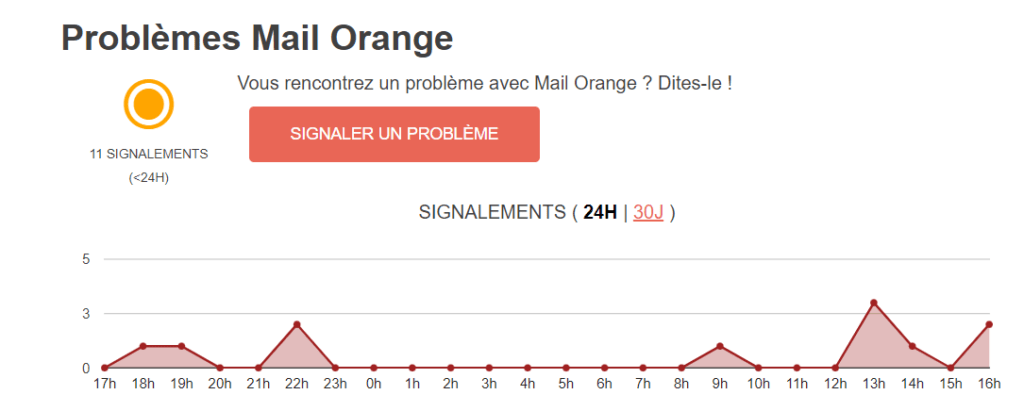
If you have any doubt about the origin of the problem or if you want to know if other Orange users are experiencing the same problem as you, you can use Totalbug , a website that lists problems and outages of the main online services.
Totalbug allows you to view incident history, user comments, reporting statistics, and proposed solutions for each service. You can also report a problem or outage you encounter to alert the community and contribute to resolving the issue.
To use Totalbug, simply go to https://www.totalbug.com/mail-orange/ . You will then be able to access the dedicated Orange Mail page to view the available information.
Totalbug is a practical and useful tool for checking whether a problem or failure is widespread or isolated, for staying informed about the evolution of the problem or failure, and for finding alternative or complementary solutions.
Conclusion
Your Orange email problem today is a common issue affecting many of the internet service provider's customers. To resolve it, you should check your internet connection, email settings, storage space, or contact Orange technical support. We hope this article has been helpful and that you will soon regain access to your emails.


