Wondering why your printer isn't working properly anymore? Have you thought about checking theink absorber ? This often-overlooked component can be the cause of many printing problems. In this article, we explain how to clean the ink absorber in your Canon printer and restore optimal print quality. Follow the guide!
What is an ink absorber and why clean it?
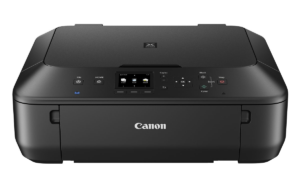
The ink absorber is an essential component of your Canon printer. Its function is to collect excess ink during printhead cleaning cycles . With repeated use, the ink absorber can become saturated , which can lead to printing problems such as ink smears on printed pages or malfunctions . Cleaning the ink absorber resolves these issues and ensures optimal print quality.
How do I access the ink absorber on my Canon printer?
Before you can clean the ink absorber, you must first access it. Here's how:
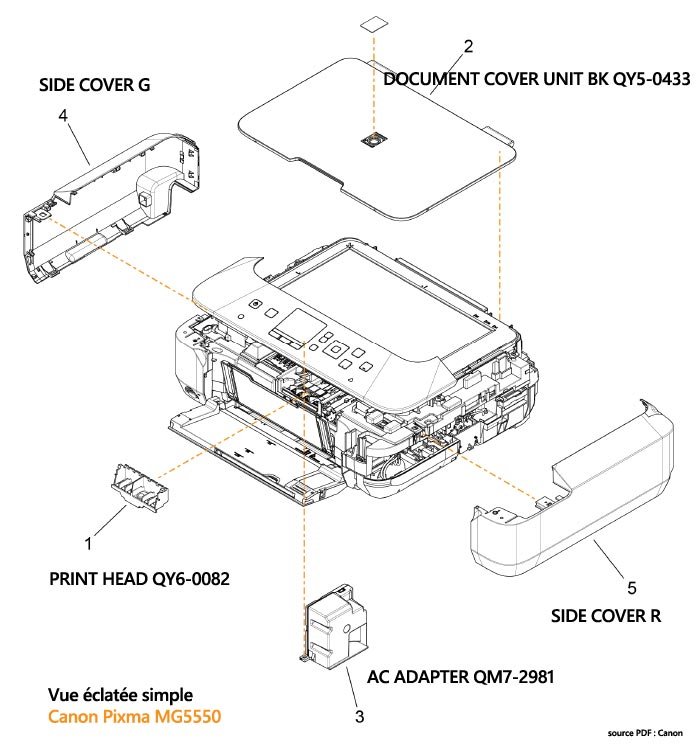
- Turn off your Canon printer and unplug it from the electrical outlet.
- Open the top cover of the printer to access the ink cartridges and print heads.
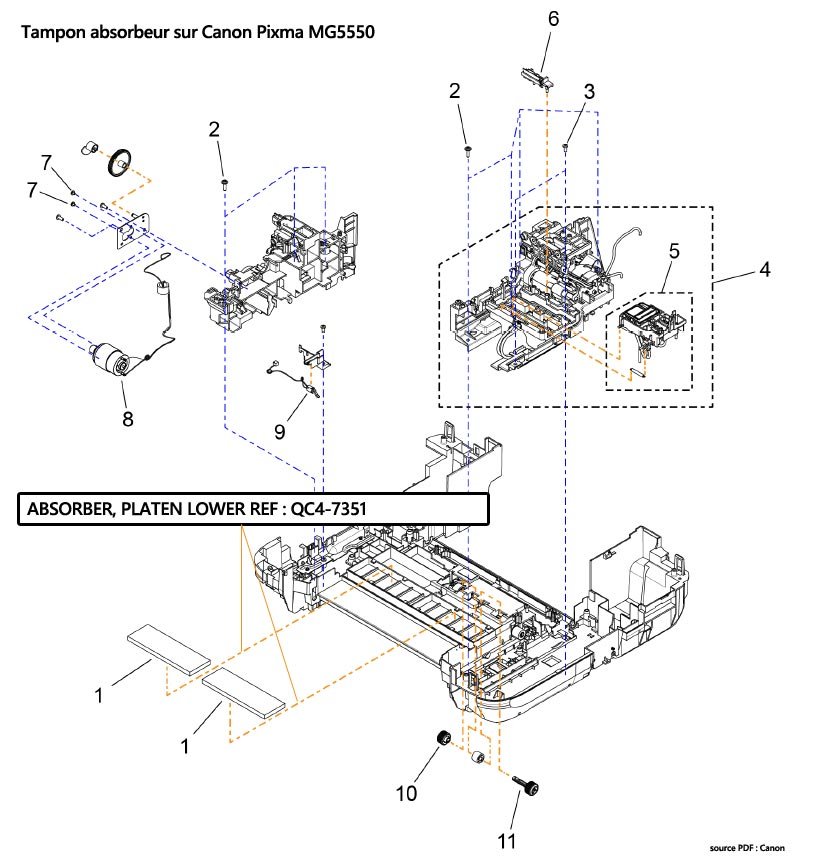
- Locate the ink absorber: it is usually found in a corner of the printer, under the ink cartridges. It is a small rectangular sponge.
This article might interest you: Printer paused under Windows 10: what to do?
Cleaning the ink absorber: steps to follow
Once you have accessed the ink absorber, here's how to clean it:
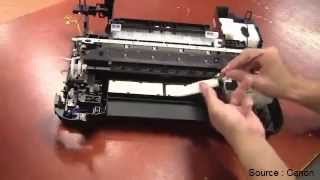
- Carefully remove the ink absorber from its location. You can use tweezers or latex gloves to avoid getting your hands dirty.
- Place the ink absorber in a container filled with hot water and a few drops of dish soap. Let it soak for about 10 minutes to dissolve the ink.
- After soaking, rinse the ink absorber with clean water to remove ink and soap residue.
- Thoroughly squeeze the ink absorber by pressing it between your hands or using a paper towel. Make sure to remove as much water as possible.
- Allow the ink absorber to air dry completely for several hours or until completely dry.
- Replace the ink absorber in its original location in the printer, making sure that it is properly in place.
- Close the printer's top cover and plug it back into the power outlet.
- Turn on the printer and perform a printhead cleaning cycle to ensure everything is working properly.
Good to know : For optimal performance and increased longevity of your printer, use only genuine Canon printer ink cartridges
When should the ink absorber be replaced?
Cleaning the ink absorber can resolve many printing problems, but there comes a time when it needs to be replaced. Generally, it's recommended to replace the ink absorber when the printer displays an error message indicating that the ink absorber is full or saturated. In this case, you'll need to obtain a new ink absorber compatible with your Canon printer model and follow the manufacturer's instructions for replacement.
We recommend
Comparative table of Canon ink absorbers
Printer Model | Ink Absorber Reference | Approximate Price | Canon PIXMA MG3650 QY5-0557 €25 | Canon PIXMA MX922 QY6-0086 €35 | Canon PIXMA iP7250 QY5-0557 €25 | Canon PIXMA MX532 QY6-0080 €30
By following these steps and tips, you should be able to clean the ink absorber in your Canon printer and restore optimal print quality. Remember that regular maintenance of your printer, including cleaning the ink absorber, is essential to prolong its lifespan and ensure optimal performance.
Read also: Printing with your smartphone is possible!
FAQ
How do I know if my ink absorber is full?
It is often difficult to determine if the ink absorber is full without receiving an error message from the printer. However, some signs can indicate that the ink absorber is saturated:
- Error message on the printer screen or on your computer.
- Recurring printing problems, such as ink smears on the paper.
- Degraded printer performance, including malfunctions.
If you experience these problems, it is recommended to check the ink absorber and clean or replace it if necessary.
Can the ink absorber of other printer brands be cleaned in the same way?
The process for cleaning the ink absorber can vary depending on the printer's make and model. However, the method described in this article for Canon printers may also apply to other brands, with a few differences:
- Location of the ink absorber: it may be located in a different place in the printer.
- Disassembly procedure: The process for accessing the ink absorber may vary depending on the model.
- Ink absorber type: Some printer models use disposable ink absorbers that cannot be cleaned and must be replaced.
It is recommended to consult your printer's manual or contact the brand's technical support for instructions specific to your model.
How to prevent the ink absorber from becoming saturated?
The ink absorber will inevitably become saturated over time and with printer use. However, you can take certain steps to delay this:
- Use only good quality ink cartridges that are compatible with your printer.
- Perform printhead cleaning cycles regularly to prevent ink buildup.
- Print regularly to prevent the ink from drying out and accumulating in the ink absorber.
What is the average lifespan of an ink absorber?
The average lifespan of an ink absorber depends on several factors, such as how often the printer is used, the quality of the ink used, and regular printer maintenance. Generally, an ink absorber can last from 2 to 5 years, depending on these factors. It is recommended to watch for signs that the ink absorber is full and clean or replace it accordingly.
Can I use alcohol to clean the ink absorber?
It is best to use warm water and a mild detergent to clean the ink absorber, as alcohol can damage some printer components. If you choose to use alcohol, be sure to use low-concentration isopropyl alcohol (70% or less) and rinse the ink absorber thoroughly with clean water after cleaning to remove all alcohol residue.
How do I reset the ink counter after cleaning or replacing the ink absorber?
Once you have cleaned or replaced the ink absorber, it is important to reset the printer's ink counter to prevent future error messages. The reset procedure varies depending on the printer model. Consult your printer's user manual or the manufacturer's website for instructions specific to your model.
Can compatible or generic ink absorbers be used to replace the original ink absorber?
While compatible or generic ink absorbers can be used, it is recommended to use ink absorbers specifically designed for your printer model to ensure optimal performance and avoid potential compatibility issues. Be sure to check product reviews and specifications before purchasing.
Are there any eco-friendly alternatives to the traditional ink absorber?
Currently, there is no direct eco-friendly alternative to the traditional ink absorber. However, you can adopt certain practices to reduce the environmental impact of printer use:
- Print only when necessary and use duplex printing.
- Recycle used ink cartridges.
- Choose energy-efficient and environmentally friendly printers.
How can I prevent the ink from drying on the ink absorber?
To prevent the ink from drying on the ink absorber, follow these tips:
- Use the printer regularly to avoid the buildup of dried ink.
- Perform printhead cleaning cycles from time to time to remove excess ink.
- Store the printer in a place free from moisture and dust to prevent the ink from drying out.
What are the risks if I continue to use my printer with a saturated ink absorber?
Continuing to use a printer with a saturated ink absorber can lead to several problems:
- Deterioration of print quality: ink stains and marks on the paper.
- Damage to the printer's internal components due to excessive ink buildup.
- Recurring error messages that can disrupt normal printer use.
- Risk of ink leaks, resulting in damage to work surfaces and surrounding objects.
It is strongly recommended to clean or replace the ink absorber as soon as you notice that it is saturated, in order to preserve the performance and lifespan of your printer.
Conclusion
Taking care of your printer's ink absorber is essential for optimal print quality and extending the life of your device. By regularly cleaning or replacing the ink absorber and following the advice in this FAQ, you can keep your printer in good working order and avoid common problems associated with a saturated ink absorber.