
The Windows process ZAAR.exe is an executable file belonging to the ZoneAlarm Anti-Ransomware or Check Point Internet Security software from Check Point Software Technologies . It is a program designed to protect your computer against ransomware attacks, malicious software that encrypts your files and demands a ransom for their decryption.
How does the Windows ZAAR.exe process work?

The Windows process ZAAR.exe starts when Windows and runs in the background . It monitors for suspicious activity on your system, such as the modification or deletion of important files, and blocks ransomware attempts. It can also restore files damaged by ransomware using a backup mechanism. If you want to optimize your computer's performance, you can non-essential startup programs
Is the Windows process ZAAR.exe dangerous or essential?
The Windows process ZAAR.exe is not essential for Windows , but it can be useful for enhancing your computer's security. It is not known to cause problems unless it conflicts with other security software or is configured incorrectly. It is recommended not to disable or delete it without a valid reason .
How do I uninstall or update the Windows process ZAAR.exe?
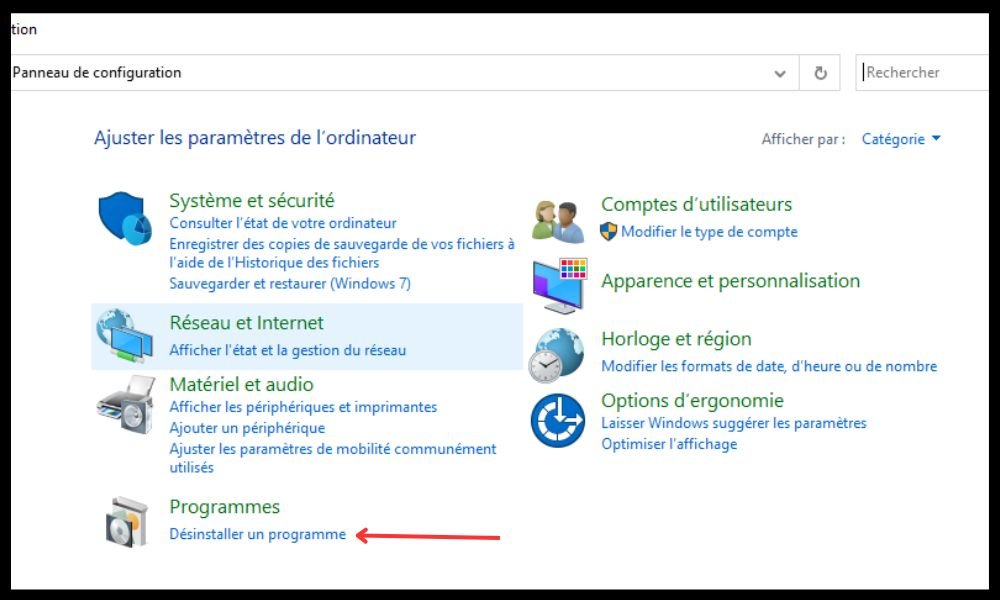
If you wish to uninstall or update ZoneAlarm Anti-Ransomware or Check Point Internet Security software, you can do so from the Windows Control Panel by selecting the “ Add/Remove Programs ” option.
You can also contact the Check Point Software Technologies website (www.checkpoint.com) for help or additional information.
How to detect and remove errors related to the Windows process ZAAR.exe?
It's Windows process ZAAR.exe is infected with a virus, Trojan, spyware, or adware disguised under its name . To check if this is the case, you can use a security tool like Security Task Manager , which scans the processes running on your computer and tells you their level of danger. If you detect a malicious process named ZAAR.exe, you should remove it immediately with antivirus or anti-malware software.
FAQ
What is ransomware?

Ransomware is a type of malware that encrypts your computer files and demands a ransom to decrypt them. It may also threaten to delete or release your data if you don't pay .
How to protect yourself against ransomware?
To protect yourself against ransomware, it is advisable to:
- Install security software such as ZoneAlarm Anti-Ransomware or Check Point Internet Security , which can block and restore ransomware attacks.
- Back up your important files regularly to an external storage device or to the cloud.
- Do not open suspicious attachments or links in emails or messages.
- Do not download or install software from untrusted sources.
How to recognize ransomware?
Ransomware typically manifests itself through:
- A message appears on your screen informing you that your files have been encrypted and that you must pay a ransom to recover them.
- An unusual extension added to your files, such as .locky, .crypt, .cerber , etc.
- An inability to access your files or programs.
What should you do if you are a victim of ransomware?

If you are a victim of ransomware, you can:
- Do not pay the ransom , as there is no guarantee that you will recover your files and you will encourage cybercriminals to continue their activities.
- Try to decrypt your files with a decryption tool No More Ransom website (https://www.nomoreransom.org/) which offers free solutions for some types of ransomware.
- Contact the relevant authorities to report the incident and request assistance.
What is Check Point Software Technologies?
Check Point Software Technologies is an Israeli company specializing in cybersecurity solutions. It offers products and services to protect networks, devices, data, and applications against cyber threats . It is particularly known for its ZoneAlarm firewall and its ZAAR.exe anti-ransomware software.
What is ZoneAlarm Anti-Ransomware?
ZoneAlarm Anti-Ransomware is a security software program that is part of the Check Point Internet Security suite. It aims to protect your computer against ransomware attacks by blocking malicious processes and restoring damaged files. It uses an advanced algorithm to detect and neutralize both known and unknown ransomware.
What is Check Point Internet Security?

Check Point Internet Security is a comprehensive security suite that includes several modules to protect your computer against cyber threats. These include:
- ZoneAlarm Anti-Ransomware , which blocks and restores ransomware attacks.
- ZoneAlarm Anti-Virus , which detects and removes viruses, trojans, spyware and other malware.
- ZoneAlarm Firewall , which controls the incoming and outgoing traffic of your computer and prevents intrusions.
- ZoneAlarm Identity Protection , which protects your personal and financial information against theft and fraud.
- ZoneAlarm Web Secure Free , which secures your internet browsing by blocking dangerous websites and encrypting your data.
Conclusion
The Windows process ZAAR.exe is an executable file that is part of ZoneAlarm Anti-Ransomware or Check Point Internet Security software, designed to protect your computer against ransomware. It is not essential for Windows , but it can be beneficial to your security. It is not dangerous unless it is infected with malware disguised as ZAAR.exe. You can uninstall or update it via the Windows Control Panel , or contact the Check Point Software Technologies website for more information.


