
The BTServer.exe is a program that is part of the Bluetooth Stack for Windows by Toshiba. It is a service that manages Bluetooth connections between your computer and compatible devices. This process is not essential for Windows , but it can be useful if you frequently use Bluetooth devices.
What is the purpose of the BTServer.exe process?
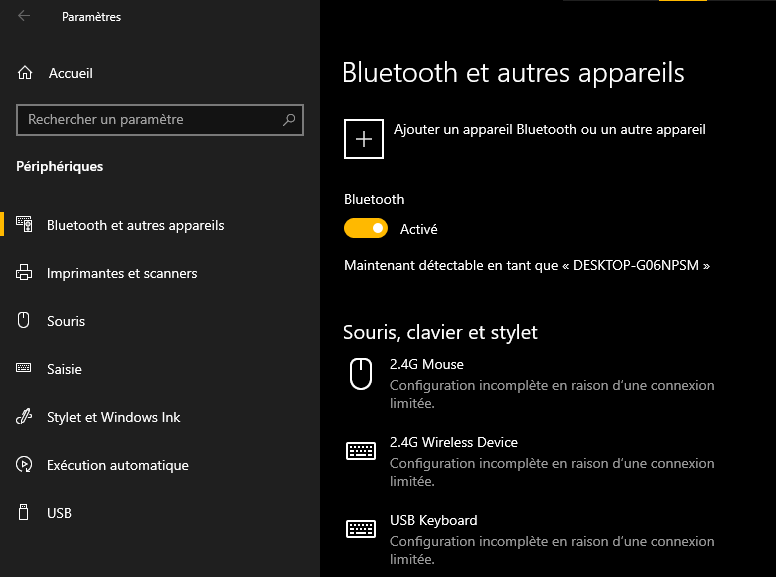
The BTServer.exe process's main function is to provide a graphical interface for configuring and controlling your computer's Bluetooth settings. It allows you to:
- Enable or disable Bluetooth
- Detect and pair Bluetooth devices
- Send and receive files via Bluetooth
- Create profiles for different types of Bluetooth devices
- Change Bluetooth security and privacy settings
The BTServer.exe process starts automatically when Windows starts and is usually located in the folder C:\Program Files (x86)\Toshiba\Bluetooth Toshiba Stack. It consumes minimal system resources and has no significant impact on your computer's performance.
How can I tell if the BTServer.exe process is legitimate or malicious?
The BTServer.exe process is normally a safe and reliable program, but it can sometimes be impersonated by malware. To check if the BTServer.exe process is legitimate, you can follow these steps:
- Open Task Manager by pressing Ctrl + Alt + Delete simultaneously.
- Click the Processes tab and locate the BTServer.exe process in the list.

Right-click the BTServer.exe process and select Open file location. - Check that the file is located in the folder C:\Program Files (x86)\Toshiba\Bluetooth Toshiba Stack
- If this is not the case, it is probably a virus or spyware that has taken the name of the BTServer.exe process to hide itself
- In this case, you should scan your computer with an up-to-date antivirus program and remove the malicious file
How do I stop or uninstall the BTServer.exe process?
If you do not use Bluetooth or prefer to use other software to manage your Bluetooth connections, you can stop or uninstall the BTServer.exe process. To do this, you have two options:
- Disable the Stack for Windows by Toshiba Bluetooth service
- Uninstall the Bluetooth Stack for Windows by Toshiba software
To disable the Bluetooth Stack for Windows by Toshiba service, follow these steps:
- Open the Control Panel by clicking the Start button and selecting Control Panel
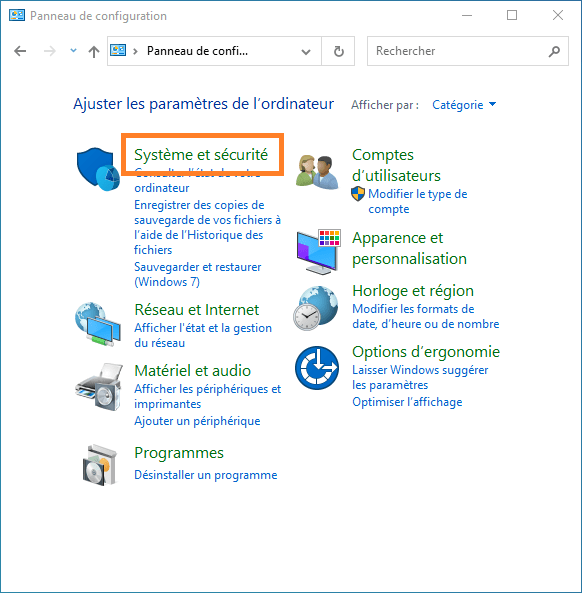
- Click on System and Security, then on Administrative Tools

- Double-click on Services and look for the service named Bluetooth Stack for Windows by Toshiba
- Right-click on this service and choose Properties
- In the General tab, change the startup type to Disabled
- Click Apply and then OK
To uninstall the Bluetooth Stack for Windows by Toshiba software, follow these steps:
- Open the Control Panel by clicking the Start button and selecting Control Panel
- Click on Programs, then on Programs and Features

- Look for the program named Bluetooth Stack for Windows by Toshiba in the list
- Click on it and then click Uninstall
- Follow the on-screen instructions to complete the uninstallation
What are the advantages and disadvantages of the BTServer.exe process?
The BTServer.exe process has advantages and disadvantages, depending on your use of Bluetooth. Here are some of those advantages and disadvantages:
Benefits
- It allows you to easily manage your Bluetooth connections with a graphical interface
- It offers you customization and security options for your Bluetooth devices
- It is compatible with most Bluetooth devices on the market
- It does not consume many system resources

Disadvantages
- It can be replaced by malware that impersonates it
- It may conflict with other Bluetooth software
- It may be unnecessary if you do not use Bluetooth or if you use other Bluetooth software
- It can be difficult to uninstall completely
FAQ
Here are some frequently asked questions about the BTServer.exe process:
Is the BTServer.exe process essential for Windows to function?
No, the BTServer.exe process is not essential for Windowsto function. It is an optional program that is part of the Bluetooth Stack for Windows software by Toshiba. You can disable or uninstall it if you don't need it.
Is the BTServer.exe process dangerous for my computer?
No, the BTServer.exe process is not dangerous to your computer unless it is a fake process hiding malware. To check whether the BTServer.exe process is legitimate or not, you can follow the steps described in the section "How to tell if the BTServer.exe process is legitimate or malicious?"
Can the BTServer.exe process slow down my computer?
No, the BTServer.exe process shouldn't slow down your computer, as it consumes minimal system resources. However, if you notice a decrease in your computer's performance, you can check if the BTServer.exe process is infected with a virus or if you have too many programs open simultaneously.
Can I use Bluetooth software other than Bluetooth Stack for Windows by Toshiba?
Yes, you can use Bluetooth software other than Bluetooth Stack for Windows by Toshiba, provided it is compatible with your computer and Bluetooth devices. You will then need to disable or uninstall the BTServer.exe process to avoid conflicts between the two programs.
How can I update the BTServer.exe process?
You can update the BTServer.exe process by updating the Bluetooth Stack for Windows software by Toshiba. To do this, visit the official Toshiba website and download the latest version of the software. You will then need to install it on your computer by following the on-screen instructions.
Conclusion
The BTServer.exe process is a program that is part of the Bluetooth Stack for Windows by Toshiba. It's a service that manages Bluetooth connections between your computer and compatible devices. This process isn't essential for Windows , but it can be useful if you frequently use Bluetooth devices. For the BTServer.exe process to work correctly, you need to install the Broadcom BCM20702A0 driver , which is the hardware component responsible for Bluetooth communication. You can check whether the BTServer.exe process is legitimate, stop or uninstall it, and learn about its advantages and disadvantages by following the advice in this article.


