

Windows 10 is the world's most popular operating system, but it's not without its problems. One of the most common is the Windows 10 activation error code , which can appear when you try to activate your copy of Windows 10 after an upgrade , reinstallation , or hardware change . This error code means that Windows 10 cannot verify that your license is genuine and hasn't been used on more devices than permitted under the terms of the Microsoft software license agreement.
Fortunately, there are several possible solutions to resolve this issue and activate Windows 10 smoothly. In this article, we'll explain the possible causes of the Windows 10 activation error code and provide you with the steps to fix it.

What are the causes of the Windows 10 activation error code?
The Windows 10 activation error code can have several causes, depending on your situation:
- You have entered a product key that cannot be used to activate Windows 10.
- You have reinstalled Windows 10 on a new device or on the same device after formatting the hard drive.
- You have made a major hardware configuration change on your device, such as replacing the hard drive, motherboard, or processor.
- You upgraded to Windows 10 from an earlier version of Windows (Windows 7, Windows 8.1) and you did not activate your copy of Windows before the upgrade.
How to fix the Windows 10 activation error code?
Depending on the cause of the problem, there are different solutions to fix the Windows 10 activation error code. Here are the most common:

Enter your product key again
If you entered an incorrect or invalid product key, you can try entering it again by following these steps:
- Windows settings by pressing the Windows + I .
- Click on Update & Security , then on Activation .

- Click on Edit product key and enter your valid 25-character product key.
- Click Next and follow the on-screen instructions to complete the activation.
If you do not have a valid product key, you can purchase a new one from the Microsoft Store or an authorized reseller.
Activate with a digital license
If you've made a major hardware change or reinstalled Windows 10 on a new device or on the same device after formatting the hard drive, you can try activating Windows 10 with a digital license linked to your Microsoft account. To do this:
- Windows settings by pressing the Windows + I .
- Click on Accounts , then on Your Information .

- Click on Sign in with a Microsoft account and enter the credentials of the Microsoft account to which your digital license is linked.
- Windows settings , then click on Update & Security , then on Activation .
- Click on Troubleshoot and follow the on-screen instructions to reactivate Windows 10.
If you do not have a digital license linked to your Microsoft account, you can obtain one by purchasing Windows 10 from the Microsoft Store or an authorized reseller.
Run the activation troubleshooter
If you upgraded to Windows 10 from an earlier version of Windows and did not activate your copy of Windows before the upgrade, you can try running the activation troubleshooter to resolve the issue. To do so:
- Windows settings by pressing the Windows + I .
- Click on Update & Security , then on Activation .

- Click on Troubleshoot and follow the on-screen instructions to activate Windows 10.
If the activation troubleshooter doesn't work, you can try reverting to your previous version of Windows and activating it before upgrading to Windows 10 again. To do this:
- Windows settings by pressing the Windows + I .
- Click on Update & Security , then on Recovery .
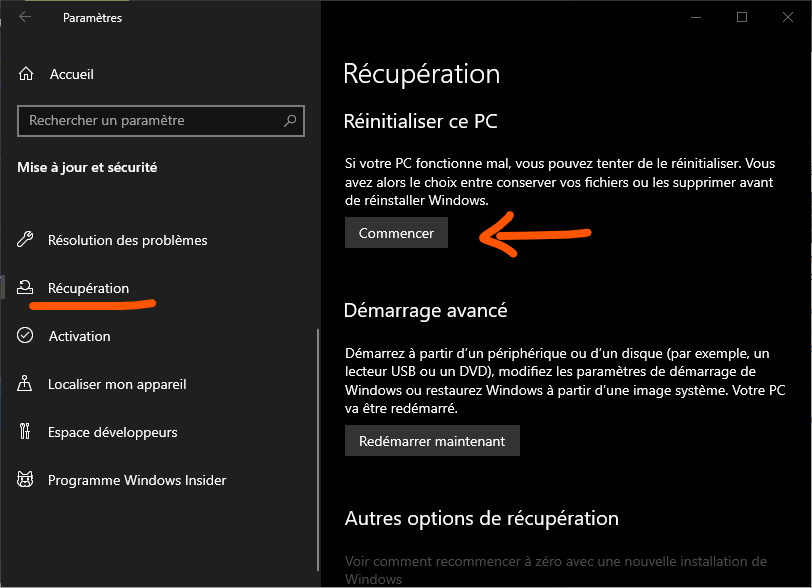
- Under Revert to the previous version of Windows , click Get Started and follow the on-screen instructions.
Warning: This option is only available for 10 days after upgrading to Windows 10. After this period, you will need to reinstall the previous version of Windows using installation media.
Summary table of possible solutions
| Cause of the problem | Possible solution |
| Incorrect or invalid product key | Re-enter the product key or purchase a new one |
| Major hardware configuration change or Windows 10 reinstallation | Activate with a digital license linked to a Microsoft account |
| Upgrade to Windows 10 without prior activation | Run the activation troubleshooter or revert to the previous version of Windows |
FAQ
What is the Windows 10 activation error code?
Windows activation error code is an error message that appears when Windows 10 cannot verify that your license is genuine and hasn't been used on more devices than permitted under the terms of the Microsoft Software License Agreement. This issue can occur if you've changed hardware or reset your locked Windows account without reactivating Windows 10. To resolve this issue, you can try reactivating Windows 10 online or by phone, or contact Microsoft technical support for assistance.
How do I find my Windows 10 product key?
Your Windows 10 product key is a 25-character code used to activate Windows. You can find it here:
Your Windows 10 product key is a 25-character code used to activate Windows. You can find it here:
- On the product packaging if you purchased a physical copy of Windows 10
- In a confirmation email if you purchased a digital copy of Windows 10
- On a sticker affixed to your device if you purchased a device pre-installed with Windows 10
- In the BIOS or UEFI of your device if you purchased a device pre-installed with Windows 10
How do I link my digital license to my Microsoft account?
A digital license is an activation method in Windows 10 that doesn't require entering a product key. It's automatically generated when you activate Windows 10 for the first time with a valid product key or when you upgrade to Windows 10 for free from a previous version of Windows. To link your digital license to your Microsoft account, you need to:
- Windows settings by pressing the Windows + I .
- Click on Accounts , then on Your Information .
- Click on Sign in with a Microsoft account and enter the credentials of the Microsoft account to which you want to link your digital license.
What if none of the proposed solutions work?
If none of the suggested solutions work to fix the Windows 10 activation error code, you can contact Microsoft technical support for further assistance. You can reach them by phone, online chat, or email. You can also check the official Microsoft website or community forum for other possible solutions.
How to avoid the Windows 10 activation error code?
To avoid the Windows 10 activation error code, you must:
- Always use a valid and genuine product key to activate Windows 10
- Always link your digital license to your Microsoft account to facilitate reactivation in case of a major hardware change or Windows 10 reinstallation
- Always activate your copy of Windows before upgrading to Windows 10
If you have already installed windows Windows without activating it, you can remove the “Activate Windows” watermark by Windows the windows described in this article : https://support.microsoft.com/fr-fr/windows/supprimer-le-filigrane-activer-windows-0a6c4f8c-7d0f-4a9a-9b1e-8f3b1c2f7c1b
Conclusion
The Windows 10 activation error code is a problem that can prevent your copy of Windows 10 from activating and affect its proper functioning. It can have several causes, such as an incorrect or invalid product key, a major change in hardware configuration, or upgrading to Windows 10 without prior activation. Fortunately, there are solutions to fix it, such as re-entering your product key, activating with a digital license linked to your Microsoft account, running the activation troubleshooter, or reverting to the previous version of Windows. If none of these solutions work, you can contact Microsoft technical support for further assistance.
We hope this article helped you resolve the Windows 10 activation error code and fully enjoy your operating system. If you have any questions or comments, please let us know in the section below.


