
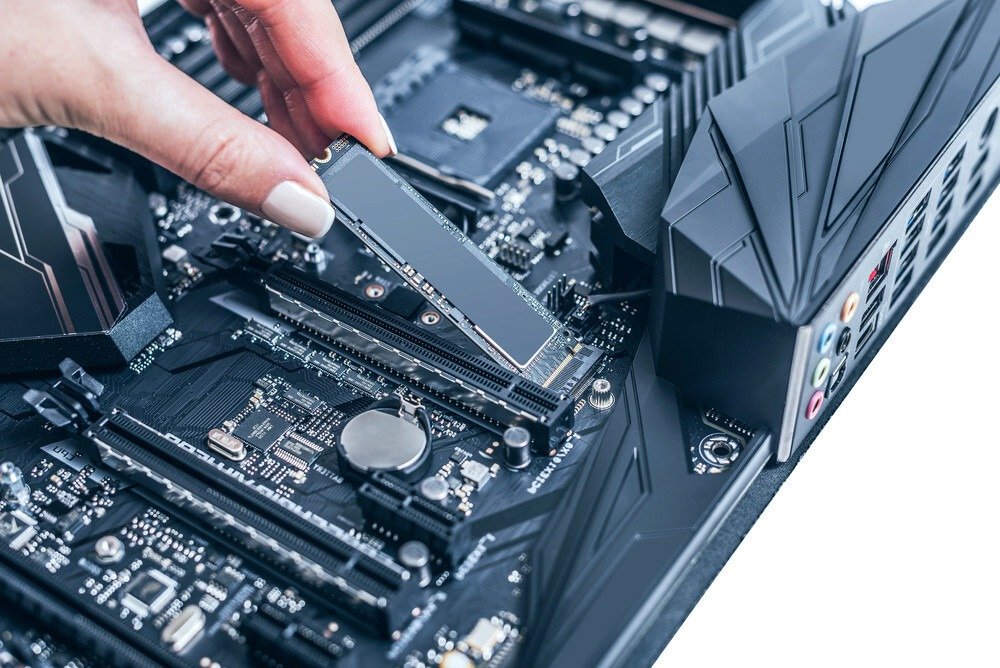
Have you purchased an M.2 SSD and noticed that it tends to overheat?
Or perhaps you intend to buy one, but you want to make sure it works perfectly and thus avoid any loss of performance?
You're in the right place, we're going to break down M.2 hard drive heatsinks so you can, on the one hand, fully understand how they work, why it's important to have one, and learn about all the different types of heatsinks to make the best purchase!
Things to know before buying an M.2 SSD heatsink
Which heatsink to choose: depending on the brand of M.2 SSD you have or plan to buy, you will need to check its size to know which type of heatsink to choose.
Compatibility of your M.2 SSD: You will need to check if your M.2 SSD is compatible with all heatsinks. Not all SSDs can be fitted with double-sided heatsinks, so you will need to check the brand and model number of your SSD to make the best choice.
How much can you expect to gain in temperature? Checking your SSD's temperature is a crucial step. Using specialized software, you'll need to analyze your hard drive's temperature level under full load. If the temperature is significantly higher than recommended, it's advisable to purchase an SSD heatsink.
Comparison of the best M2 SSD heatsinks

M.2 SSDs tend to overheat, which can lead to decreased computer performance and even shorten its lifespan. Heat sinks are designed to reduce temperature and stabilize your computer's performance.
To help you maintain your PC's performance, we'll share the best M.2 SSD heatsinks. This comparison will be based on two criteria: price and user reviews.
1. IcyBox SSD M.2

Features and Reviews
The IcyBox is the first in our selection. Priced at €16.55, this heatsink has received a good rating from users on Amazon.fr, with 4.5 out of 5 stars. This IB-M2HSF-703 accessory is a high-performance M.2 heatsink equipped with an integrated fan.
To ensure stable, long-term PC performance, this heatsink can reduce M.2 SSD temperatures by up to 25%. It combines active and passive cooling, ensuring efficient heat dissipation. This IB-M2HSF-702 model measures 7.5 x 2.4 x 1.6 cm and weighs 51 g.
In terms of specifications, the fan is a 20mm (4-pin, 12V, 10,000 RPM, non-controllable) with two silicone heat sink pads (thermal conductivity 1.5 W/mK). The unit is constructed from high-quality aluminum with cooling fins. The mounting height is 16mm. It is compatible with all M.2 NVMe SSDs or M.2 SATA SSDs.

2. Sabrent Heat Sink
Features and Reviews
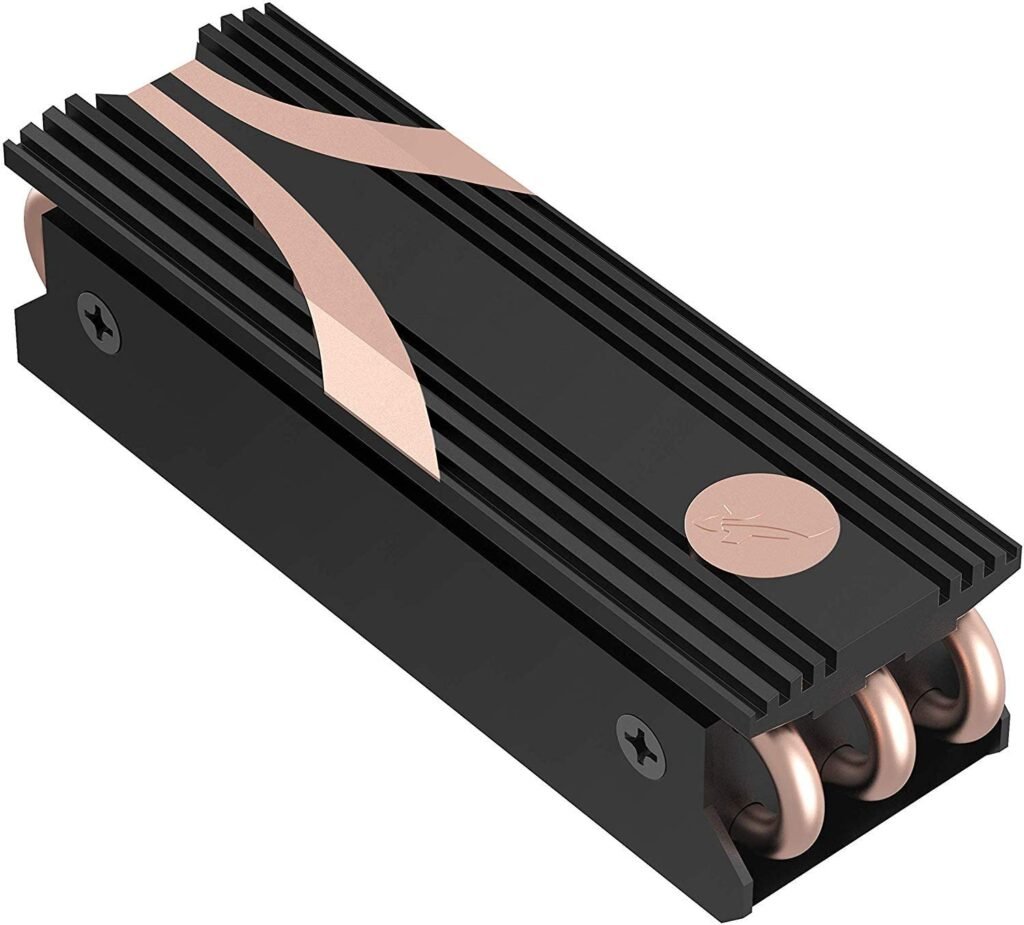
The next product in our selection is from Sabrent. This Rocket 2280 SB-HTSK heatsink is made from a combination of copper and aluminum. These materials were specifically chosen to achieve optimal results. This heatsink is designed to control the heat generated by the SSD.
Sabrent's advanced technology is based on a system: when the disc starts to produce heat, it is diffused onto the aluminum part, then absorbed by the copper part, leaving a surface for the heat to ensure active cooling.
During continuous use, this cooling system helps prevent SSD overheating and ensures optimal performance. Measuring 8 x 2.4 x 2.3 cm, the Sabrent 2280 Rocket (SB-HTSK) is specifically designed for desktop computers. Users confirm its performance, as evidenced by its 4.6 out of 5-star rating on Amazon. The heatsink comes with thermal tape, a screwdriver, and a user guide.
3. Glotrends M2 NVMe Heatsink

Features and Reviews
The M.2 NVMe heatsink designed by Glotrends is among the best on the market for PC users, gamers, and professionals. The heatsink body is made from an aluminum alloy with an anodized finish. This item measures 22 x 70 x 10 mm and weighs 17 g.
With its grooved design, this M.2 SSD heatsink significantly increases the heat dissipation area. This is intended to achieve a cooling result of 5°C to 20°C, stabilizing the PC, which can vary depending on the environment. If you choose this model, you will see the improvement in your cooling system.
This heatsink offers broad compatibility, working with M.2 2280 SSDs such as the Samsung 850 EVO, 860 EVO, 960 EVO, 970 EVO, 950 PRO, 960 PRO, 970 PRO, and others. Users have rated this product 4.4 out of 5 stars, reflecting its good performance.

4. One enjoy M.2 2280 SSD
Features and Reviews
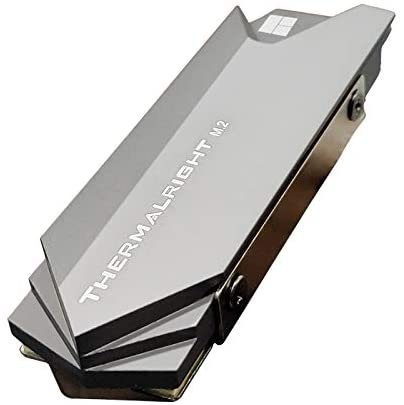
Produced by One Enjoy, the 2280 M2 heatsink with an aluminum cooler and silicone thermal pad is among the most popular on the market. With a 4.6 out of 5-star rating from online users, this heatsink promises good performance. This M.2 SSD heatsink is designed exclusively for desktop PCs. It is compatible with single-sided SSDs such as the Samsung 860 EVO, 960 EVO, 970 EVO, 970 PRO, etc
Furthermore, it's important to know that this heatsink is not compatible with ITX motherboards. Made from aluminum alloy, it offers corrosion resistance, hardness, wear resistance, insulation, and heat resistance, extending the cooler's lifespan. It also features silver plating, which helps eliminate static electricity.
Measuring just 75 x 22.7 x 11.7 mm, this accessory promises significant cooling performance. The cooling effect is between 10°C and 20°C, though this can vary depending on the environment. This is sufficient to prevent overheating and maintain PC performance.

5. ELUTENG M.2 2280
Features and Reviews
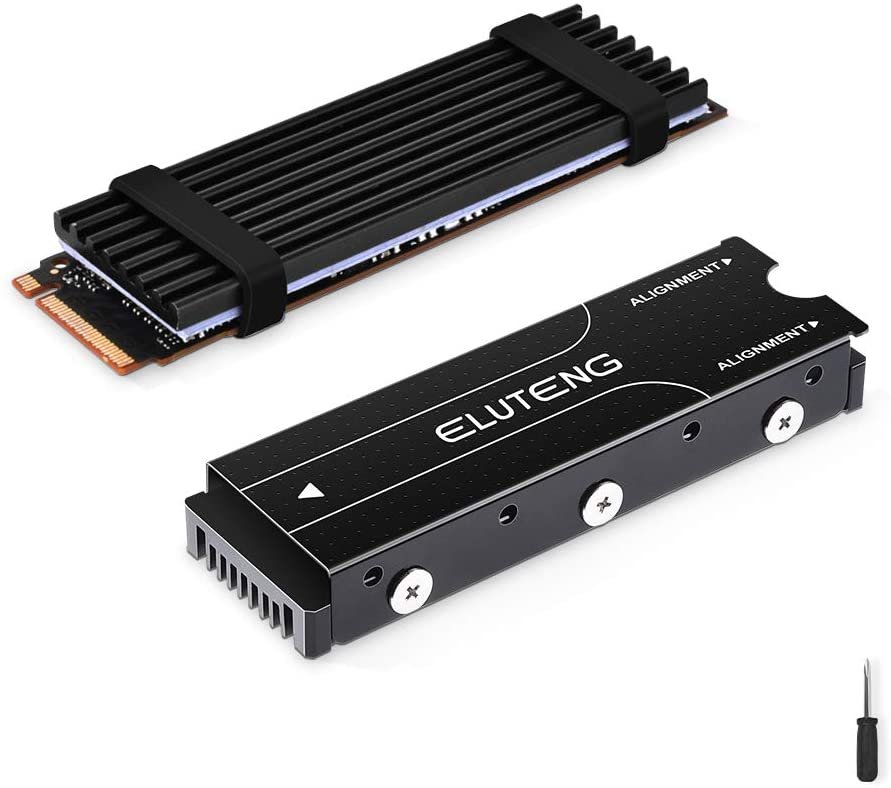
To conclude our selection of the best M.2 SSD heatsinks, the ELUTENG product seems to be a hit with users, boasting a 4.5 out of 5-star rating. If you choose this model, the package includes a screw-on heatsink, a heatsink with an elastic band, screws, a rubber ring, and a thermal silicone pad.
This product is compatible with SSDs including the Samsung 850 EVO, 860 EVO, 960 EVO, 970 EVO, 950 PRO, 970 PRO, and others. It offers rapid cooling on both sides and stabilizes PC temperatures. The increased heat dissipation surface area promises a cooling improvement of 10°C to 25°C, which may vary depending on the environment.
The use of phase-change silicon thermal wafers with a high coefficient of thermal conductivity results in improved thermal conductivity. The more you use the PC, the better the thermal conductivity. Made from aluminum alloy, the material facilitates cooling, stabilizes the PC's temperature, and helps resist corrosion.

Buyer's guide to choosing a heatsink for an M.2 SSD

WHAT IS AN M.2 SSD?
If you're looking for a fast hard drive to transfer your data in seconds and improve your PC's performance, an SSD is a must-have for tech enthusiasts!
It's hard to go back to normal life once you've tried it… Hard disk drives (HDDs) have had their day…
To allow everyone to benefit, several formats are available, including M.2. M.2 SSDs were created to offer even higher transfer speeds than standard models! Without a protective casing, these drives have the advantage of being very compact.
This type of hard drive is also increasingly used in small devices such as tablets or ultrabooks.
Good to know : If you're looking for an SSD for your PC, check out our comparison of affordable 1TB SSDs.
Make sure the M.2 SSD is compatible with your PC!
To use an M.2 SSD in your computer, you must ensure that your motherboard is compatible with the M.2 slot in terms of speed. Of course, if your motherboard doesn't have an M.2 slot, you might as well forget about using one, as it will simply be impossible.
Note that M.2 slots are generally compatible with both SATA and PCI Express, but in some cases, only SATA will be supported. You'll also find cards compatible with HCI or NVMe, but since NVMe is 3 to 4% faster, it's generally preferable to choose the NVMe standard.
The M.2 NVMe SSD to boost your PC's gaming performance!
Looking for high performance? Then you need an SSD with extremely fast loading times.
M.2 NVMe SSDs are truly remarkable in this regard, as you will experience a loading time difference that is approximately 20% faster than with an HDD hard drive during your gaming sessions!
And the other big advantage of NVMe is that it will be powered via the M.2, which means it will not need a power supply cable.
However, this SSD model has two drawbacks
- It is relatively more expensive
- It tends to get extremely hot
Therefore, acquiring a heat sink will be necessary if we want to avoid major problems, and that is exactly what we are going to explore in more detail.
THE ADVANTAGE OF AN M.2 SSD
What differentiates the performance of different hard drives beyond their capacity? Transfer speed!
If we take the example of a hard disk drive (HDD), its transfer rate is around 200 MB/s for the highest-performing models. At the time, this was excellent, as the entire ecosystem was well-suited to it, both in terms of software and gaming. Today, it's completely different. If you still work with an HDD, you probably notice that loading times are quite long, especially with your operating system during startup.
The speed of an SSD is obviously higher, but this will depend on the type of hard drive you use.
And it must be said, depending on the models, the transfer speeds are simply impressive compared to older generation hard drives.
On M.2 SSD hard drives, we will find advertised speeds of around 5500 MB/s for reading and 5000 MB/s for writing.
Let me tell you, it's a game-changer, and you'll definitely feel it when you use your computer. Your operating system loads much faster, applications too, but the real kicker is the video game loading times. No more long minutes patiently waiting for the loading bar to reach 100% before your game can load.
However, be aware that you should double-check the power consumption and heat output of an SSD before installing it, as these are completely different from those of HDDs. The speed increase offered by SSDs is so significant that a few drawbacks are easily overlooked.
WHY DOES AN SSD GET SO HOT?
When comparing the two types of SSDs, some significant differences become apparent, particularly regarding heat. While a SATA SSD reaches temperatures around 30°C, the same is not true for an M.2 SSD.
In fact, to understand why it's overheating, you need to grasp the difference between a 2.5" SSD and an NVMe SSD. The 2.5" SSD is in direct contact with the metal casing, which allows it to cool down "naturally".
The M.2 SSD, on the other hand, has a dimension that could be compared to the sticks, and in fact if you are wondering why on the manufacturer's references it says M.2 2280, it is simply to indicate the dimension of 22mm wide and 80mm long.
As you might have guessed, an M.2 SSD will have great difficulty dissipating heat without a heatsink. You risk easily overheating an M.2 SSD if it's placed in a very tight space, which is often the case in laptop configurations.
It's also possible that the M.2 SSD is placed too close to the graphics card in your PC case, causing double overheating. An M.2 SSD running at around 70°C should be avoided! Your hard drive will last longer if it stays below 50°C.
Good to know : Facebook's comprehensive study of its data centers concluded that overheating has detrimental effects on data integrity and SSD longevity.
Although it might be worthwhile to spend around ten euros more on NVMe PCI-E SSDs compared to conventional 2.5-inch SSDs, given their speed and ease of use without cables, this should not be at the expense of performance and longevity.
Do NVMe SSDs really need heat sinks? Well, yes, there's no choice, otherwise your hard drive could very well die! You will therefore need to equip your hard drive with a heat sink.
The reason is simple: thanks to this heat sink, the temperature will be lower and it will allow your disk to reach a temperature below 30°C at rest and be limited to around 40°C when it is under heavy workload.
Frequently Asked Questions
Here we answer some frequently asked questions about SSD heatsinks!
WHAT ALLOY COMBINATION FOR THE HEAT DISSIPATOR?
Based on our tests, lighter aluminum heatsinks offer excellent results. You can also find heatsinks made of both materials, equipped with a mini-fan to further expel heat.
Double-sided or single-sided SSD heatsink?
If you have the option of using a double-sided heatsink, that's definitely the recommended choice. However, you'll need to ensure your SSD's size is compatible.
Depending on your SSD's design, you might not be able to use a double-sided mount. SSDs vary depending on the manufacturer. For
example, it's difficult to perform a double-sided mount on some CorsaiR SSDs, like the MP500, where its thickness complicates things to the point that if you absolutely must apply the second side, you'll have to force it into place.
It's also worth noting that Samsung SSDs are generally compatible with double-sided mounting.
So, if you haven't yet purchased an SSD, it's best to check its compatibility before buying a heatsink without first verifying its compatibility.
HOW TO INSTALL A HEAT DRYER?
: For single-sided heatsinks, you'll typically find a silicone thermal strip, a cooling grid, and two silicone grommets. Installation is simple, but there are a few precautions to take!
First, place your M.2 SSD on a soft, clean surface, such as a cloth, to avoid any dirt or debris.
Next, take your silicone strip and remove the protective film.
Again, make sure your hands are clean, as this strip is usually sticky, and you don't want any dirt or debris sticking to it.
Then, apply the strip directly to your M.2 SSD, paying close attention to perfect alignment and ensuring no air bubbles form, and that the strip is perfectly flat.
Once that's done, you can attach the heatsink plate.
Before doing anything, we advise you to clean the heatsink plate on the side that will be in direct contact with the silicone strip. Just like the strip, you must ensure that no impurities remain on it to avoid any future problems. Once this is done
, carefully apply the heatsink plate to the strip, making sure it is perfectly aligned.
When this is complete, take the silicone grommets, spread them apart, and place them around this small mounting assembly to securely hold all the parts together.
When positioning the grommets, place them at both ends of the plate, but not at the very edge, leaving a small gap.
Once finished, you can simply install your M.2 SSD onto your motherboard.
Installing a double-sided heatsink:
For double-sided heatsinks, you will have a small enclosure that you will need to separate into two parts. On one of the two halves, following the same recommendations as for installing a single-sided heatsink, you must first apply the silicone strip.
Once that's done, place your M.2 SSD on top, making sure it's perfectly aligned. Then, simply place the second half of the enclosure directly on top. After that, take the four screws provided and screw them into each side of the enclosure. Once that's done, all you have to do is connect your M.2 SSD. As
you can see, the installation is relatively simple and will only take a few minutes. Our most important recommendation is to take your time assembling it without rushing, and to make sure that no debris gets into the assembly.
Our conclusion on SSD heatsinks
Often underestimated, you'll see a significant temperature reduction, keeping your SSD below 50°C under heavy use. Without a heatsink, it would typically reach around 70°C!
Purchasing a heatsink for your M.2 SSD is essential if you use your PC at full capacity. It effectively prevents your SSD from overheating and prematurely damaging it. Your PC's performance will only improve!
Make sure you understand the type of M.2 SSD heatsink, whether single-sided or double-sided, to ensure proper compatibility with your SSD.


