
Snapchat is a popular app that lets you share ephemeral photos and videos with your friends . But to use its features, you first need to create an account. If you don't want to use your phone number to sign up, there are two alternatives: using your email address or going through the Snapchat website . Here's how to do it in both cases .
Sign up for Snapchat with your email address
The first method to create a Snapchat account without a phone number is to use your email address. Here are the steps to follow:
- Open the Snapchat app on your smartphone or tablet .

- Click on “ Don’t have an account? Sign up” .
- Enter your personal information (name, surname, date of birth) and click on “ I register and I agree”.
- Choose a Snapchat username . Be aware that you can only change it once a year, so think carefully!

- Choose a secure password. We recommend choosing one of at least 10 characters to make it difficult to guess.
- Click on “ Sign up with your email address or phone number ”.
- Click on “Email” instead of “Phone number”.

- Enter your email address and click “ Continue ”.
- Check your email inbox and click on the confirmation link sent by Snapchat.
- Congratulations, you've created your Snapchat account without a phone number!
Sign up for Snapchat via the website

The second method to create a Snapchat account without a phone number is through the Snapchat website. Here are the steps to follow:
- Open your web browser
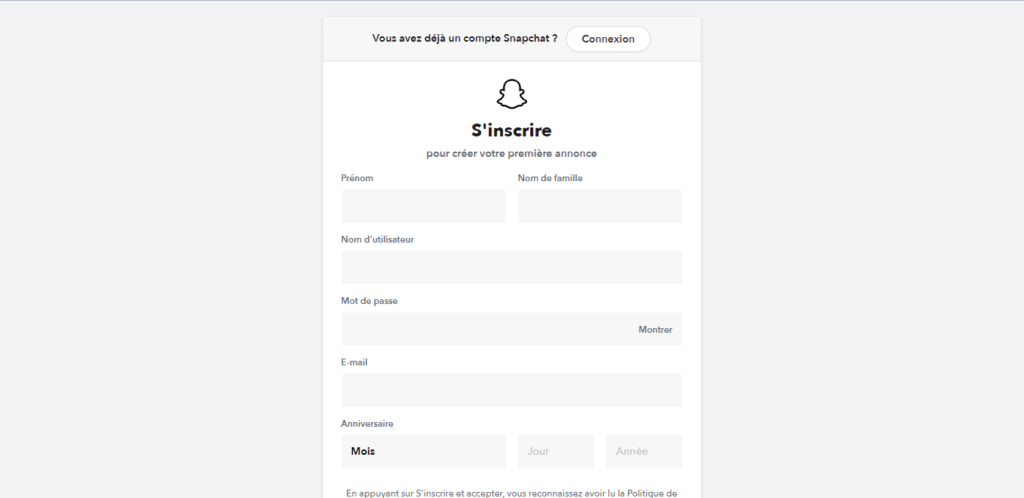
- Enter your personal information ( name, surname, date of birth ) and click on “I register and I agree” .
- Choose a Snapchat username. Be aware that you can only change it once a year, so think carefully!
- Choose a secure password. We recommend choosing one of at least 10 characters to make it difficult to guess.
- Enter your email address and click “ Continue ”.
- Check your email inbox and click on the confirmation link sent by Snapchat.
- Congratulations, you've created your Snapchat account without a phone number !
Why create a Snapchat account without a phone number?

You might be wondering why you would create a Snapchat account without a phone number ? There are several possible reasons:
- You don't want to share your phone number with a third-party application.
- You are concerned that your phone number may be used for commercial or malicious purposes.
- You want to protect your privacy and prevent your contacts from easily finding you on Snapchat.
- You either do not have access to your phone number or you don't have one at all.
Whatever your reason, know that creating a Snapchat account without a phone number is entirely possible and easy to do. Simply follow the methods we just outlined.
FAQ
How to log in to Snapchat without a phone number?
To log in to Snapchat without a phone number , simply enter your username and password. If you've forgotten your password, you can reset it using your email address.
How do I change my phone number on Snapchat?
To change your phone number on Snapchat , go to the app's settings, tap " Phone Number, " and follow the instructions. You must have access to your current phone number to change it.
How do I remove my phone number from Snapchat?
To remove your phone number from Snapchat, go to the app's settings, tap " Phone Number, " and uncheck the box " Allow my friends to find me ." Then, confirm the removal of your phone number.
How to add friends on Snapchat without a phone number?
To add friends on Snapchat without a phone number , there are several methods: using the Snapcode , username, email address, synced contacts, or friend suggestions.
How to verify your Snapchat account without a phone number?
To verify your Snapchat account without a phone number , you need to use your email address. Enter your email address when creating your account and click on the confirmation link sent by Snapchat.
How to recover your Snapchat account without a phone number?

To recover your Snapchat account without a phone number , you need to use your email address. You must enter your email address when resetting your password and follow the instructions sent by Snapchat.
How to create an anonymous Snapchat account without a phone number?
To create an anonymous Snapchat account without a phone number, you need to use a disposable or temporary email address. Then, choose a username that doesn't reveal your identity and don't add your contacts.
How to create a professional Snapchat account without a phone number?
To create a professional Snapchat account without a phone number , you need to use a professional email address or one dedicated to your business. Then, choose a username that reflects your brand or product and follow the same steps as for creating a regular account.
How to create a ghost Snapchat account without a phone number?

To create a ghost Snapchat account without a phone number , you need to use a disposable or temporary email address. Then, choose a username that doesn't reveal your identity and don't add any contacts. You also need to adjust your privacy settings to limit access to your profile and Snaps .
How to create a Snapchat account with a fake phone number?
To create a Snapchat account with a fake phone number , you need to use an online service that provides virtual or disposable numbers. You then enter the fake number when creating the account and receive a verification code via SMS or phone call.
How to create a Snapchat account with a VPN without a phone number?
To create a Snapchat account with a VPN without a phone number , you need to use a VPN app that allows you to change your IP address and location. Then, you need to use an email address that isn't linked to your real identity and follow the same steps as for creating a regular account.
But how do you choose a VPN from the many offers available on the market? Several criteria must be considered, such as:
- The speed and stability of the connection
- The number and diversity of servers
- Data security and confidentiality
- Compatibility with different operating systems and applications
- Price and customer service
Conclusion
Snapchat is an app that lets you share ephemeral photos and videos with your friends. To create an account, you can use your email address or the Snapchat website. But you can also get Snapchat on a Mac or MacBook using an Android emulator like BlueStacks . Simply download BlueStacks to your Mac, sign in with your Google account, install Snapchat, and then sign up or log in. This way, you can enjoy Snapchat on your Apple computer.
We hope this article was helpful and that you were able to create your Snapchat account without a phone number . If you have any questions or comments, feel free to leave them below. And if you liked this article, please share it with your friends!