Twitter is one of the most popular social networks in the world , with over 300 million monthly active users. If you're one of those avid Twitter users , you may have already wondered who visits your Twitter profile . Is it possible to find out? Are there tools or tips to understand your audience? In this article, we'll explain everything you need to know about the subject.
Twitter does not allow you to see who views your profile

The first thing to know is that it's not possible to see who visits your Twitter profile. Unlike LinkedIn , which lets you see who clicks on your profile , Twitter doesn't offer this feature. The only way to know if someone has seen your tweets is through direct interaction, such as a like, retweet, comment, or direct message.
So, if you see websites or apps promising to reveal who visits your Twitter profile , be wary! These are most likely scams or malware that will try to steal your personal data or make you pay for useless services. Twitter protects its data and does not allow anyone to access this information.
Twitter has chosen not to offer this feature in order to respect the privacy of its users and allow them to view the profiles they want without being tracked.
See also: Facebook automatic login: How to configure this option?
How can you find out information about your audience?

Even though you can't know who visits your Twitter profile, you can still get more general information about your audience and the users who are likely to read your tweets. To do this, you need to use the analytics that Twitter makes available to you for free.
Here's how to do it:
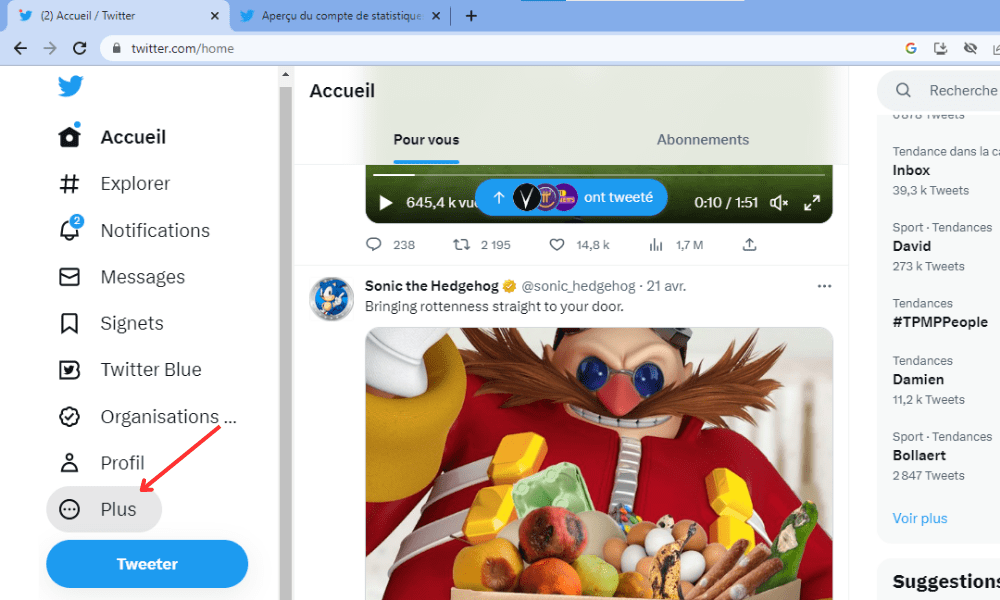
- Log in to Twitter via a computer and click on the "More" option in the left-hand section.
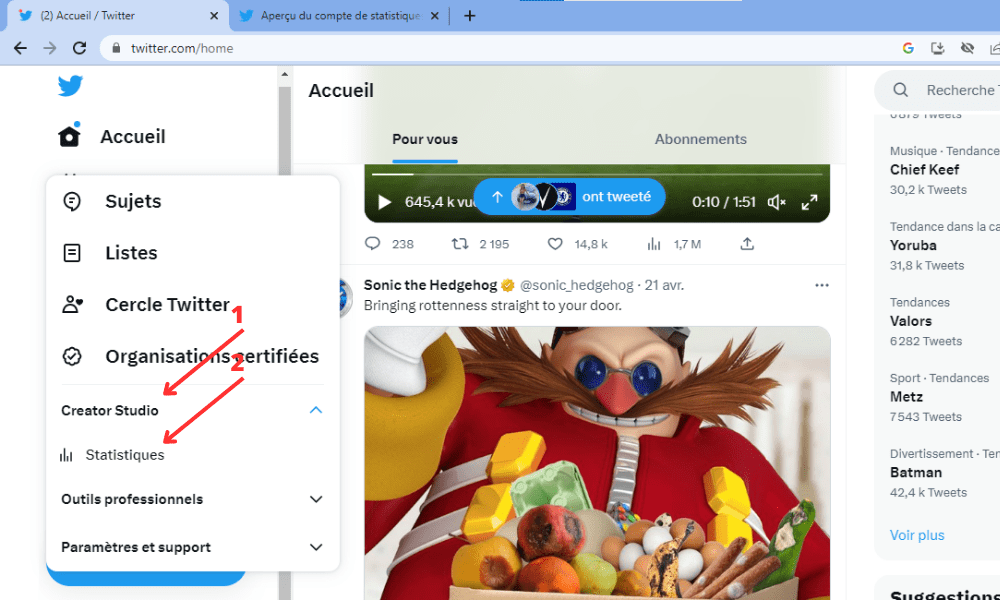
- Click on “Creator Studio” and then on “Statistics” in the dropdown menu.
Scroll down and you'll see graphs and data on all the users "reached" by your posts—that is, everyone who has been exposed to your tweets in their news feed or on your profile. You'll be able to get information about their interests, native language, gender, region or country, mobile provider, what they like to watch on TV, and more. This data is presented as a percentage of reach.

This information can help you better understand your audience and tailor your tweets to their preferences. For example, if you see that your audience is mostly made up of women between 25 and 34 years old, who speak French and are interested in fashion, you can offer them tweets about clothing trends, brands to follow, or great shopping deals.
How to increase the visibility of your Twitter profile?

If you want more people to visit your Twitter profile and interact with your tweets, you need to work on your content strategy and optimize your profile. Here are some tips to help you do just that:
- Choose a username and profile picture that reflect your identity or activity.
- Write a short, catchy bio that presents who you are and what you do.
- Add a link to your website or blog if you have one.
- Use a custom banner that grabs attention and complements your profile picture. You can include an image that represents your business, your slogan, your logo, or a catchy message.
- Use relevant and popular hashtags in your tweets to increase their reach.
- Publish varied and high-quality content: text, image, video, gif, poll, etc.
- Interact with other users: follow , like, retweet , comment, reply to private messages .
- Be active and regular: tweet at least once a day, at times when your audience is most active.
- Analyze your statistics to find out which tweets perform best and why.
FAQ: Frequently asked questions about Twitter profiles
To conclude this article, here are some questions you may have about your Twitter profile and their answers.
How do I change my username on Twitter?
To change your Twitter username, go to your account settings, then to “Username”. You can then choose a new username, provided it is available and complies with Twitter's rules.
How do I delete my Twitter profile?

To delete your Twitter profile , go to your account settings, then to “Your Account,” and then to “Deactivate your account.” You will then need to confirm your password and click “Deactivate.” Your account will be deactivated for 30 days before being permanently deleted. If you change your mind, you can reactivate your account by logging back in during this period.
How do I make my Twitter profile private?
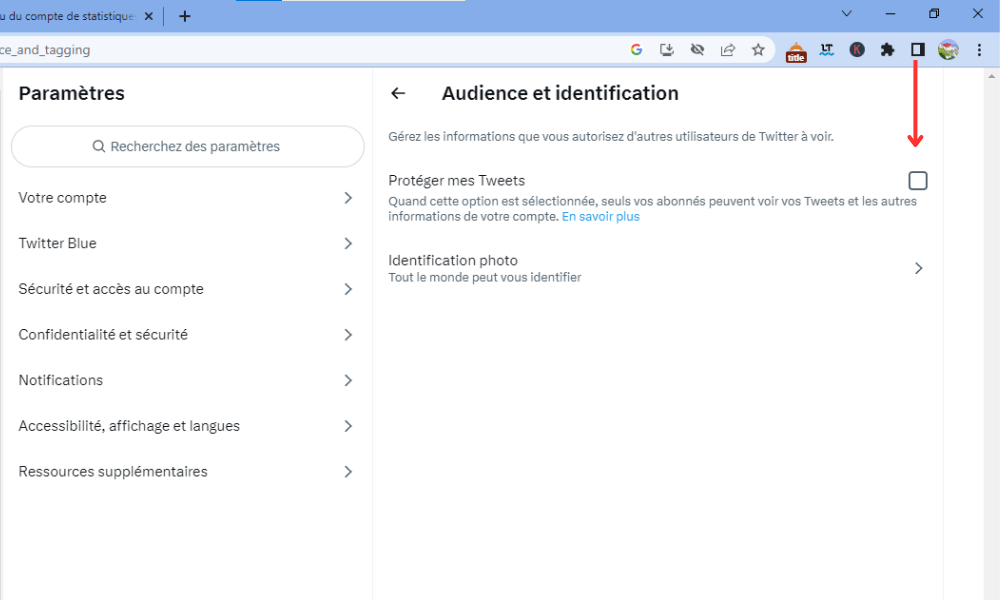
To make your Twitter profile private , go to your account settings, then to “Privacy and security,” and then to “Audience and verification.” You will then need to check the box “Protect my Tweets.” Your tweets will then only be visible to your followers, and you will need to approve follow requests.
How do I block or report a user on Twitter?
To block or report a user on Twitter , click the three dots next to their username, then select "Block" or "Report." You can also access the list of users you've blocked in your account settings, under "Privacy and security," then "Blocked accounts."
How do I verify my Twitter profile?
To verify your Twitter profile—that is, to obtain the blue badge that confirms your identity or reputation—you must meet certain criteria and submit a request to Twitter. You can find the requirements and the request form on this page: https://help.twitter.com/fr/managing-your-account/about-twitter-verified-accounts
Conclusion: Who visits my Twitter profile?
As you've probably gathered, there's no reliable way to know exactly who visits your Twitter profile. However, you can gain insights into your audience through Twitter analytics and boost your profile's visibility with a solid content strategy . We hope this article has been helpful and that you've learned something interesting about how Twitter works. Feel free to leave a comment if you have any questions or suggestions.