

Do you want to sell, give away, or recycle your Android smartphone? Before parting with it, it's essential to perform a data wipe , which means erasing all the personal data stored on your device. A simple factory reset isn't enough to permanently delete your photos, contacts, messages, or emails. This information can be easily recovered by specialized software and fall into the wrong hands. So, how do you perform a data wipe on your Android smartphone? What steps should you take to protect your privacy and sensitive data? Follow this guide!
What is a data wipe?

A data wipe is a software method that eliminates all traces of data from a digital device, such as a smartphone, tablet, or computer. A data wipe goes beyond simply deleting files or performing a factory reset. It involves repeatedly writing random data over the memory space previously occupied by the old data, rendering it unrecoverable.
Wiping data is particularly useful when you want to get rid of your Android smartphone without risking your personal data being exposed to malicious individuals. Even if you reset your device to factory settings, some data remains accessible in the system cache or internal memory. This data can be easily restored using free tools like FTK Imager .

To avoid this scenario, it is therefore recommended to perform a data wipe before selling, giving away, or recycling your Android smartphone. This ensures that no one can access your personal information and that your device will be like new for its new owner.
How do I perform a data wipe using a dedicated application?
The easiest way to wipe data on your Android smartphone is to use a dedicated app, such as Secure Eraser or iShredder . These apps allow you to permanently erase your smartphone's data using secure algorithms. Simply download the app from the Google Play Store, launch it, and follow the on-screen instructions.
Here are the steps to follow to perform a data wipe with Secure Eraser:

- Open the Secure Eraser app
- Select the Erase all option to delete all data from your smartphone
- Choose the level of security you wish to apply (from 1 to 5 passes)
- Press the Clear button and confirm your choice
- Please wait while the application erases all data from your smartphone
- Restart your smartphone
Here are the steps to follow to perform a data wipe with iShredder:

- Open the iShredder app
- Select the Erase all option to delete all data from your smartphone
- Choose the security standard you wish to apply (e.g., DoD 5220.22-M)
- Press the Start button and confirm your choice
- Please wait while the application erases all data from your smartphone
- Restart your smartphone
How do I perform a data wipe using recovery mode?
Another method for wiping data on your Android smartphone is to use your device's Recovery Mode. This mode allows you to access advanced system options, such as wiping the cache partition or performing a data wipe/factory reset. Wiping the cache partition removes temporary system files that can cause performance or startup problems. A data wipe/factory reset restores your smartphone to its factory settings and erases all user data.
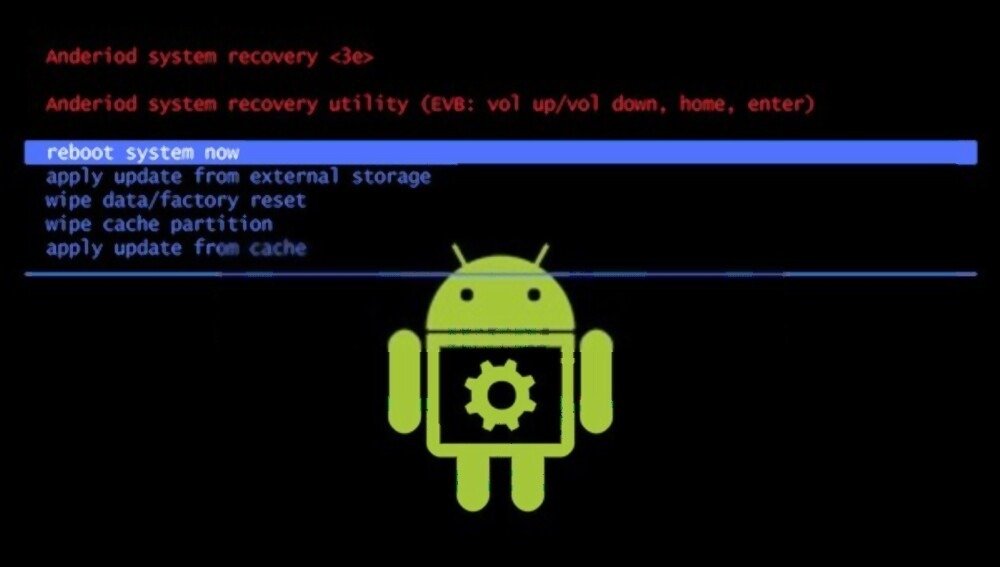
To access recovery mode, you must turn off your smartphone and simultaneously press a key combination specific to each model. For example, on Samsung smartphones, you must press the volume up, home, and power buttons. On Pixel/Android Charger smartphones, you must press the volume down and power buttons. You can consult your device's user manual for the exact combination.
Once you are in recovery mode, you can use the volume keys to navigate the menus and the power button to confirm your selection. Here are the steps to follow to perform a data wipe using recovery mode:
- Select the "wipe cache partition" option and confirm with the power button
- Please wait while the system deletes the temporary files
- Select the wipe data/factory reset option and confirm with the power button
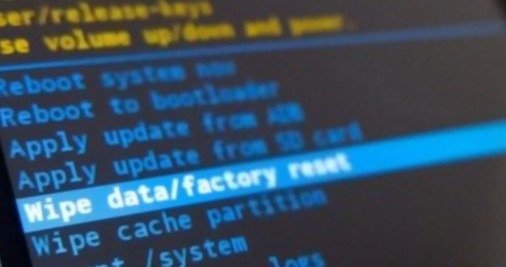
- Please wait while the system resets your smartphone and erases all user data
- Select the reboot system now option to restart your smartphone
Warning: Wiping data/factory reset will erase all your personal data and change all your settings. Therefore, it is strongly advised to back up your important data before proceeding.
How to strengthen the security of your data?
If you want to be absolutely certain your data is completely erased and unrecoverable, there's an additional trick: encryption. Encryption transforms your data into a code unreadable to anyone without the decryption key. This way, even if someone manages to recover your data after a data wipe, they won't be able to read it without knowing your password.
To encrypt your Android smartphone, go to Settings, then Security. Select Encryption and credentials and follow the on-screen instructions. The process can take several minutes or even several hours, depending on the amount of data to be encrypted. It is recommended to connect your smartphone to a power supply source during the encryption process.
Once your smartphone is encrypted, you can perform a data wipe as explained previously. This ensures that your data is doubly protected and that no one will be able to recover it.
FAQ
Here are some frequently asked questions about wiping data:
What is the difference between a data wipe and a format?
A data wipe is more effective than formatting for erasing data from a digital storage device. Formatting only removes information about how the files are organized on the device, not the files themselves. These files therefore remain accessible with specialized software. A data wipe, on the other hand, overwrites the files with random data, rendering them unrecoverable.
What are the risks of a data wipe?
A data wipe presents little risk if you correctly follow the steps described in this article. The only risk is permanently losing your personal data if you haven't made a backup beforehand. Therefore, it's important to verify that you have backed up your data online, in the cloud , or on an external storage device before performing a data wipe.
- What are the advantages of a data wipe? A data wipe offers several advantages:
- It protects your privacy and sensitive data by preventing anyone from accessing your personal information after you dispose of your Android smartphone.
- It improves the performance and stability of your smartphone by removing temporary files, unnecessary applications, or viruses that can slow down or block your device.
- It frees up storage space on your smartphone by deleting all the files that are unnecessarily taking up memory.
Conclusion
Performing a data wipe on your Android smartphone is essential if you want to get rid of your device without compromising your privacy and sensitive data. A simple factory reset isn't enough to permanently delete your personal information, which can be easily recovered by malicious individuals. To perform a data wipe, you can use a dedicated app, such as Secure Eraser or iShredder, or your device's recovery mode. If you choose this option, you'll need to use "Reboot to Bootloader" on Android to access the recovery menu and select the "wipe data/factory reset" option. To further enhance your data security, you can also encrypt your smartphone before performing a data wipe. This ensures that no one can access your personal information.


