

Watermarking, or digital watermarking , is a technique that involves inserting a logo , text, or symbol onto an image to indicate its source or owner. Watermarking helps protect your images against theft, copying, or unauthorized use online. In this article, we'll explain what watermarking is, why it's important, how to do it, and its advantages and disadvantages.
What is watermarking?
Watermarking is a form of invisible or visible marking applied to a digital image. It involves adding extra information to the image, such as a name, logo, date, or code. This information can serve as a digital signature to identify the author or owner of the image. Watermarking can be done in various ways:
- Visible watermarking: This involves adding a graphic element to the image, such as a digital watermark , which clearly indicates the source or owner of the image. Visible watermarking can be discreet or conspicuous, depending on the desired level of protection.
- Invisible watermarking: This involves inserting an element imperceptible to the naked eye into an image, such as a binary code or a digital signature , which allows the source or owner of the image to be identified. Invisible watermarking can be detected by specific software or algorithms.
Watermarking can be achieved using various techniques, such as spread spectrum , amplitude modulation , or Fourier transform . These techniques involve subtly modifying the image signal to incorporate the watermark.
Why use watermarking?

Watermarking serves several purposes:
- Protect your images from theft: by adding a watermark to your images, you deter malicious individuals from copying or using them without your permission. This allows you to assert your copyright in the event of a dispute.
- Enhance your work: by adding a watermark to your images, you display your name or brand and promote your work. This allows you to increase your visibility and credibility with your target audience.
- Improve your search engine ranking: by adding a watermark to your images, you optimize their indexing by search engines. This can improve your ranking on Google and attract more traffic to your website.
How do you do watermarking?
To create watermarks , you need software or an application that allows you to add a graphic or digital element to your images . Many free and paid tools exist for watermarking, such as Photoshop, GIMP, Lightroom, Canva, PicMonkey, and Watermarkly. Here are the general steps to follow for watermarking:
- Choose the image you want to protect and open it with the software or application of your choice.
- Create or import the watermark you want to use. It can be text, a logo, a symbol, or a code.
- Position the watermark on the image, choosing its location, size, color, and opacity. You can also adjust the image resolution and quality.
- Save the image with the watermark and export it in the format of your choice.
Below, discover how to create watermarks using Canva's free software
Step 1: Log in to the official Canva website.

Step 2: Click the Create a design button and choose Custom size.

Step 3: Choose your desired height and width and click Create a new design. In our example, we will choose 1000px x 600px.
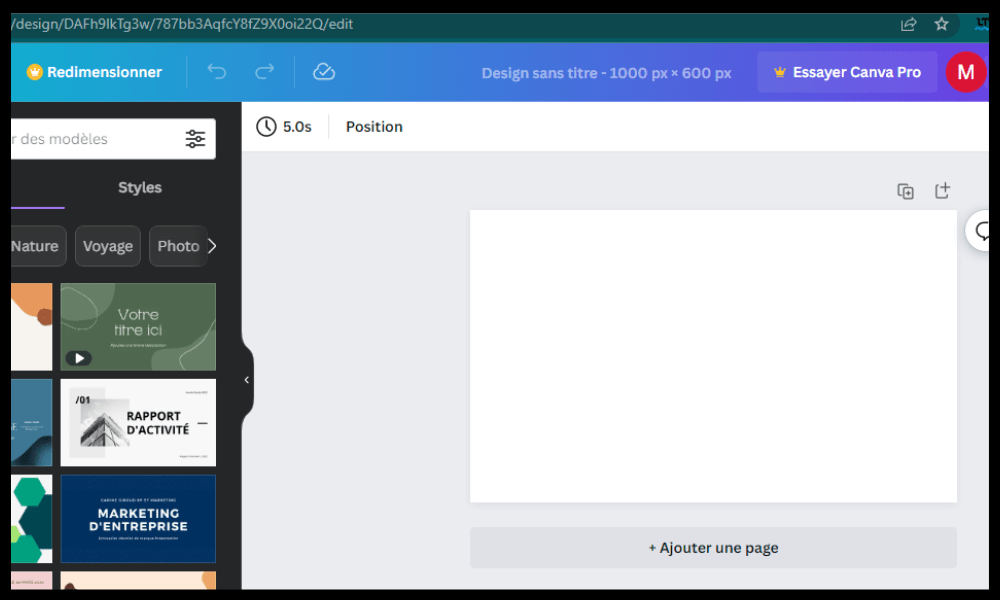
Step 4: Start by importing the image you want to watermark and adjust the edges so that they match the size of the base template.
When you don't do this, you'll get this type of result:

However, when you do it correctly, you will get this:

Step 5: We want to add the "tt-hardware.com" watermark to this image. To do this, click on "Text" in the left sidebar and type the text you want to add. In our case, this will look like:

Seen like this, we are far from the expected result, but don't worry. We will now make changes to the text to make it transparent. To do this,
Step 6: Click on the text and locate the black and white flag in the upper right corner.

Step 7: Click on the flag and adjust the transparency as needed. In our case, we'll leave it at 25.

Step 8: You have the option of leaving your watermark as is, enlarging it, or dragging it to a corner of the image.

Step 9: Rename your image, and upload it by pressing the "Share" button in the upper right corner.
Our downloaded image will therefore look like this:

Tip : To avoid repeating the same process every time you want to watermark an image, you can duplicate the page you're working on. This way, you can reuse your watermark if you accidentally delete it. And if that happens, you can try undoing the operation by pressing Ctrl + Z.
There you go, you now know how to create a watermark with Canva ! You can repeat the process for all the images you want to protect.
What are the advantages and disadvantages of watermarking?

Watermarking has advantages and disadvantages that should be considered before using it. Here are the main ones:
Benefits
- Watermarking helps protect your images against theft and unauthorized use.
- Watermarking allows you to enhance the value of your work and promote your name or brand.
- Watermarking makes it easier to index your images on the internet.
Disadvantages
- Watermarking can alter the quality and aesthetics of your images.
- Watermarking can be circumvented using software or techniques that allow the watermark to be erased or modified. For example, there are cloning, cropping, or retouching tools that can remove or hide the watermark.
- Watermarking can be perceived as a nuisance by users who want to fully enjoy your images. It can also damage your brand image if the watermark is too intrusive or inappropriate.
The different types of watermarking
| Type of watermarking | Benefits | Disadvantages |
|---|---|---|
| Visible | Easy to make and detect | May alter the quality and aesthetics of the image |
| Invisible | Preserves the quality and aesthetics of the image | Requires specific software or algorithms to be detected |
| Discreet | Does not interfere with the image display | Can be easily erased or cropped |
| Ostentatious | Strongly deters theft or unauthorized use of the image | May be perceived as a nuisance by users |
Watermarking FAQ
To conclude this article, here are some frequently asked questions about watermarking and their answers:
What is the difference between watermarking and copyright?
Watermarking is a technique used to indicate the source or owner of an image , while copyright is a unauthorized copying Watermarking is not legal proof of ownership , but it can serve as a deterrent or a means of asserting rights in the event of a dispute.
What is the best place to put a watermark?
There's no universal rule for choosing where to place a watermark. It all depends on the type of image, the message you want to convey, and the level of protection you're looking for. Generally, it's advisable to place the watermark somewhere that doesn't obstruct the image's readability but isn't too easy to erase or crop. For example, you could choose a corner, an edge, or the center of the image.
What is the best size for a watermark?
The size of a watermark also depends on the type of image, the message you want to convey, and the level of protection you require. Generally, it's advisable to choose a size that is visible enough to be recognized, but not so large as to degrade the image's quality or aesthetics. For example, you could opt for a size between 5% and 15% of the image's width or height.
What is the best color for a watermark?
The color of a watermark also depends on the type of image, the message you want to convey, and the level of protection you're looking for. Generally, it's advisable to choose a color that contrasts with the image's background but isn't too bright so as not to attract too much attention. For example, you could opt for gray , white, or black, adjusting the opacity to fine-tune the watermark's visibility.
What is the best software for watermarking?
There's no single ideal software for watermarking . It all depends on your needs, preferences, and budget. There are free and paid programs, available online or as downloads, simple or complex, offering a variety of features for watermarking. For example, you can use Photoshop, GIMP, Lightroom, Canva , PicMonkey, or Watermarkly.
How to choose between visible and invisible watermarking?
The choice between visible and invisible watermarking depends on your objective and target audience. If you want to clearly display your name or brand on your images, you can opt for visible watermarking. If you want to protect your images without altering their original appearance , you can choose invisible watermarking. However, it's important to know that invisible watermarking is more difficult to apply and detect than visible watermarking.
What are the legal risks associated with watermarking?
Watermarking is not a guarantee of image protection . There may be cases where watermarking is considered a violation of copyright or image rights. For example, if you use a watermark that resembles someone else's or brand's, you could be accused of trademark infringement or unfair competition . If you use a watermark on an image depicting a person or place without their consent, you could be accused of violating image rights or the right to privacy. It is therefore important to comply with the legal regulations in force in your country and in the countries where you distribute your images.
What are the advantages and disadvantages of watermarking compared to other image protection methods?
Watermarking is a method of image protection that has advantages and disadvantages compared to other methods, such as encryption, pixel tagging, or Creative Commons licensing. Here are a few examples:
- Encryption is a method that renders an image unreadable without a key or password. Encryption offers a high level of security, but it prevents the image from being viewed and shared.
- Pixel tagging is a method that involves modifying one or more pixels of an image to insert a code. Pixel tagging is very subtle, but it can be easily erased or altered by modifications to the image.
- A Creative Commons license is a method of granting rights to use and distribute an image under predefined conditions. While a Creative Commons license encourages sharing and distribution of images, it does not guarantee respect for copyright.
Conclusion
Watermarking is a technique that allows you to protect your images online by adding a logo, text, or symbol. Watermarking has advantages and disadvantages that should be considered before using it. To watermark, you need software or an application that allows you to add a graphic or digital element to your images . There are several types of watermarking : visible or invisible, discreet or conspicuous. The choice of watermark depends on the type of image, the message you want to convey, and the level of protection you require.


