

If you've ever bought a computer or software, you may have come across the terms x86 and x64 . But what exactly do they mean? What's the difference between these two types of processors ? And how do you choose the right operating system for your computer?
In this article, we will explain the basics of x86 and x64, and give you some tips to make the right choice.
What are x86 and x64?
x86 and x64 are names that refer to processor architectures , that is, how they are designed and how they work. Processors are the components that execute software instructions and process data. They are therefore essential for the proper functioning of your computer.
The term x86 refers to 32-bit processors , which can process data in 32-bit blocks. The term x64 refers to 64-bit processors , which can process data in 64-bit blocks. Both types of processors have advantages and disadvantages, which we will examine in more detail.
Comparison between x86 vs x64
| Processor architecture | Benefits | Disadvantages |
|---|---|---|
| x86 (32-bit) | – Compatibility with most existing operating systems and applications. – Lower power consumption than 64-bit systems. | – Limited RAM to 4 GB. – Lower system security and stability than 64-bit systems. |
| x64 (64-bit) | – Ability to use more RAM than 32-bit systems. – Higher processor performance and speed than 32-bit systems. – Higher system security and stability than 32-bit systems. | – Compatibility with some older operating systems and applications. – Higher power consumption than 32-bit systems. |
What are the advantages of x64 processors?
x64 processors are faster and more powerful than x86 processors because they can process more information at once. For example, if you want to add two numbers, an x86 processor might need to perform several operations to get the result, while an x64 processor can do it in a single operation.
Another advantage of x64 processors is that they can use more random access memory, or RAM . RAM is the memory that stores data and programs currently in use. The more RAM you have, the more programs your computer can run simultaneously, and the faster and more efficient it will be.
x86 processors have a RAM limit of 4 GB , which may be insufficient for some software or games. x64 processors do not have this limit and can use much more RAM. For example, a computer with an x64 processor can have 8 GB, 16 GB, or even 32 GB of RAM.
Finally, x64 processors are safer and more stable than x86 processors because they have better memory management and security. They are less likely to experience errors or crashes and can better protect your computer against viruses or malware.
What are the disadvantages of x64 processors?
x64 processors are not perfect and have some drawbacks. The first drawback is that not all software is compatible with x64 processors. Some software is designed only for x86 processors and will not run on a computer with an x64 processor.
Fortunately, most modern software is compatible with both types of processors , and you can check a program's compatibility before buying or downloading it. If you have a program that isn't compatible with x64 processors, you can try running it in compatibility mode or use an emulator.
Another drawback of x64 processors is that they consume more resources than x86 processors . This means they require more power, more cooling, and more space. If you have an older or less powerful computer, you may experience performance or overheating issues with an x64 processor.
How to choose between x86 and x64?
Now that you know the differences between x86 and x64, how do you choose the right operating system for your computer? Here are some tips to help you make the right choice.
Check your computer's processor type.
You can do this by looking at your computer's technical specifications, or by using software like CPU-Z . If your processor is x86, you must choose a 32-bit operating system. If your processor is x64, you can choose either a 64-bit or 32-bit operating system.
Check the amount of RAM in your computer
You can do this by looking at your computer's technical specifications or by using software like Speccy. If your computer has less than 4 GB of RAM, you can choose a 32-bit or 64-bit operating system. If your computer has more than 4 GB of RAM, you should choose a 64-bit operating system to take full advantage of your memory.
Check software compatibility
You can do this by looking at the software information, or by using a site like Can You Run It . If all the software you use or want to use is compatible with 64-bit operating systems, you can choose a 64-bit operating system.
If some software that you use or want to use is not compatible with 64-bit operating systems, you can choose a 32-bit operating system, or try to run it in compatibility mode or with an emulator.
How can you tell if your system is x86 or x64?
There are several methods to determine if your system is x86 or x64, depending on the operating system you are using. Here are a few examples for Windows :
From Windows settings
- Click the Start , then click Settings .
- Click on System , then on About .
- Look at the value of System Type .
If it says 32-bit operating system, x86 processor, your system is x86.
If it says 64-bit operating system, x64 processor, your system is x64.

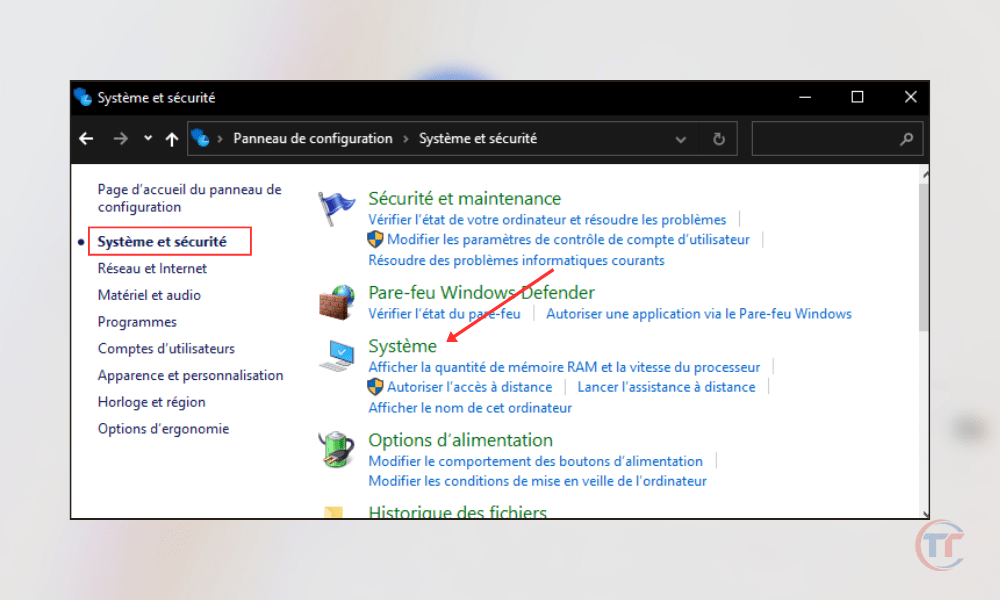
From the Windows control panel
- Click the Start , then click Control Panel .
- Click on System and Security , then on System .
- Look at the value of System Type .
In Windows system information
- Click the Start , then type System Information in the search bar.
- Click on System Information in the list of results.
- Look at the value of System Type .

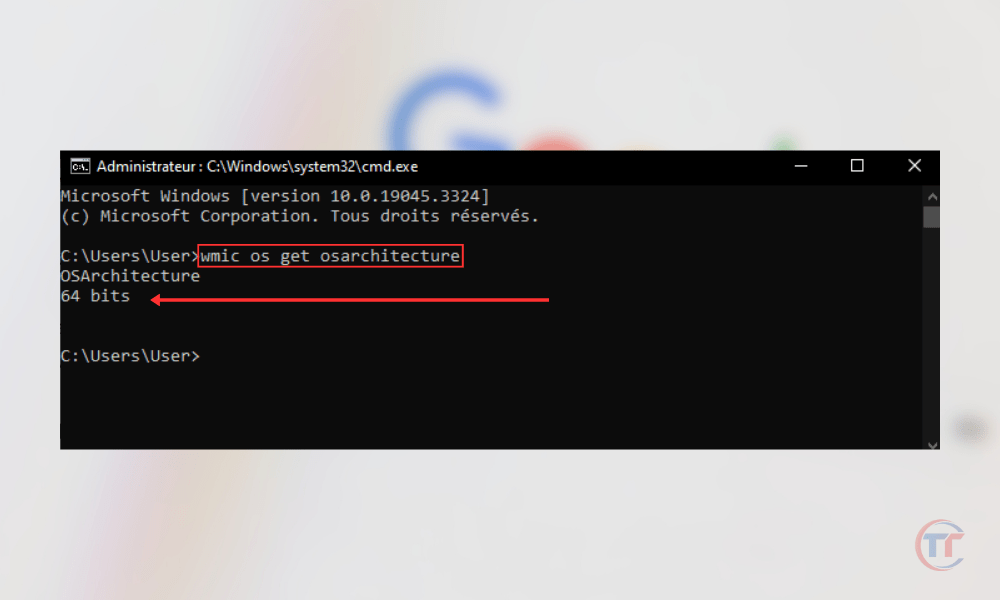
Using the Windows command prompt
- Click the Start , then type cmd in the search bar.
- Right-click Command Prompt in the list of results, and then click Run as administrator .
- Type the command wmic os get osarchitecture , then press Enter.
- Look at the value of OSArchitecture .
How to switch from an x86 system to an x64 system?
If you wish to switch from an x86 system to an x64 system , you must meet certain prerequisites; we invite you to watch this video tutorial:


