

PunkBuster is an anti-cheat software used by some online video games to detect and ban players who use illegal programs or modifications to cheat. PunkBuster is currently compatible with over 60 games, including Battlefield, Call of Duty, Medal of Honor, and Rainbow Six.
 PunkBuster runs in the background while you play, constantly scanning your computer for signs of cheating. If PunkBuster detects an anomaly, it can kick you from the game , send you a warning message , or even permanently ban you from the server . PunkBuster also has an automatic update system that downloads the latest versions of the software and configuration files.
Why uninstall PunkBuster?
There may be several reasons why you might want to uninstall PunkBuster from your computer. For example:
- You no longer play games that use PunkBuster and you want to free up disk space.
- You are experiencing compatibility or performance issues with PunkBuster and want to try to resolve them by uninstalling and reinstalling it.
- You were banned in error by PunkBuster and you want to contest the decision by providing evidence that you did not cheat.
- You want to cheat at games that use PunkBuster and you want to avoid being detected.
How do I uninstall PunkBuster?
The method for uninstalling PunkBuster depends on the game you are playing. There are two main ways to uninstall PunkBuster:
- Using the uninstallation program Provided by Even Balance. This method allows you to completely and cleanly uninstall PunkBuster, removing all files and registry entries related to PunkBuster. To do this, you must:
- Visit the official PunkBuster website: https://www.evenbalance.com/downloads.php
- Click on the “Download PBSetup” link to download the PunkBuster uninstaller.
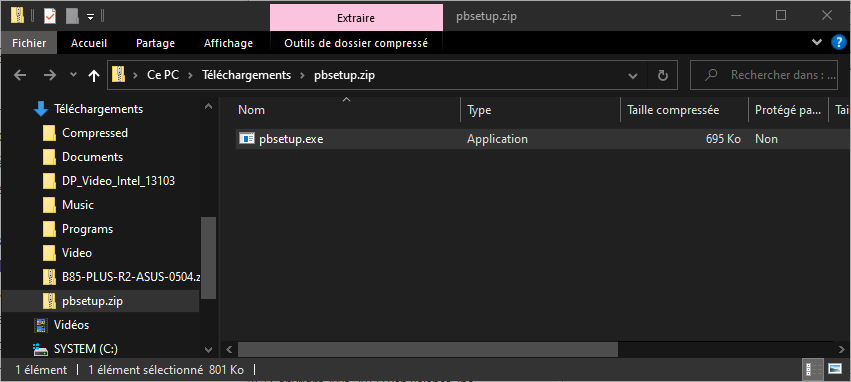
- Save the pbsetup.zip file to your computer and extract it to a folder of your choice.
- Open the folder where you extracted the file and double-click on the pbsetup.exe file to launch the PunkBuster uninstallation program.
- Accept the terms of the license agreement and click “Next”.
- Select the game you want to uninstall PunkBuster from the drop-down list and click “Remove Game”.

- Wait for the uninstallation program to finish its work and click “OK”.
- Close the uninstallation program and restart your computer if necessary.
- By manually deleting the files and folders related to PunkBuster. This method allows you to uninstall PunkBuster more quickly, but it may be less effective, as it can leave traces of PunkBuster on your computer. To do this, you must:
- Open File Explorer and navigate to the installation directory of the game from which you want to uninstall PunkBuster. For example, if you play Call of Duty, the installation directory might be C:\Program Files (x86)\Steam\Call of Duty 4.
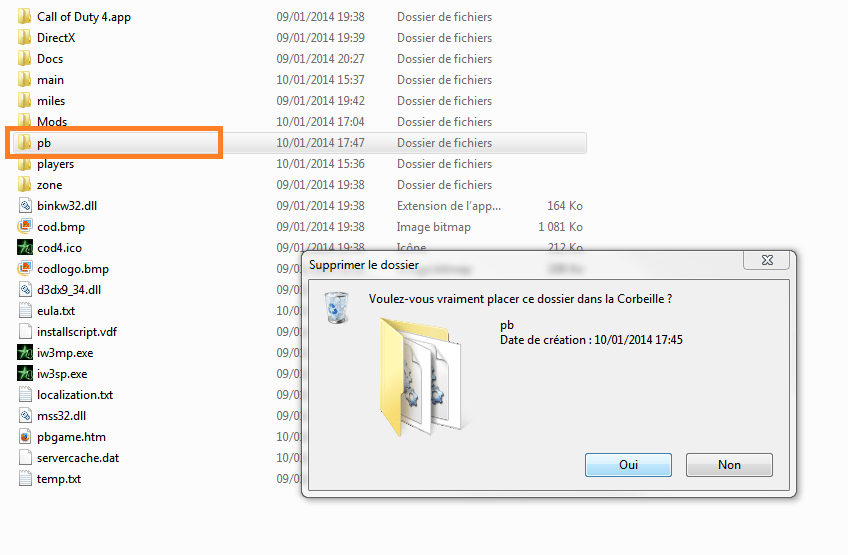
- Locate the folder named “pb” in the game's installation directory and delete it. This folder contains the main PunkBuster files.
- Locate the file named “pbsvc.exe” in the game's installation directory and delete it. This file is the PunkBuster installer.
- Empty the recycle bin to permanently delete files and folders related to PunkBuster.
This article might interest you: Mfplat.dll not found on windows 10: how to fix this error?
This article may interest you: Discord won't launch: what to do?
What are the risks of uninstalling PunkBuster?

Uninstalling PunkBuster can negatively impact your gaming experience. Here are some potential risks:
- You will no longer be able to play on servers that use PunkBuster, as it is required to connect to them. Therefore, you will have to make do with servers that do not use PunkBuster, which are often fewer in number, less populated, or less secure.
- You will be more vulnerable to cheaters, as you will no longer benefit from the protection offered by PunkBuster. You are therefore more likely to encounter players who use aimbots, wallhacks, or other illegal programs to gain an unfair advantage over you.
- You will lose the ability to contest an unjustified ban by PunkBuster, as you will no longer have access to the log files that can serve as proof that you did not cheat.
What are the alternatives to PunkBuster?
If you're not satisfied with PunkBuster or want to play games that don't use this software, there are other anti-cheat solutions you can try. Here are a few examples:
 VAC (Valve Anti-Cheat) : This is the anti-cheat system used by games developed or distributed by Valve, such as Counter-Strike, Half-Life, and Team Fortress. VAC works similarly to PunkBuster, scanning your computer for prohibited programs and banning you if you are using one. VAC is known for being very effective and discreet, but also very strict and irreversible. If you are banned by VAC, you will never be able to play the affected games on your Steam account again.
 BattlEye : This is the anti-cheat system used by games like Fortnite, PUBG, and Rainbow Six Siege. BattlEye is software that installs automatically with the game and launches every time you start it. BattlEye monitors your in-game activity and blocks cheating attempts. If you try to bypass BattlEye or prevent it from working, you will be banned from the game. BattlEye is considered one of the most effective and innovative anti-cheat systems on the market.
 Easy Anti-Cheat : This is the anti-cheat system used by games like Apex Legends, Rust, and Dead by Daylight. Easy Anti-Cheat is software that downloads and installs with the game and checks the integrity of the game files and the operating system. If Easy Anti-Cheat detects a suspicious modification or malware, it will prevent you from playing or ban you from the game. Easy Anti-Cheat is known for being a reliable anti-cheat system that respects player privacy.
Comparative table of anti-cheating systems
| System | Compatible games | Benefits | Disadvantages |
| PunkBuster | More than 60 games, including Battlefield, Call of Duty, Medal of Honor or Rainbow Six | – Old and proven – Automatic updates – Option to appeal a ban | – May cause compatibility or performance issues – May be banned accidentally – Requires manual installation |
| VAC | Games developed or distributed by Valve, such as Counter-Strike, Half-Life, or Team Fortress | – Efficient and discreet – Integrated with Steam – Covers a wide range of games | – Severe and irreversible – May take time to detect cheaters – Does not work with all games |
| BattlEye | Games like Fortnite, PUBG or Rainbow Six Siege | – Powerful and innovative – Installs automatically with the game – Blocks cheating attempts in real time | – Can be bypassed by experienced cheaters – Can interfere with other legitimate software – Can be perceived as intrusive |
| Easy Anti-Cheat | Games like Apex Legends, Rust or Dead by Daylight | – Reliable and privacy-respecting – Checks the integrity of game and operating system files – Installs with the game | – May be incompatible with some antivirus or firewall software – May generate false positives – Does not cover all types of cheating |
Also read: Mouse jumping on Windows 10: how to solve this problem?
FAQ
Here are some frequently asked questions about PunkBuster and their answers:
How can I tell if PunkBuster is installed on my computer?
You can check if PunkBuster is installed on your computer by looking for the “pb” folder in the installation directory of the game you are playing. You can also use the pbsvc.exe program provided by Even Balance to test the status of PunkBuster on your computer.
How do I update PunkBuster?
PunkBuster updates automatically when you launch a game that uses it. You can also update PunkBuster manually using the pbsetup.exe program provided by Even Balance. Simply download it, run it, and select the game you want to update PunkBuster to.
How to solve PunkBuster problems?
If you are experiencing problems with PunkBuster, such as unexpected evictions, error messages, or performance drops, you can try the following solutions:
- Check that PunkBuster is properly installed and up to date.
- Disable or configure your antivirus, firewall, or any other software that might interfere with PunkBuster.
- Launch the game as administrator or in compatibility mode.
- Reinstall PunkBuster using the pbsvc.exe program provided by Even Balance.
How to contest a ban by PunkBuster?
If you believe you were wrongly banned by PunkBuster, you can appeal the decision by contacting Even Balance support. You will need to provide information about your account, the game you were playing, the server you were on, and the PunkBuster log files. Even Balance will review your case and may lift the ban if you are innocent.
Conclusion
PunkBuster is an anti-cheat software used by some online video games to detect and ban cheating players. PunkBuster has its advantages and disadvantages, and it can be uninstalled if you wish. However, uninstalling PunkBuster may prevent you from playing on servers that use it and expose you to cheaters. There are other anti-cheat systems you can use, such as VAC, BattlEye, or Easy Anti-Cheat. Each system has its own features, strengths, and weaknesses. The choice of anti-cheat system depends on the game you play and your personal preferences.


