

The processor ( CPU ) is the brain of your computer. It is responsible for executing the instructions and calculations necessary for programs and applications to run. Therefore, it is essential to ensure that your CPU is efficient and stable, especially if you use your computer for demanding tasks such as programming or gaming.
To do this, there are CPU stress testing software programs that allow you to subject your processor to intense workloads and measure its responsiveness, temperature, and power consumption. These programs can help you to:
- Detect any potential defects or malfunctions in your CPU
- Check the compatibility and stability of your system after changing BIOS settings or overclocking your CPU
- Compare the performance of different CPU models or brands
- Optimize your computer's cooling and power supply
In this article, we will introduce you to the 5 best CPU stress testing software for programmers and gamers, along with their features, advantages, and disadvantages.
Prime95
Prime95 is one of the most popular and widely used CPU stress testing software programs. It is based on the GIMPS (Great Internet Mersenne Prime Search) project, which aims to find the largest Mersenne primes. A Mersenne prime is a prime number that can be written in the form 2^n – 1, where n is a positive integer.
Prime95 uses the Fast Fourier Transform (FFT) algorithm to test CPU accuracy and stability by performing complex mathematical operations on these numbers. It offers three test modes:
- Torture Test: the most demanding mode, pushing the CPU to its maximum limit and generating a lot of heat. It is recommended for checking system stability after overclocking or a hardware change.
- Blend Test: the intermediate mode, which tests both the CPU and RAM. It is useful for detecting errors or incompatibilities between these two components.
- Small FFTs test: the lightest mode, which primarily tests the CPU cache. It is suitable for measuring CPU temperature and power consumption.

Prime95 is a free and easy-to-use software. Simply download it, run it, and choose the desired test mode. It then displays the results in real time, such as CPU frequency, temperature, voltage, and power. It also allows you to save the results to a text file or send a report via email.
The advantages of Prime95 are:
- Its reliability and precision
- Its compatibility with all types and generations of CPUs
- Its ability to detect even the slightest errors or instabilities in the system
The disadvantages of Prime95 are:
- Its excessive energy consumption and excessive heat generation
- Its lack of customizable options
- Its austere and unintuitive interface
AIDA64 Extreme

AIDA64 Extreme is a comprehensive and versatile software that allows you to stress test not only the CPU, but also the GPU, hard drive, SSD, network, and sensors. It offers a wealth of detailed information on all your computer's components and peripherals, as well as optimization, diagnostic, and benchmarking tools.
AIDA64 Extreme offers several types of CPU stress tests, which use different algorithms to stress the processor:
- FPU test: the most intensive test, which uses floating-point instructions to simulate scientific or graphical calculations. It is ideal for measuring CPU temperature and power consumption.
- CPU Test: The most balanced test, which uses integer and floating-point instructions to simulate general calculations. It is suitable for evaluating CPU stability and performance.
- Cache Test: the lightest test, which uses entire instructions to simulate simple calculations. It is useful for testing the speed and reliability of the CPU cache.

AIDA64 Extreme is paid software, but it offers a free 30-day trial. It's easy to install and use. Simply launch it, click on the "Tools" tab, and then on "System Stability Test." It then displays the results in real time as graphs, gauges, or tables. It also allows you to save the results to an HTML or CSV file, or share them on social media.
The advantages of AIDA64 Extreme are:
- Its richness and diversity of features
- Its compatibility with all types and generations of CPUs
- Its personalization and user-friendliness
The disadvantages of AIDA64 Extreme are:
- Its high cost
- Its significant consumption of resources
- Its interface is sometimes complex and cluttered
HeavyLoad

HeavyLoad is a simple and effective software that allows you to test the stress on your CPU, as well as your GPU, RAM, hard drive, and SSD. It simulates a heavy workload on your computer by running several tasks simultaneously, such as:
- Calculate the decimal places of the number Pi
- Allocating and releasing memory
- Write and read files
- Drawing 3D graphics
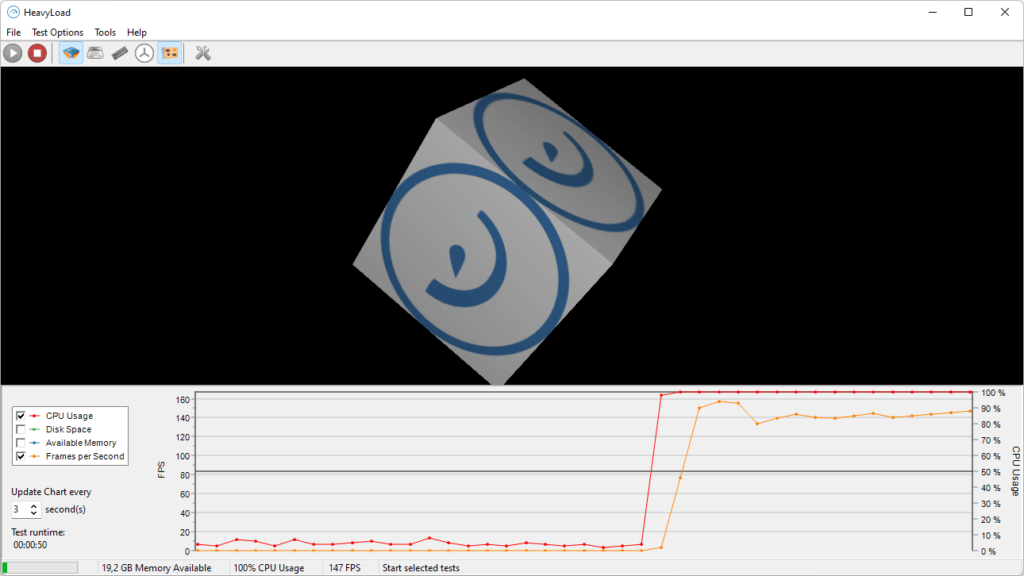
HeavyLoad is a free and easy-to-use software. Simply download it, run it, and choose the tasks you want to perform. It then displays the results in real time as colored indicators, showing the usage level of the CPU, GPU, RAM, hard drive, or SSD. You can also display the results in a separate window or in the taskbar.
The advantages of HeavyLoad are:
- Its lightness and speed
- Its simplicity and practicality
- Its ability to adjust the duration and intensity of the test
The disadvantages of HeavyLoad are:
- Its lack of detailed information on system performance
- Its lack of customizable options
- Its minimalist and unattractive interface
Intel BurnTest
Intel BurnTest is software specifically designed to stress test Intel CPUs. It uses the Linpack algorithm, a set of mathematical routines used to solve systems of linear equations. This algorithm is very demanding on the CPU, as it requires many floating-point operations and heavily utilizes cache memory.
Intel BurnTest offers four levels of testing:
- Very High: the highest level, which uses all available memory and tests all CPU cores. It is recommended for verifying maximum system stability.
- High: the intermediate level, which uses approximately 80% of available memory and tests all CPU cores. It is suitable for evaluating average system performance.
- Standard: the basic level, which uses approximately 50% of available memory and tests all CPU cores. It is useful for detecting obvious system errors.
- Custom: the customizable level, which allows you to choose the amount of memory to use and the number of cores to test.
Intel BurnTest is a free and easy-to-use software. Simply download it, run it, and choose the desired test level. It then displays the results in real time as text, indicating the number of iterations performed, the elapsed time, the processor speed, and the maximum temperature reached. It also allows you to save the results to a text file or send them by email.

The advantages of Intel BurnTest are:
- Its reliability and precision
- Its compatibility with Intel CPUs of all generations
- Its simplicity and speed
The disadvantages of Intel BurnTest are:
- Its excessive energy consumption and excessive heat generation
- Its lack of customizable options
- Its austere and unintuitive interface
Cinebench

Cinebench is a CPU stress test software that uses the Cinema 4D graphics engine to simulate complex and realistic 3D scenes. It measures the CPU's ability to render these scenes using all available cores. It offers two test modes:
- Multi-Core Test: the most comprehensive mode, which tests all CPU cores simultaneously. It is ideal for evaluating overall system performance.
- Single-Core Test: the simplest mode, which tests only one CPU core at a time. It is useful for comparing the individual performance of cores.
Cinebench is a free and easy-to-use software. Simply download it, run it, and click the "Run" button corresponding to the desired test mode. It then displays the results as a numerical score, indicating the number of frames per second (FPS) rendered by the CPU. It also allows you to compare the results with those of other CPU models or brands.

The advantages of Cinebench are:
- Its quality and realism
- Its compatibility with all types and generations of CPUs
- Its ease and speed
The disadvantages of Cinebench are:
- Its significant consumption of resources
- Its lack of customizable options
- Its minimalist and unattractive interface
Why do you need CPU stress tests?
CPU stress tests are operations designed to evaluate the reliability, stability, and performance of your processor by subjecting it to a maximum workload for an extended period. CPU stress testing software uses various techniques to push your CPU to 100% of its capacity for an hour or more, then analyzes its behavior.
CPU stress tests are also called CPU load tests. They are useful for several reasons:
- Test the system's stability beyond standard use and its limits
- Detect any potential CPU defects or malfunctions
- Determine the maximum load that the CPU can handle
- Confirm that the planned specifications are met
- Optimize the CPU cooling system and noise level
- Compare the performance of different CPU models or brands
- Preparing for a safe CPU overclock
CPU stress tests are particularly recommended for people experiencing performance issues with their older computers, or for those who use their computers for demanding tasks such as programming or gaming. They help ensure that the CPU can meet user needs without compromising system health.
FAQ
Here are some frequently asked questions about CPU stress testing software:
What is the ideal duration for a CPU stress test?
There is no single answer to this question, as it depends on the software used, the chosen stress level, the type of CPU being tested, and the desired outcome. Generally, a CPU stress test should last at least 15 minutes to be meaningful and at least an hour to be comprehensive. Some software offers predefined durations, while others allow manual adjustment.
What is the maximum tolerable temperature for a CPU?
The maximum acceptable temperature for a CPU varies depending on the model, brand, and generation of the processor. It is usually indicated in the manufacturer's technical specifications. On average, a CPU should not exceed 80°C under load and should remain below 60°C at idle. If your CPU exceeds these thresholds, it may suffer irreversible damage or have its lifespan reduced.
How to reduce CPU temperature during a stress test?
There are several ways to reduce CPU temperature during a stress test, such as:
- Improve case cooling by adding fans or optimizing airflow. You can consult our guide to the best CPU fans for your processor to choose the model best suited to your needs.
- Replace the CPU heatsink or thermal paste. These components are essential to ensure proper heat transfer between the CPU and the cooling system.
- Use a liquid or air cooling system. Liquid cooling is more efficient and quieter than air cooling, but it is also more expensive and more complex to install.
- Reducing the CPU frequency or voltage. This decreases the CPU's power consumption and heat output, but also reduces its performance.
- Stop unnecessary programs or services running in the background. They can consume CPU resources and increase its temperature. You can use software like AVG TuneUp to identify and disable these programs.
- Clean any dust or debris that may be blocking the vents. Dust can reduce the efficiency of the cooling system and prevent air from circulating properly within the case.
What are the results of a stress test?
The results of a CPU stress test can vary depending on the software used, the test mode chosen, the type of CPU being tested, and the environmental conditions. Generally, a CPU stress test can be considered successful if:
- The CPU shows no errors or instabilities
- The CPU does not exceed the maximum tolerable temperature
- The CPU reaches or exceeds its nominal frequency
- The CPU scores highly compared to other similar processors
Conclusion
CPU stress testing is an important operation to verify the reliability, stability, and performance of your computer. Several software programs can perform this test, each with its own features, advantages, and disadvantages. In this article, we present the 5 best CPU stress testing software programs for programmers and gamers:
- Prime95: the most reliable and accurate software, but also the most demanding and the most demanding
- AIDA64 Extreme: the most complete and versatile software, but also the most expensive and complex
- HeavyLoad: the simplest and most efficient software, but also the most limited and least attractive
- Intel BurnTest: software specifically designed for Intel CPUs , but also the most energy-intensive and least intuitive.
- Cinebench: the software that uses realistic 3D scenes, but also the most resource-intensive and least customizable
We hope this article has been helpful in choosing the software that best suits your needs and expectations. Please feel free to share your comments or questions in the section below.


