

A true developer is defined by the quality of their equipment. And when we talk about equipment, the first thing that comes to mind is their computer. However, the sheer variety of options available on the market can be confusing.
For several months now, manufacturers have been constantly innovating in laptop design. The latest news on this topic is updated monthly, further complicating the choice. Manufacturers have recently announced the release of new, even more powerful models thanks to their new Intel Tiger Lake processors.
We all remember the recent releases from Dell, Asus, Acer, HP… which all featured this characteristic. But is this aspect enough to choose the best laptop for developers in 2020? Certainly not!
To help you see things more clearly, we have created a buyer's guide and comparison of the best laptops on the market, particularly on the Amazon online store.
In this article, we offer advice on choosing the right computer for you, whether you want to try your hand at HTML, CSS, JavaScript, or other programming languages. But before we get to that, here's our comparison of the best laptops for developers in 2020.
Comparison of the best laptops for developers in 2020
Choosing the best laptop for developers isn't as simple as it seems, so we've done the work for you. This way, you won't have to waste precious time searching for the perfect laptop for your needs. Discover our selection!
1. HP Spectre x360 (2020), an ultraportable computer designed for mobile users
Features and Reviews
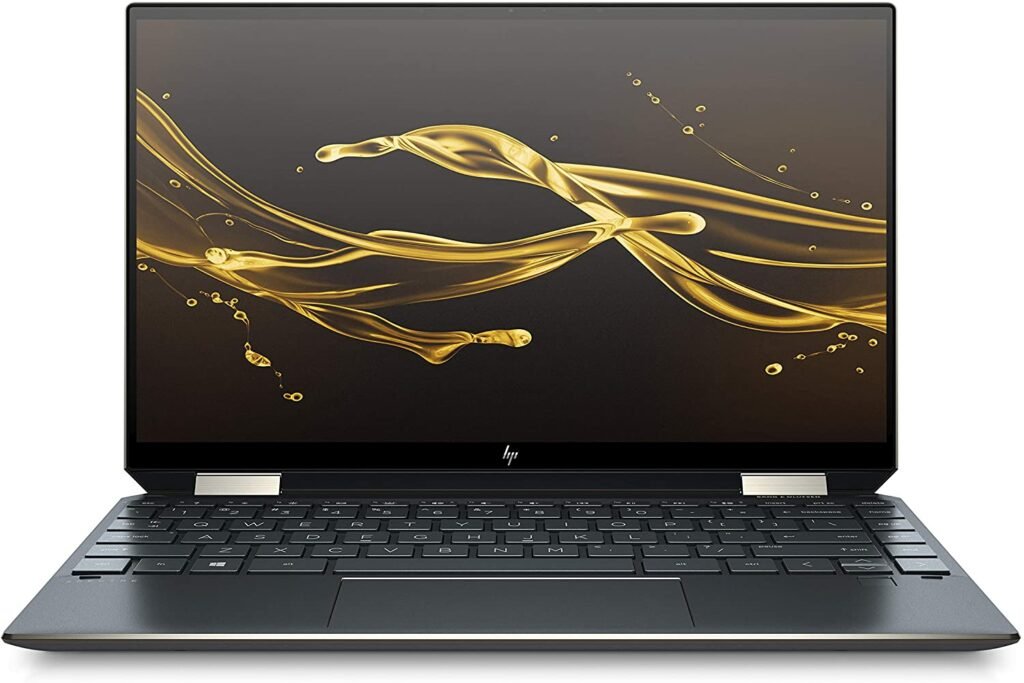
HP has elevated the Spectre x 360 (2020) to the high-end category. Currently, it's the best laptop HP has ever designed. Its features clearly surpass those of its predecessors and competitors. After testing this laptop for coders and developers, we can assure you it's revolutionary. For its price, it offers far more than you could possibly need. We'll tell you everything in detail.
Design and conception
The HP Spectre x360 rises to the top and has nothing to envy in other computers of its generation. From the moment we unboxed it, it only took a few seconds to realize that the computer is made of high-quality materials. The HP brand is renowned for the luxury and beauty of its laptops.
The HP Spectre x360 laptop is no exception. Clad entirely in black aluminum, the HP Spectre x360 comes with a leatherette sleeve. Its 360° gold hinge makes it a convertible laptop. Thanks to its excellent backlighting, the keyboard offers better visibility, even at night.
A screen with undeniable readability
The HP Spectre x360 features a 13.3-inch screen, a size sufficient for working with documents, playing games, and watching high-definition movies. It's an extremely fast IPS touchscreen. The screen is also available in an Ultra HD 4K version and a Full HD resolution of 920 x 1080 pixels.
Its slim profile and 0.4 cm thickness make it portable and easy to use. While it's true this screen isn't the best on the market, its contrast ratio is acceptable. Its color temperature can reach up to 7475K.
Options and features
This HP Spectre x360 ultraportable laptop is powered by an Intel Core i7 processor. Its 8GB of storage is perfect for storing large files.
Its RAM reaches 8 GB and its SSD 1 TB. The device features a rechargeable battery via a USB-C port as well as a USB 3.1 input. The HP Spectre x360 is the best compromise to keep you company on all your travels.
Thanks to its articulated hinges, you can use your computer in stand or tent mode. Furthermore, this ultraportable excels in battery life. It can be used for 12 hours and 2 minutes under heavy use with the screen brightness at 200 cd/m².
The Spectre x 360's poor sound quality is a drawback. However, this isn't surprising, as it's a common issue with all laptops. Similarly, if you're looking for an ultra-quiet computer, this isn't the one for you. The fan is noisy when it's running, producing 33.5 decibels.

2. MAK Book Air (2020): A breath of fresh air
Features and Reviews
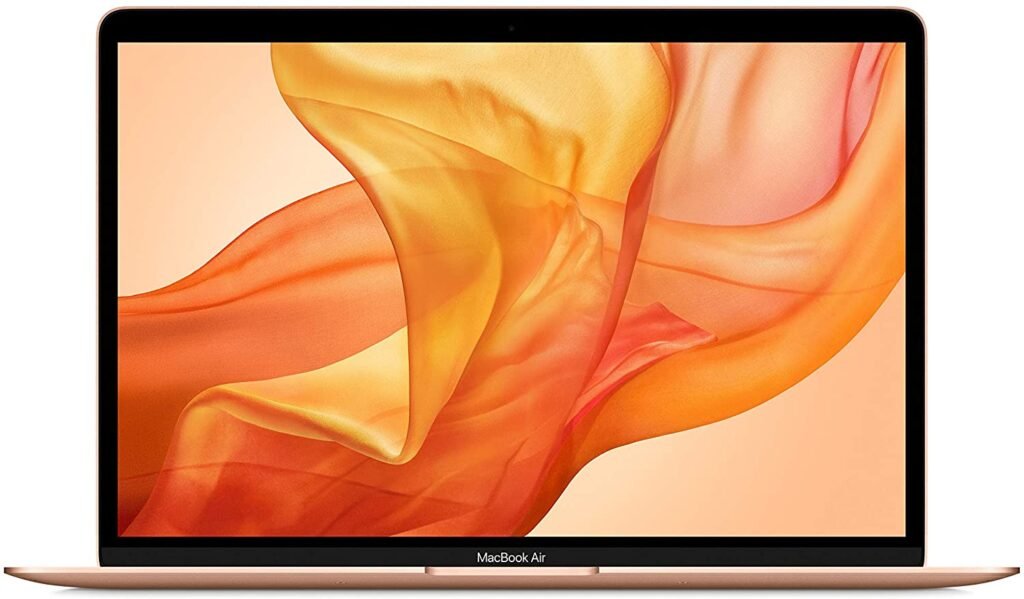
Lighter and more powerful, Apple offers its new MacBook, which arrives with a number of improvements. It breaks with tradition with its new keyboard, which has been a hit with consumers. In short, the Mac Pro Air seems to tick all the boxes. The computer is designed to be ideal for developers and programming work. Apple is known for its thin, light, and easily portable computers. The featherweight 2020 Mac Pro Air offers easy storage and makes it a computer that can easily slip into a bag. In addition to its unprecedented power, Apple's lightest computer boasts exceptional build quality. The good news is that its price is incredibly low.
Design, Screen and Keyboard
When it comes to its finishes, Apple has never been one for subtlety. Like the 2019 and 2018 MacBook Air models, Apple offers the 2020 model with a raw aluminum, gray, or space gold finish. Unadorned, the 2020 MacBook Air boasts a compact design with a width of 30.4 centimeters and a depth of 21.3 centimeters. It is 1.6 centimeters thick at the top and 0.4 centimeters at the bottom.
Furthermore, its featherweight design (1.29 kg) makes it an ultra-portable device that can be taken everywhere without straining your shoulders or arms. As for the 2020 MacBook Air's screen, Apple hasn't made any major changes. Its 13.3-inch Retina display offers a resolution of 2560 x 1600 pixels.
The screen isn't as bright as the one on the MacBook Pro. However, the screen bezels are quite wide. The 2020 MacBook Air developer laptop features the Touch Bar, just like the MacBook Pro. However, this feature is presented as a set of traditional buttons. Touch ID provides fingerprint recognition for added security.
Autonomy and performance
Battery life and performance are essential aspects to consider when choosing a laptop for programmers and developers. Apple raises the bar by improving computer performance to create an ultra-portable product. For example, the 2020 MacBook Air now boasts eight cores, up from two.
This model features a quad-core Intel Core i5 processor paired with 8GB of LPDDR4X RAM. While the computer is perfectly usable for office tasks, it will also handle coding work with ease. That's why we included it in our selection of the best laptops for developers in 2020.

3. ASUS Zenbook UX434FLC-A5179T: Ultra-portable and super convincing

Features and Reviews
Asus is a well-known brand in laptop design, offering a full range of products. With its ZenBook models, it has enjoyed a solid reputation in the market for several years. The ZenBook UX434FLC-A5179T is one of the most popular laptops among developers. Its main innovation lies in the ScreenPad 2. A gimmick for some, a disruptive element for others, is this screen-as-touchpad enough to stand out against the numerous competitors in this segment?
Construction and design
From the outside, the ZenBook Ux434FLC 2020 developer laptop looks almost identical to the previous Zenbook UX434FL and UX434FN models. However, it's important to note that three significant features distinguish the test product from these models.
The new 2020 UX434FLC model is available in silver or blue, unlike the 2019 models which were only offered in royal blue. Furthermore, the Zenbook UX434FL features a fairly large ScreenPad, but it doesn't interfere with everyday use.
Thirdly, the other change is located on the underside of the device. Here, the manufacturer has redesigned the air vents and opted for a larger intake above the entire assembly. This change significantly improves the product's performance and thermal management. Besides its elegant appearance, this computer has a compact design, which remains the selling point Asus is using to market its product.
Performance and features
Our Asus Zenbook UX434FL is equipped with a 10th generation Intel Core U Lake processor. The product features a Core i7-10510U processor. This is a significantly more powerful model than the 2019 devices that included a Core i7-8565U processor. Furthermore, it boasts Intel UHD 620 graphics and a 2GB Nvidia MX250 graphics card with Optimus technology. It also has 16GB of RAM.
Thanks to its 10th-generation processor, this device can achieve slightly higher Turbo Boost speeds in a number of situations, ensuring that an i7-88565U configuration performs consistently. This feature gives the Asus Zenbook UX434FL a privileged position in the developer laptop market.

4. Microsoft Surface Book 3

Features and Reviews
The Surface Book 3 laptop is to Microsoft what the MacBook Pro is to Apple. This device from Microsoft's Surface line, released in early May 2020, is a hybrid product and one of the manufacturer's most accomplished models. The Surface Book 3 laptop combines elegance and power.
Specifically designed for geeks, it comes in two versions: 13 and 15 inches, priced at €1799 and €2599 respectively. When we unpacked the package, we found that it contained a computer, of course, a user guide, a charging cable, and a power supply .
Design and ergonomics
The third model in the Surface Book range allowed Microsoft to play the continuity card. There's no reason to criticize the brand on this point, as it remains true to its design style. The Surface Book 3 PC boasts an elegant design and excellent quality materials. Clad entirely in magnesium, the device exudes an indescribable minimalism. The quality of its finish is beyond reproach, and the device is offered with a 15-inch screen.
Its dimensions are 343 mm x 251 mm x 15 mm-23 mm and its weight 1905 g, making it a behemoth, much like Apple's 16-inch MacBook Pro. While its size is quite imposing, this has allowed the manufacturer to include a variety of ports for improved user comfort.
The manufacturer has gone the extra mile by equipping the Surface Book 3 with an 8-inch rear camera capable of recording HD video. It's positioned on the upper right side of the computer. In addition, a 4-megapixel front-facing camera is also available.
A 4K screen for a more user-friendly experience
Microsoft did not include a display panel during the design of the Surface Book 3 PC. However, this omission is understandable, since the computer's screen can also be used as a tablet. Therefore, it goes without saying that most of the components are located in the upper part of the device, as well as around the screen.
Moreover, the screen boasts exceptional specifications (3:2 aspect ratio, 4K – 3240 x 2160p). While the screen is well-suited for photo editing, creative software, gaming, or video editing, it is unsuitable for watching movies.
Performance and battery life
While Microsoft offers this Surface Book 3 model with a hybrid design that appeals to many, its construction required the manufacturer to integrate its main components behind the screen. The model includes an Intel Core i7-1065G7 processor, which reduces the risk of overheating during intensive use.
The manufacturer has been very subtle when it comes to the quality of the graphics card. The computer features an Nvidia GeForce GTX 1660 Ti Max-Q card with 6GB of GDDR6 RAM.

5. HP EliteBook x360 1040 G5

Features and Reviews
If you're looking for a professional laptop, the HP EliteBook x360 G5 is for you. It's available from €1499 for the base model to €2349 for the higher-end versions. For this price, users will appreciate everything a Core i7 processor has to offer. The device features a touchscreen keyboard and high-performance speakers. With its aluminum chassis, the EliteBook x360 G5 is a laptop well-suited for developers, although its display is somewhat blurry.
Design and conception
For its EliteBook x360 1040, HP only offered it in silver. This color is the antithesis of Dell and Lenovo models, which most often offer the more conservative dark gray. Its unibody design gives it a minimalist and elegant look.
Its satin finish, clean and well-defined lines with a good balance of curves and delicately machined beveled edges. Furthermore, the manufacturer has equipped the HP Elite x360 1040G with a good number of ports. It features two Thunderbolt 3 connectors, a full-size HDMI port, two USB 3.1 Type 1 ports, a 3.5 mm audio connector, and a power supply button.
Features and performance
Despite its limited power, this laptop still managed to deliver impressive scores. Consuming only 15W of power, its performance was optimized thanks to its higher core count compared to previous models.
In terms of performance, this computer lasted from a few minutes to less than seven hours in our YouTube video test, playing a video counted as 10 hours long at maximum brightness with maximum performance settings, disabling all power-saving features and letting the laptop run until it shut down.
As for the laptop's speakers, they are very, very good; far better than you would expect from a business laptop. The audio quality is full-bodied, punchy, and has plenty of character, whether you're playing jazz or action movies.

Buyer's guide: how to choose a laptop for developers?
Choosing a computer for developers involves considering several factors. Indeed, computer specifications vary depending on the user. If you are a programmer or coder, you will need a high-performance computer to meet all your needs. Whether for coding, development, or programming, choosing the best computer is not easy, as there are many features to consider. Fortunately, we have taken the time to write the information below to help you choose a computer suited to your needs.
Your needs and your budget
Your choice of a suitable developer computer will depend on your needs and budget. If you can't clearly define your actual needs, you'll simply choose a computer that doesn't meet them.
What type of development do you do? Do you develop mobile applications for iOS or Android? Are you a web developer? By answering these questions, you'll be able to choose a specific device that suits your needs. It's a fairly simple task for experienced developers, but choosing a quality computer isn't always easy for beginners. Once you know what you'll be doing with your computer, you can define your budget. While it's possible to manage with basic machines, you'll get much better results with the most innovative computers on the market, featuring 4K screens and high speeds.
Which operating system should I choose for a developer's computer?
Here, the choice still depends on your activity. That said, those who develop Windows applications can opt for a computer with a Windowsoperating system. However, if you develop web or mobile applications, your choice will depend on your personal preferences. On the market, you will find four main operating systems: Microsoft Windows, Linux, Apple macOS, and ChromeOS.
Processor and Hard Drive
The processor is the component at the heart of a laptop. Several types of processors are available on the market. And since you're a developer, it would be best to consider an Intel Core i5 or i7 chip, either eighth or tenth generation .
With such a chip, you'll benefit from the best possible speeds. Furthermore, this feature will provide a certain fluidity during coding. Honestly, any 64-bit processor can do this job, but keep in mind that processors of this capacity are not all created equal.
When choosing a laptop for developers, you need to consider both its speed and capacity. When coding, you'll likely need to store all your project files on your computer, at least in many cases. You might also need to run some development virtual machines for testing purposes. This means you'll need a significant amount of storage space.
Hard drive speed is just as important as size, since you'll likely need to open several applications simultaneously during your work. That's why you'll need a fast hard drive. On the market, you'll find traditional hard drives and SSDs (Solid State Drives). While a hard drive has moving mechanical parts, an SSD stores data on microchips, much like a memory card. For your needs, a 7200 RPM drive will suffice.
RAM
A serious developer needs a high-quality computer with top-notch RAM. RAM for high-performance computers ranges from 8 to 32 GB. Starting with 8 GB, the most common RAM size, you can already handle a wide range of tasks. Machines with 16 GB of RAM are considered the standard for high-end machines. Gaming PCs typically offer this amount of memory. 32 GB is the largest amount of RAM available on today's most powerful computers.
Screen: size and resolution

Display is crucial for any developer. In any case, you need a laptop with a large display. This will allow you to display everything you want to see. 13-inch screens are hardly recommended. It's best to opt for screens ranging from 15 to 17 inches for developing software, web applications, and mobile apps.
Regarding resolution, you might be tempted to save a few euros by opting for a 720p screen, but I wouldn't recommend it. You need plenty of screen space to read all your code. You need to develop your test environments and demonstrate your application. You'll find everything looks cramped if you choose a low resolution. That's why many developers prefer a minimum of Full HD 1080p resolution, although you might also want to consider a 4K screen.
Chart
Wondering what type of graphics card to choose for your developer laptop? Your choice depends on the work you need to do. Graphics cards aren't necessary if you're creating standard desktop applications or doing light web development.
Graphics won't be that important, meaning you should be fine using only an integrated graphics chip on your laptop. However, if you're doing work that requires significant graphics processing, you'll need to avoid any computer with integrated graphics. Dedicated graphics will be necessary. An Nvidia 10-series graphics card would be suitable in this case.
Best laptop for developers: the final word

Thank you for reading this article to the end. We've compiled a comparison and buying guide for the best laptops for developers. To make things easier for you, we've put together a top 5 list of the best laptops for development and programming. We hope our selection has helped you choose a suitable model that meets both your needs and your budget. At the very least, we hope that our buying guide, based on the information we've gathered, has helped you achieve that goal. If you enjoyed this article or have any questions, please feel free to like it or leave a comment.


