

Port 8080 is a port number that identifies an application on a server . It is a non-standard port, meaning it is not assigned by default to a specific application but can be freely used by developers or administrators. Port 8080 is often used for web servers that operate in parallel with port 80, the standard port for the HTTP protocol. Port 8080 can also be used by other types of applications, such as proxy servers , email servers , or online game servers .
In this article, we will explain:
- How does port 8080 work and why is it used?
- How to configure port 8080 on your server or computer
- How to test port 8080 and troubleshoot any problems
- What are the advantages and disadvantages of port 8080?
How does port 8080 work and why is it used?

A port is a software component that allows an application to communicate with the network. Each application that uses the network must have a unique port number, between 0 and 65535 , to be identified by the operating system and other applications. Ports are classified into three categories:
- well-known ports , which range from 0 to 1023, and which are assigned by the IANA (Internet Assigned Numbers Authority) to common applications, such as port 80 for HTTP, port 443 for HTTPS or port 21 for FTP.
- Registered ports , which range from 1024 to 49151, are reserved for specific applications, but can be used by other applications with the owners' permission.
- Dynamic or private ports , which range from 49152 to 65535, and which are free for use by any application.
Port 8080 is a registered port, but it has no function defined by the IANA . Therefore, it is often used as an alternative port for web servers, especially those using the HTTP protocol . This is because port 80, the standard port for HTTP, may be occupied by another application or blocked by a firewall. Port 8080 allows users to bypass these limitations and run a web server on a different port.
Port 8080 can also be used for other types of applications that use the HTTP protocol or other TCP (Transmission Control Protocol)-based protocols, such as proxy servers , mail servers , or online game servers . The choice of port 8080 is often arbitrary or based on convention, but it has no particular significance.
How do I configure port 8080 on my server or computer?

To use port 8080 on your server or computer, you need to configure the application that will use this port and possibly modify the firewall or router settings to allow incoming and outgoing traffic on this port.
The application configuration depends on the type of server you are using and your operating system. For example, if you are using an Apache web server on Linux , you need to modify the httpd.conf file and change the Listen directive:
Listen 80
by
Listen 8080
You must then restart the Apache service for the change to take effect.
If you are using an IIS web server on Windows, you must open the server management console, select the website you want to configure, click on Bindings in the right sidebar, and then modify the value of the Port field:
Port: 80
by
Port: 8080
You must then click OK to confirm the change.
The firewall or router configuration also depends on the type of hardware and software you have. Generally, you need to access the firewall or router's management interface and then create a rule that allows inbound and outbound traffic on port 8080. If you are also using port 443 , you must create a similar rule for that port. You should also verify that ports 8080 and 443 are not being blocked by another firewall or router on the path between your server and the network.
How to test port 8080 and resolve any potential problems?

To test port 8080, you can use a web browser and enter your server address followed by the port number, for example:
http://localhost:8080
Or
http://www.example.com:8080
If everything is working correctly, you should see your server's web page displayed. Otherwise, you may encounter several types of problems, such as:
- A 404 (Not Found) error means that the server could not find the requested resource. This can be due to a misconfiguration of the server or an error in the URL.
- A 403 (Forbidden) error means that the server denied access to the requested resource. This can be due to a misconfiguration of the server or an authentication problem.
- A 500 error (Internal Server Error) means that the server has encountered an internal error. This could be due to a bug in the server code or a resource problem.
- A connection error means that the browser was unable to establish communication with the server. This can be due to a network problem, a port blocked by a firewall, or a server that is down.
To resolve these issues, you need to check your server, firewall, and router configuration, as well as the status of your network. You can also use tools like telnet, ping, or traceroute to test the connectivity between your computer and your server.
What are the advantages and disadvantages of port 8080?

Port 8080 has advantages and disadvantages compared to port 80 or other ports. Here are a few examples:
- Port 8080 allows a web server to run in parallel with port 80 , which can be useful for testing applications in development or for hosting multiple websites on the same server.
- Port 8080 allows you to bypass restrictions imposed by some firewalls or Internet service providers that block port 80 for security or bandwidth reasons.
- Port 8080 may be easier to remember than other non-standard ports because it resembles port 80.
- Port 8080 can cause compatibility issues with some browsers or software that don't recognize it as a web port. In such cases, the port number must be specified in the URL, which can be less convenient or less aesthetically pleasing.
- Port 8080 can be used by applications other than web servers , which can create conflicts or confusion if multiple applications use the same port on the same server or network.
- Port 8080 may be less secure than port 443 , which is the standard port for HTTPS, the protocol that encrypts communications between the browser and the server. Therefore, it is recommended to use HTTPS rather than HTTP if you want to protect your data.
FAQ
Here are some frequently asked questions about port 8080:
How do I change port 8080?
To change port 8080 , you must modify the configuration of the application using that port and possibly that of the firewall or router that allows it. You can choose any other non-standard port number between 1024 and 65535 , avoiding ports already used by other applications.
How can I tell if port 8080 is open?
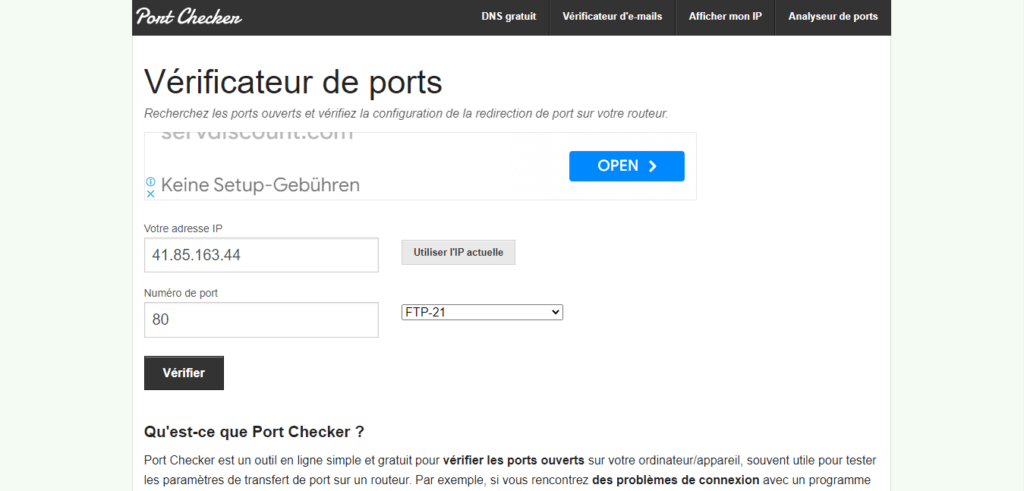
To check if port 8080 is open , you can use an online tool like Port Checker or YouGetSignal , which allow you to test whether a port is open on a given IP address. You can also use a tool like telnet, which allows you to attempt to establish a connection with a server on a given port. For example, if you want to test port 8080 on the server www.example.com , you can enter the following command in a command prompt:
telnet www.example.com 8080
If the port is open, you should see a message like:
Trying 93.184.216.34... Connected to www.example.com. Escape character is '^]'.
If the port is closed, you should see a message like:
Trying 93.184.216.34... telnet: connect to address 93.184.216.34: Connection refused telnet: Unable to connect to remote host
How do I close port 8080?
To close port 8080 , you must stop the application using that port and possibly modify the firewall or router configuration that allows it. You can also use a tool like netstat , which allows you to see open ports and the applications using them. For example, if you want to see the open ports on your Windows , you can enter the following command in a command prompt:
netstat -a -n -o
You should see a list of ports and IP addresses, with the process ID associated with each port. If you want to close port 8080, you need to identify the process using that port and terminate it using Task Manager or the `taskkill` command.
How do I open port 8080?
To open port 8080 , you need to launch the application that uses this port and possibly modify the firewall or router configuration to allow it. You can also use a tool like netstat, which allows you to check if the port is open and if the application is working correctly.
What is the difference between port 80 and port 8080?
Port 80 is the standard port for the HTTP protocol , which is used by web servers to send web pages to browsers. Port 8080 is a non-standard port that can be used by web servers or other applications that use the HTTP protocol or other TCP-based protocols. Port 8080 is often used as an alternative port for web servers that cannot use port 80 for technical or regulatory reasons.
What is the difference between port 443 and port 8080?

Port 443 is the standard port for HTTPS , a secure version of HTTP that encrypts communications between the browser and the server. Port 8080 is a non-standard port that can be used by web servers or other applications that use HTTP or other TCP-based protocols. Port 8080 is not secure by default unless the application using it implements its own encryption mechanism.
What is the advantage of using port 8080?
The advantage of using port 8080 is the ability to run a web server or other application on a port other than the standard port, which can be useful for testing applications in development, for hosting multiple websites on the same server, for bypassing restrictions imposed by some firewalls or Internet service providers , or for avoiding conflicts with other applications that are already using the standard port.
What are the risks of using port 8080?
The risks of using port 8080 include encountering compatibility issues with some browsers or software that do not recognize this port as a web port, creating confusion or conflicts with other applications that use the same port on the same server or network, or compromising data security if the port is not protected by encryption.
How can I find out which application is using port 8080?
To find out which application is using port 8080 , you can use a tool like netstat, which allows you to see open ports and the applications using them. For example, if you want to see the open ports on your Windows , you can enter the following command in a command prompt:
netstat -a -n -o
You should see a list of ports and IP addresses, with the process ID associated with each port. If you want to know which application is using port 8080, you need to identify the process using that port and name it using the Task Manager or the `tasklist` command .
How do I change port 8080 on Tomcat?

Tomcat is a web server that uses port 8080 by default for Java-based web applications. To change the port to 8080 on Tomcat, you need to modify the server.xml file located in the Tomcat conf directory. You need to find the following line:
<Connector port="8080" protocol="HTTP/1.1" connectionTimeout="20000" redirectPort="8443" />
and change the port parameter value:
<Connector port="8081" protocol="HTTP/1.1" connectionTimeout="20000" redirectPort="8443" />
Tomcat is a web server that uses port 8080 by default for Java-based web applications. To change the port to 8080 on Tomcat , you need to modify the server.xml file located in the Tomcat conf directory. You need to find the following line:
<Connector port="8080" protocol="HTTP/1.1" connectionTimeout="20000" redirectPort="8443" />
and change the port parameter value:
<Connector port="8081" protocol="HTTP/1.1" connectionTimeout="20000" redirectPort="8443" />
You must then restart Tomcat for the change to take effect.
How do I change port 8080 on Apache?
Apache is a web server that uses port 80 by default for HTTP-based web applications. To change port 80 on Apache, you need to modify the httpd.conf file located in the Apache conf directory. You need to look for the following line:
Listen 80
and change the value of the Listen parameter:
Listen 8080
Apache is a web server that uses port 80 by default for HTTP-based web applications . To change port 80 on Apache, you need to modify the httpd.conf file located in the Apache conf directory. You need to look for the following line:
Listen 80
and change the value of the Listen parameter:
Listen 8080
You must then restart Apache for the change to take effect.
How do I change port 8080 on IIS?
IIS is a web server that uses port 80 by default for HTTP-based web applications. To change port 80 on IIS, you must open the Server Management Console, select the website you want to configure, click Bindings in the right sidebar, and then modify the value in the Port field .
Port: 80
by
Port: 8080
You must then click OK to confirm the change.
How do I change port 8080 on Nginx?

Nginx is a web server that uses port 80 by default for HTTP-based web applications. To change port 80 on Nginx, you need to edit the nginx.conf file located in the Nginx conf directory . You need to look for the following line:
listen 80;
and change the value of the listen parameter:
listen 8080;
Nginx is a web server that uses port 80 HTTP- based web applications . To change port 80 on Nginx, you need to edit the nginx.conf file located in the Nginx . You need to look for the following line:
listen 80;
and change the value of the listen parameter:
listen 8080;
You then need to restart Nginx for the change to take effect.
How do I change port 8080 on Node.js?
Node.js is a runtime environment that allows you to create JavaScript-based web applications . To change the port to 8080 in Node.js, you need to modify your application's code and change the port parameter value. For example, if you are using the http module to create a web server , you would need to look for the following line:
server.listen(8080);
and change the value of the listen parameter:
server.listen(8081);
Node.js is a runtime environment that allows you to create JavaScript-based web applications . To change the port to 8080 in Node.js, you need to modify your application's code and change the port parameter value. For example, if you are using the http module to create a web server , you would need to look for the following line:
server.listen(8080);
and change the value of the listen parameter:
server.listen(8081);
You must then restart your application for the change to take effect.


