

Nahimic Service is software that improves sound quality on computers . It is often pre-installed on MSI PCs , but it can also be downloaded from the official Nahimic website . This software offers features such as noise reduction, bass enhancement, virtual surround sound, and equalizer customization.
So, is Nahimic Service useful or harmful to your PC? Should you keep it or uninstall it? In this article, we'll explain what Nahimic Service , how it works, its advantages and disadvantages, and how to remove it if you wish.
What is Nahimic Service and how does it work?

Windows service that runs in the background on your PC. It starts automatically when your computer boots up and updates regularly. It is associated with Nahimic software that allows you to control the sound settings on your PC.
Nahimic service works like an audio filter that modifies the sound signal before it reaches your speakers or headphones. It uses advanced algorithms to improve sound quality based on your preferences and the type of content you're listening to (music, movies, games, etc.).
Nahimic service is compatible with most audio and video applications, such as Spotify , YouTube , Netflix , VLC , etc. It can also detect the games you launch and adjust the sound accordingly. For example, it can amplify footsteps or gunshots to give you a tactical advantage.
What are the advantages of Nahimic Service?

Nahimic service offers several advantages for users looking to optimize their PC audio experience . Here are some of the benefits you can expect from Nahimic service:
- A clearer, more detailed sound , with less distortion and background noise.
- A more immersive and realistic sound , with a virtual surround effect that creates a sense of space and depth.
- A more personalized sound tailored to your tastes , with the ability to adjust the equalizer, bass, treble, etc.
- A sound more suited to the type of content you listen to, with preset modes for music, movies, games, etc.
- A more interactive and playful sound , with features like the HD microphone or the Sound Tracker that allow you to communicate with your friends or locate your enemies in games.
What are the disadvantages of Nahimic Service?
Nahimic service is not without its flaws. Some users may encounter problems with this software, such as:
- Excessive resource consumption on your PC. The Nahimic service can use up to 10% of your CPU and 100MB of your RAM, which can slow down your computer or cause overheating. If you want to check your CPU's health and test it under different loads, you can use PC CPU stress testing software . This software will allow you to measure your processor's temperature, frequency, and voltage, as well as its stability and reliability.
- Incompatibility with certain software or audio devices . Nahimic service may conflict with other programs that manage sound on your PC, such as Realtek Audio Manager or Dolby Atmos. It may also cause malfunctions with some speakers or headphones that are not recognized by Nahimic service.
- An alteration of the original sound . Nahimic service can modify the sound in a way that is too artificial or too aggressive, which can impair sound fidelity or your listening comfort. Some users may prefer the natural sound of their PC without Nahimic service.
How do I remove the Nahimic service?
If you are not satisfied with Nahimic Service or if you are experiencing problems with this software, you can remove it from your PC. Here are the steps to uninstall Nahimic Service:
- Open your PC's Control Panel Uninstall a program .
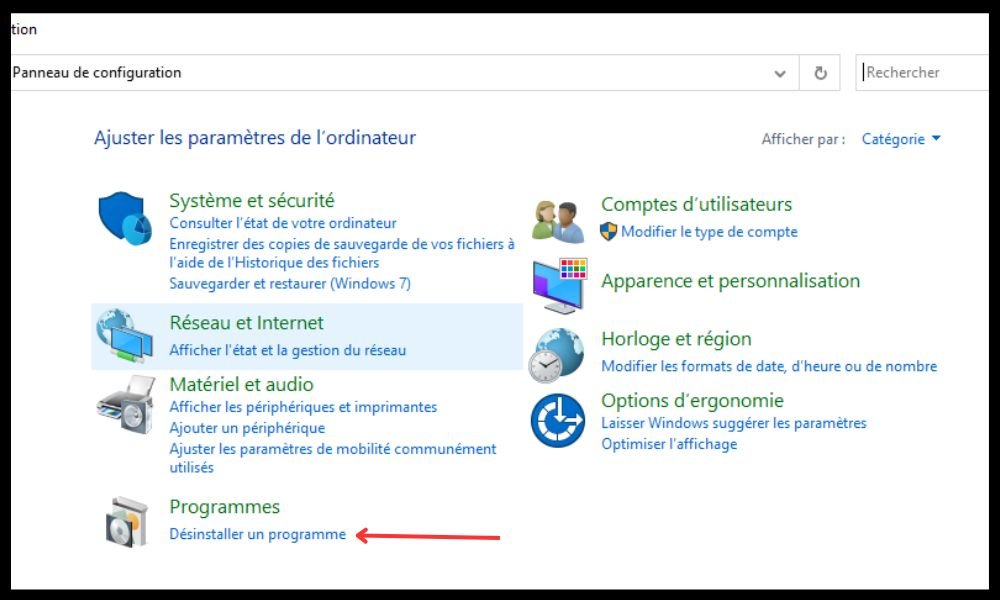
- Find Nahimic in the list of programs and click on it.
- Click Uninstall and follow the on-screen instructions to complete the uninstallation.
- Restart your PC for the changes to take effect.
You can also remove the nahimic service using a cleaning software like CCleaner or Revo Uninstaller, which will allow you to remove all files and registry entries associated with the nahimic service.
FAQ
Here are some frequently asked questions about Nahimic Service:
Is Nahimic service a virus?
No, Nahimic Service is not a virus . It's legitimate software designed to improve the sound quality on your PC. It poses no threat to your security or privacy.
Is Nahimic service free?
Yes, Nahimic service is free . You can download it from the official Nahimic website or find it pre-installed on some MSI PCs .
Is Nahimic service compatible with Windows 10?

Yes, Nahimic Service is compatible with Windows 10. It can work with most audio and video applications that run under this operating system.
Is the Nahimic service compatible with Mac?
No, Nahimic Service is not compatible with Macs . It is designed only for Windows PCs .
Is the Nahimic service compatible with Linux?
No, Nahimic Service is not compatible with Linux . There is no Linux version of this software.
Is the Nahimic service compatible with game consoles?
No, Nahimic Service is not compatible with game consoles . It cannot be installed on a PlayStation , Xbox , or Nintendo Switch.
Is the Nahimic service compatible with smartphones?
No, Nahimic Service is not compatible with smartphones . It cannot be installed on an iPhone, Android, or Windows Phone.
How do I update Nahimic Service?

To update the Nahimic service , you can either use the Nahimic software which will automatically offer you available updates, or go to the official Nahimic website and download the latest version of the software.
How do I enable or disable the Nahimic service?
To enable or disable the Nahimic service , you can either use the Nahimic software which will allow you to check or uncheck the “ Enable Nahimic ” box, or go to your PC's Task Manager and stop or restart the “ NahimicService.exe ” process.
How do I adjust the sound settings with Nahimic Service?
To adjust the sound settings with the Nahimic service , you can use the Nahimic software, which gives you access to various options such as equalizer, bass, treble, virtual surround sound , etc. You can also choose from preset modes for music, movies, games, etc.
How to use the HD microphone with Nahimic service?

To use the HD microphone with the Nahimic service , you must connect a compatible microphone to your PC and activate the “ HD Microphone ” feature in the Nahimic software . This feature will allow you to improve your voice quality by reducing background noise, increasing volume , or changing the pitch.
How to use the Sound Tracker with the Nahimic service?
To use the Sound Tracker with the Nahimic service , you must activate the “ Sound Tracker ” feature in the Nahimic software. This feature will display a visual indicator on your screen showing the direction and distance of sounds in games. This will allow you to more easily locate your enemies or allies.
How do I disable the Sound Tracker with the Nahimic service?
To disable the Sound Tracker with the Nahimic service, you can either press the “ Ctrl + Alt + S ” key on your keyboard, or go into the Nahimic software and uncheck the “ Sound Tracker ” box.
How to resolve sound problems with Nahimic Service?
If you experience sound problems with Nahimic service , such as dropouts, crackling, lag, or incompatibilities, you can try the following solutions:
- Check that your audio drivers are up to date and that your audio device is properly connected and recognized by your PC.
- Check that Nahimic service is up to date and that it does not conflict with other audio software on your PC.
- Check that the sound settings are correctly configured in the Nahimic software and in the applications you use.
- Restart your PC or restart the Nahimic service if the problem persists.
How do I contact Nahimic Service support?
If you need help or advice with Nahimic Service, you can contact Nahimic Service support by visiting the official Nahimic website and clicking on “ Support .” There you will find a FAQ, a forum, and a contact form . You can also send an email to support@nahimic.com or follow Nahimic on social media ( Facebook, Twitter, Instagram ).
Conclusion
Nahimic Service is software that improves sound quality on PCs, particularly those from MSI. If you own an MSI PC equipped with an X570S motherboard, MSI's latest flagship model , you can fully enjoy the performance of Nahimic Service. It offers useful features for customizing and optimizing sound based on the type of content you're listening to. However, it can also cause performance , compatibility , or sound quality on your PC. If you wish to remove Nahimic Service, you can easily uninstall it from the Control Panel or by using a cleanup program.


