
The Freebox is a device that allows you to access the services of the Free operator . To manage these services, you need to access the Freebox administration interface and you need a password . How do you find it?
Here are some tips to achieve this.
The default password
When you receive your Freebox, it is configured with a default password , which is the same for all users . This password is indicated in quick installation guide on the sticker affixed to the bottom of the Freebox Server. It is a sequence of eight digits , for example, 12345678.
To access the Freebox administration interface, simply enter this password in the designated field. You can then change this password more personalized and secure one by following the steps described in the next section.
Changing your password
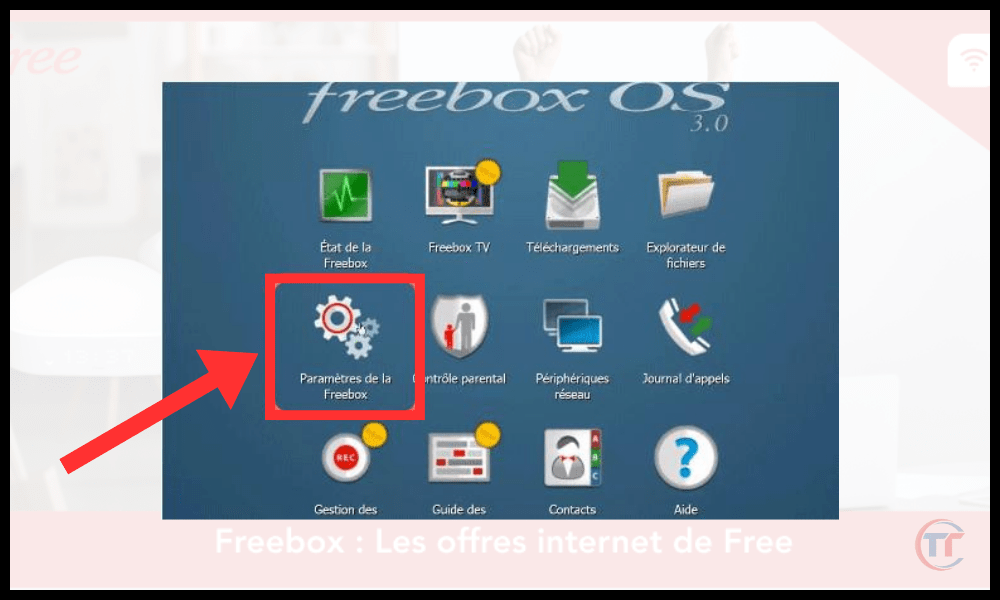
If you wish to Freebox administration password Freebox Settings ” tab, then to the “ Access Management ” section. You will then see a “ Web Interface Access ” section, where you can change the current password .
To do this, you need to enter the old password , then the new password twice , respecting the following criteria:
- The password must be at least eight characters long
- The password must contain at least one uppercase letter, one lowercase letter, one number, and one special character
- The password should not be easy to guess, nor should it correspond to personal information (name, surname, date of birth, etc.)
Once you have entered the new password, click “ Save ” to confirm the change. You will then need to log back into the administration interface with the new password .
Password reset
If you have Freebox administrator password you don't know the default password , there is a way to reset . This involves using the button located on the back of the Freebox Server, which restores the factory settings .
To reset your password, follow these steps:
- power supply cable from the Freebox Server
- and hold the button
- Reconnect the power supply cable while holding down the button
- Wait until the red light flashes rapidly , then release the button.
- Wait for the Freebox to restart and display the time on its screen.

Once the reset is complete , you can access the administration interface using the default password found in the quick installation guide or on the label under the Freebox Server. You can then change this password as explained previously.
FAQ
What is the Freebox administration interface?
The Freebox administration interface is a web page that allows you to manage the various services offered by your Freebox , such as internet access, television, telephone, and home automation. You can access it from any device connected to your local network by entering the address http://mafreebox.freebox.fr in your browser .
How do I protect my Freebox administration password?
To protect your Freebox administration password, it is recommended to follow these tips:
- Do not write your password down on paper or in a file accessible to everyone.
- Do not share your password with unauthorized individuals.
- Do not enter your password on a public or unsecured device.
- Change your password regularly , at least every six months.
- Use a different password for each online service
How can I tell if someone has accessed my Freebox administration interface?
If you suspect that Freebox administration interface check the connection history in the “ Freebox Settings ” tab, then in the “ Access Management ” section.
Connection History section , where you can view the date , time , IP address and browser type used for each connection.
If you notice a suspicious connection , you can immediately change your administration password and contact Free customer service to report the problem.

How to access the Freebox administration interface from a mobile device?
You can access the Freebox from a mobile device , such as a smartphone or tablet , using the same method as from a computer .
You can also download the Freebox Companion app , available on Android and iOS, which allows you to access Freebox administration interface other features such as parental control, file sharing, and call management.
Where can I find more information about the Freebox administration interface?
If you would like to find more information about the Freebox administration interface, you can consult the following sources:
- The official Free website offers guides and tutorials for using your Freebox.
- The official Free forum , where you can interact with other users and ask your questions
Conclusion
Finding your Freebox administrator password isn't complicated if you know the different methods. Whether you use the default password , change your password , or reset it , you can access the administration interface and manage the services offered by your Freebox.
However, remember to choose a secure and easy-to-remember password, and do not disclose it to unauthorized persons.
You may have heard of Zimbra Free online email service that offers more advantages than Free's standard webmail . It's a free and open-source service . It offers a user-friendly interface, ample storage space, and numerous collaboration features.


