

Want to watch YouTube videos in high resolution, but don't know how to download them in 4K? Don't worry, this article will show you how in a few simple steps.
There are free and easy-to-use tools for downloading YouTube videos in 4K .
What are the methods for downloading 4k YouTube videos?

There are several methods for downloading 4K YouTube videos, but they are not all equal in terms of simplicity, speed , and security . Here are the main options available to you:
1. Use dedicated software
The first method involves using software specifically designed to download 4k YouTube videos.
These programs are generally easy to use : simply copy the URL of the YouTube video you want to download, paste it into the program, choose the desired format and resolution, and start the download. You can also download multiple videos at once, or even entire playlists.
- The advantage of this method is that it allows you to download 4K YouTube videos with good quality and no loss . Furthermore, some software offers additional features, such as conversion to other formats , audio extraction , and video trimming or cropping .
- The drawback of this method is that it requires installing software on your computer or smartphone, which can take up space and slow down your system . Furthermore, some software may be paid or contain advertisements or viruses. Therefore, you must be vigilant and choose reliable and secure software .
Several are available on the market, such as 4K Video Downloader, WinX YouTube Downloader, and VideoProc. Here's a presentation of each:
4K Video Downloader

This software allows you to download videos from all popular websites, including YouTube, Facebook, Vimeo, Bilibili, and more. You can choose the output quality and format, as well as download subtitles, playlists, and entire channels.
Benefits :
- Free and ad-free
- Supports 4K and 8K
- Compatible with Windows, Mac and Linux
Disadvantages:
- Some features are limited in the free version, such as the number of simultaneous downloads or the ability to subscribe to YouTube channels
- Requires a stable internet connection to download videos
Learn more about 4K Video Downloader
WinX YouTube Downloader

This software allows you to download any multimedia content from YouTube and over 300 other sites. You can convert videos to various formats, such as MP4, MP3, FLV, or WebM. You can also adjust the resolution, bitrate, and frame rate to suit your needs.
Benefits :
- Free and virus-free
- Supports HD, 4K and 8K video
- Compatible with Windows 7/8/10/11
Disadvantages:
- It does not have advanced video editing options
- Not available for Mac or Linux
VideoProc

This software is an all-in-one video editing tool that lets you edit, convert, compress, and download 4K/HDR videos. You can trim, crop, merge, add effects, subtitles, or filters to your videos. You can also extract audio, burn DVDs, or record your screen.
Benefits :
- GPU-accelerated for optimal speed and quality
- Supports over 370 input codecs and over 420 output formats
- Compatible with Windows and Mac
Disadvantages:
- Paid service after the free trial period
- May be complex for beginners to use
2. Use an online website
The second method involves using an online website that offers to download 4K YouTube videos. Several exist on the internet, such as Y2mate, Keepvid, or Online Video Converter.
These websites work in the same way as software: simply copy the URL of the YouTube video you want to download, paste it into the website , choose the desired format and resolution , and start the download .
Here is a description for each online website that offers to download 4k YouTube videos:
Y2mate

Y2mate is a website that allows you to download YouTube videos in various formats and resolutions, including 4K. Simply copy and paste the video URL into the website, choose the MP4 or WEBM format, and select the 2160p resolution. Then, click the "Start" button and wait for the download to begin.
Benefits :
- Free and easy to use.
- Supports multiple languages, including French.
- No software or extension installation required.
Disadvantages:
- It displays many advertisements that can be annoying or dangerous.
- May be blocked by some antivirus programs or browsers due to the risk of viruses or malware.
- Performance or availability issues depending on website traffic.
Keepvid

Keepvid is a website that lets you download 4K YouTube videos from the video's URL. Simply copy and paste the video's URL into the website, then click the "Download Now" button. Next, choose the MP4 or WEBM format and the 2160p resolution. The download will start automatically.
Benefits :
- Quick and easy to use.
- Supports several online video websites, such as Facebook, Vimeo, or Dailymotion.
- Offers the option to download subtitles or audio tracks separately.
Disadvantages:
- It is not free; a subscription is required to access all website features.
- It also displays advertisements that may be intrusive or malicious.
- It requires the installation of an extension for certain browsers, such as Chrome or Firefox.
Online Video Converter

Online Video Converter is a website that allows you to download 4K YouTube videos using the video's URL. Simply copy and paste the video's URL into the website, then click the "Go" button. Next, choose the MP4 or WEBM format and the 2160p resolution. Click the "Download" button to begin the download.
Benefits :
- Free and with no limit on video size or duration.
- It also supports other online video websites, such as Instagram, TikTok, or Twitch.
- It allows you to customize conversion parameters, such as bitrate, frequency, or volume.
Disadvantages:
- It also displays advertisements that can be annoying or harmful.
- It can be slow or unstable depending on the quality of the network or server.
- Does not guarantee the security or confidentiality of downloaded data.
3. Use a browser extension
The third method involves using a browser extension that allows you to download 4K YouTube videos. This is a small program that adds itself to your browser and gives you the ability to download YouTube videos directly from the web page .
There are several extensions of this type, such as Video DownloadHelper, YouTube Video Downloader, and Easy YouTube Video Downloader Express. These extensions are generally simple to use : just click on the extension icon in your browser's toolbar , choose the desired format and resolution, and start the download.
Here is a presentation of each extension, with its advantages and disadvantages:
Video DownloadHelper

Firefox and Chrome extension . It allows you to download 4K YouTube videos, as well as videos from other sites like Vimeo, Dailymotion, and Facebook. It also offers the ability to convert videos to various formats, such as MP4, AVI, and WMV.
Benefits :
- It is free and easy to install .
- It automatically detects videos present on the web page and displays an animated icon in the toolbar.
- It allows you to choose from several download options, such as format, resolution, file name or destination folder.
- It supports batch downloading, meaning it can download multiple videos at the same time.
Disadvantages:
- It requires the installation of additional software called Video DownloadHelper Companion App in order to download certain protected videos or convert videos into other formats.
- It displays advertisements in its interface and in converted videos if you do not purchase the premium version.
- It can slow down the browser or cause bugs if too many videos are downloaded at the same time.
YouTube Video Downloader
Chrome extension . It allows you to download YouTube videos in 4K, as well as 1080p, 720p, 480p, or 360p. It also offers the option to download only the audio from YouTube videos in MP3 format.
Benefits :
- It is free and easy to install .
- She adds a Download under each YouTube video, making downloading very quick and convenient.
- It allows you to choose the format and resolution of the videos to download with one click.
- It supports batch downloading, meaning it can download multiple videos at the same time.
Disadvantages:
- It only works for YouTube videos, not for other sites.
- It does not allow converting videos into formats other than those offered by YouTube.
- It can be blocked by Google or YouTube if they detect that it violates their terms of service.
Easy YouTube Video Downloader Express

Easy YouTube Video Downloader Express is an extension available for Firefox , Chrome , Opera , and Edge . It allows you to download YouTube videos in 4K, as well as 1080p, 720p, 480p, or 360p. It also offers the option to download only the audio from YouTube videos in MP3 or M4A format.
Benefits :
- It is free and easy to install .
- She adds a Download As under each YouTube video, making downloading very quick and convenient.
- It allows you to choose the format and resolution of the videos to download with one click.
- It supports batch downloading, meaning it can download multiple videos at the same time.
Disadvantages:
- It only works for YouTube videos, not for other sites.
- It does not allow converting videos into formats other than those offered by YouTube.
- It displays advertisements in its interface and in downloaded videos if you do not purchase the premium version.
What are the advantages and disadvantages of each method?
To summarize, here is a comparative table of the advantages and disadvantages of each method for downloading 4k YouTube videos:
| Method | Benefits | Disadvantages |
|---|---|---|
| Dedicated software | – Good quality and lossless – Additional features | – Requires installation – May be costly or dangerous |
| Website online | – No installation required – Free and fast | – Limited quality and selection – May be unstable or dangerous |
| Browser extension | – Convenient and fast – Good quality and no waste | – Requires installation – May affect browser performance and security |
FAQ
What are the disadvantages of watching YouTube videos in 4k?
Watching YouTube videos in 4k also has some drawbacks:
- You consume more data , which can be problematic if you have a limited plan or a slow connection.
- You need a compatible monitor , such as a 4k gaming screen or a 4k portable monitor , otherwise you won't see the difference with Full HD.
- You need a device powerful enough to play 4k videos , otherwise you may experience slowdowns or stuttering.
How can you tell if a YouTube video is in 4k?
To determine if a YouTube video is in 4k, you can check several elements:
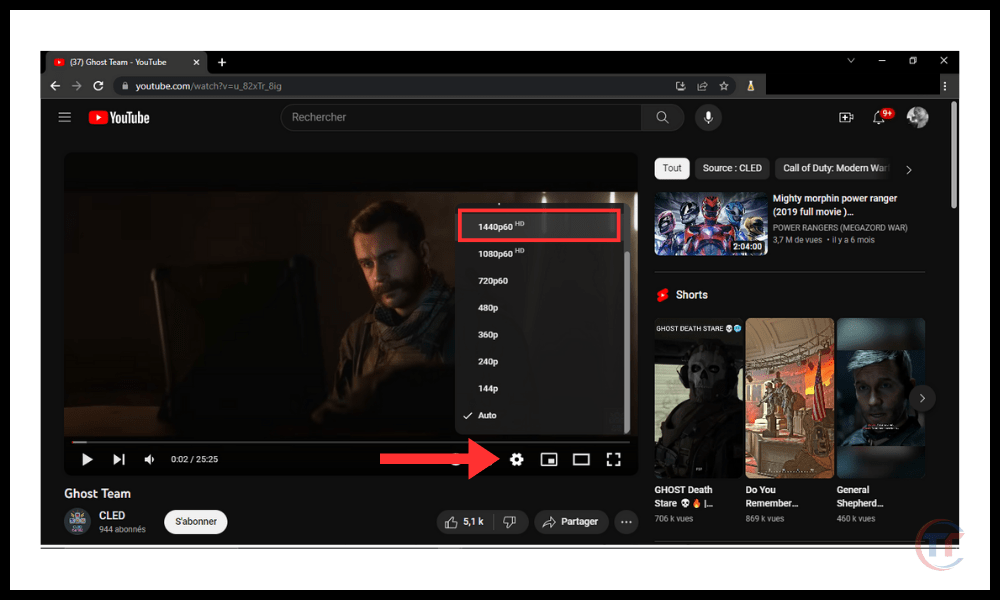
- On the video's webpage , click the settings icon (the gear) in the bottom right corner of the screen, then click " Quality ". If you see the option " 2160p " or " 4k ", this means the video is in 4k.
- On the YouTube app for smartphones or tablets, tap the three-dot icon in the top right corner of the screen, then tap “Quality”. If you see the option “ 2160p ” or “ 4k ”, it means the video is in 4k.
- On some browsers or applications, you may also see a small “ 4k ” logo next to the video title.
How do I enable 4K on YouTube?
To enable 4K on YouTube, you must follow these steps:
- On the video's webpage , click the settings icon (the gear) in the bottom right corner of the screen, then click " Quality 2160p " or " 4k option to switch to 4k mode.
- On the YouTube app for smartphones or tablets, tap the three-dot icon in the top right corner of the screen, then tap “ Quality ”. Choose the “ 2160p ” or “ 4k ” option to switch to 4k mode.
- On some browsers or applications, you can also enable 4k automatically by going into Youtube settings and checking the option “ Always choose the best quality for my connection and device ”.
What is the difference between 4k and Ultra HD?
4K and Ultra HD are two terms that refer to the same thing: a resolution of 3840 x 2160 pixels. However, there is a nuance between these two terms:
- 4K is a term used in digital cinema , which corresponds to an exact resolution of 4096 x 2160 pixels. It is the format used by professional cameras and projection rooms.
- Ultra HD is a term used in television and consumer displays , referring to a slightly lower resolution of 3840 x 2160 pixels. It is the format used by television channels, streaming services, and home screens.
How to reduce the size of a 4k YouTube video?
If you want to reduce the size of a 4k YouTube video , you can use several methods:
- Change the video format or codec : You can convert your video to a more efficient format or codec, such as MP4 with the H.265 codec or WebM with the AV1 codec. This will allow you to reduce the file size without losing too much quality.
- Reduce the video resolution or frame rate : You can reduce the resolution or frame rate of your video, for example, by switching from 4K to Full HD or from 60 fps to 30 fps. This will reduce the file size, but also the image quality.
- Reduce the bitrate or video quality : You can reduce the bitrate or quality of your video, for example, by going from 20 Mbps to 10 Mbps or from high quality to medium quality. This will allow you to reduce the file size, but also the image quality.

Conclusion
If you want to download 4K YouTube videos , you have several options, but they are not all equal. Some are simpler, others safer, and still others more comprehensive.
For example, did you know that you can enjoy YouTube Premium for free for a month ? This allows you to download YouTube videos in 4k without ads, without third-party software, and with optimal quality.
Regardless of the method chosen, you must always respect the copyright of the YouTube videos you download, and not use them for commercial or illegal purposes .


