

Oze 78, also known as Oze Yvelines, is the Digital Workspace (ENT) for middle schools in the Yvelines department. It is a digital tool that allows students, parents, and teachers to communicate, collaborate, and access online educational resources.
In this article, we will explain how to log in to your Oze Yvelines account, what the advantages of this space are, and how to resolve any connection problems.
UPDATE for the start of the 2023 school year : NEO replaces OZE 78
The disappearance of oze 78, the digital learning environment for middle schools in Yvelines
Oze 78 encountered technical and financial difficulties that led to its closure in July 2023. According to the website neoprofs.org, Oze 78 was “a very expensive, unreliable, user-unfriendly, and insecure digital learning environment (ENT).” The Yvelines Departmental Council therefore decided to terminate its contract with ODE and select a new provider to supply a more efficient and less expensive ENT.
What is the new ENT that replaces oze 78?
The new digital learning environment (ENT) replacing oze 78 is called Néo and is developed by the company Kosmos. Néo is a modular and customizable ENT that offers services tailored to user needs. It allows users to manage timetables, absences, grades, homework, educational resources, collaborative projects, and more. Néo is also compatible with national applications such as Pronote, Eduthèque, and Pix. Néo has been progressively rolled out in middle schools in the Yvelines department since the start of the 2023 school year.
Users can access Neo via the website https://ent.ecollege78.fr/.
How to connect to Néo, the new digital workspace (ENT) for the Yvelines department (78)?
To log in to Néo, the new digital learning environment (ENT) replacing Oze 78 in Yvelines, you will need your username and activation code. This information is provided by your school.
Step 1: Go to the website ent.ecollege78.fr
To access Neo, you must go to the website https://ent.ecollege78.fr.
Step 2: Enter your username and activation code
You will arrive at the authentication page, which looks like this:
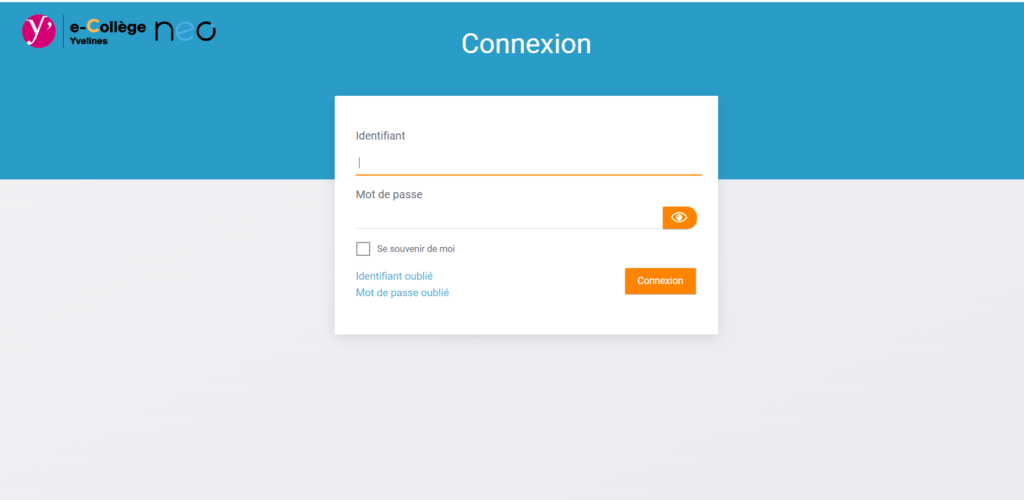
On this page, you must enter your username and activation code in the corresponding fields. Be careful to respect uppercase and lowercase letters. Then, you must click on the "Login" button.
Step 3: Choose a new password and enter your email address
After clicking on "Login", you will arrive at the first login page.
On this page, you must choose a new password, containing at least 8 characters, including at least one uppercase letter, one lowercase letter, and one number. You must also enter your personal email address to receive a password reset email in case you forget your password. Then, you must click the "Submit" button.
Congratulations, you are connected to neo, the new ENT 78 of Yvelines!
See also: Oze 92
What is Oze 78 d'Yvelines?
Oze 78 is a project initiated by the Yvelines Departmental Council and the Versailles Academy, in partnership with the company Kosmos. It is part of the digital plan for education, launched by the Ministry of National Education in 2015.
The goal is to promote student success by offering them simplified and secure access to digital services and content tailored to their needs.
Oze Yvelines is accessible from any computer, tablet, or smartphone connected to the internet. It includes several features, such as:
- Access to the lesson plan book , which allows students to consult the lessons, exercises and assessments planned by their teachers, as well as instructions and corrections.
- Access to online school reports
- Access to messaging , which allows students, parents and teachers to exchange messages, documents and information.
- Access to collaborative spaces , which allow students to work in groups on projects, presentations or research, and teachers to offer interactive educational activities.
- Access to digital resources , which allows students to access a variety of educational content (videos, podcasts, games, etc.) and teachers to diversify their teaching materials.
- Access to the blog , which allows students, parents and teachers to stay informed about school news and events.
Oze 78 is therefore a tool that facilitates communication between the different actors in the educational community, strengthens the link between school and family, and contributes to the development of students' digital skills.
What are the advantages of Oze Yvelines 78?
Oze 78 offers numerous benefits for students, parents, and teachers. Here are a few examples:
- For the students :
- They can consult their timetable and their lesson plans at any time, and thus better organize themselves in their schoolwork.
- They can access a variety of fun and engaging digital resources that complement the lessons taught in class.
- They can communicate with their teachers and classmates, ask questions, request help, etc.
- They can develop their digital skills, which are essential in today's world.
- For parents :
- They can monitor their children's schooling by checking their grades, absences, homework, etc.
- They can be informed of news and events at the school, and thus strengthen the link with the school.
- They can communicate with teachers and other parents via messaging or the ENT forums.
- They can carry out administrative procedures online, such as paying for half-board, registering their children for the canteen, etc.
- For teachers :
- They can manage their class remotely, by publishing the lesson plan, homework assignments, documents, assessments, etc.
- They can offer innovative and interactive educational activities, using the digital resources available on the ENT.
- They can communicate with students and parents by sending messages, surveys, announcements, etc.
- They can benefit from support and training to use the ENT.
Oze Yvelines is therefore a tool that offers multiple possibilities to enrich and facilitate the school experience for all users.
How to resolve connection problems with Oze Yvelines / ENT 78?
Occasionally, some users may experience difficulties connecting to Oze Yvelines / ENT 78. Here are some tips to resolve the most common problems:
- Check that you have a stable and sufficient internet connection. If not, try moving closer to the router or changing networks.
- Double-check that you have entered your username and password correctly. Pay attention to uppercase and lowercase letters, accents, and spaces. If you have forgotten your password, click the “Forgot your password?” link on the login page and follow the instructions to reset it.
- Ensure you are using a web browser compatible with the digital learning environment (ENT). It is recommended to use the latest version of Google Chrome, Mozilla Firefox, Microsoft Edge, or Safari. You must also enable JavaScript and cookies in your browser settings.
- Check that you haven't activated an ad blocker or antivirus software that could prevent the ENT from functioning correctly. If so, you must temporarily disable it or add the ENT to the list of allowed sites.
- Check that the ENT website is not undergoing maintenance or is down. If it is, you must wait until the service is restored. You can check the service status on the official website or on the ENT's social media channels.
If the problem persists despite these tips, you should contact the ENT technical support. Contact information can be found on the official website or in the user guide provided by the school. You will then need to clearly explain the problem, specifying your username, school, web browser, and the error message displayed.
FAQ about Oze 78 – Oze yvelines
What are the technical requirements to access Oze 78?
To access Oze Yvelines / ENT 78, you need a computer, tablet, or smartphone with an internet connection. You also need a recent web browser, such as Google Chrome, Mozilla Firefox, Microsoft Edge, or Safari.
It is recommended to update your browser regularly to benefit from the best performance and security. You should also enable JavaScript and cookies in your browser settings.
How do I change my Oze Yvelines password?
It is recommended to change your Oze Yvelines password regularly to strengthen your account security. To do this, you need to:
- Log in to your Oze Yvelines account as previously indicated.
- Click on your name in the top right corner of the screen, then on “My Account”.
- Click on the “Password” tab.
- Enter your old password, then your new password twice.
- Click the “Save” button to confirm the change.
How do I disconnect from Oze Yvelines?
To disconnect from Oze Yvelines, simply:
- Click on your name in the top right corner of the screen, then click on “Logout”.
- Confirm the disconnection by clicking the “Yes” button.
How do I personalize my profile?
To personalize your profile on Oze Yvelines / ENT 78, log in to your account and click on "My Account" in the horizontal menu at the top. Then click on "Edit my profile" in the vertical menu on the left.
You can then modify your personal information, such as your name, surname, email address, phone number, photo, etc. You must click the "Save" button to confirm the changes.
How can I access the archives from previous years on Oze 78?
To access the archives from previous years on Oze 78, you must log in to your account and click on "My Class Space" in the horizontal menu at the top. Then click on "Archives" in the vertical menu on the left.
It is then possible to consult the lesson plans, report cards, timetables, etc., from previous years. You must select the desired school year and class from the drop-down menus.
How to create a collaborative space on Oze Yvelines?
To create a collaborative space on Oze Yvelines / 78, log in to your account and click on "My collaborative spaces" in the top horizontal menu. Then click on the "Create a collaborative space" button in the bottom right corner. Next, give your collaborative space a name, a description, and an image.
You must also choose the type of collaborative space from the available options: project, presentation, research, etc. Finally, you must invite the members you wish to associate with your collaborative space by entering their names or email addresses.
How to access digital resources on Oze Yvelines?
To access digital resources on Oze Yvelines, you must log in to your account and click on "My digital resources" in the horizontal menu at the top. You can then view the various digital resources (videos, podcasts, games, etc.) selected by the Versailles Academy and adapted to the school curriculum.
You can search for a resource by keyword or filter. You can also sort resources alphabetically, by date, or by popularity.
How to contact Oze Yvelines technical support?
If you encounter a problem with Oze Yvelines, you can contact the site's technical support. To do so, you need to:
- Go to the website's homepage: https://www.oze-yvelines.fr/.
- Click on the “Contact” link at the bottom of the page.
- Fill out the form by indicating your name, your email address, the subject of your request and your message.
- Click the “Submit” button to send your request.
You will receive a response by email as soon as possible.
Conclusion
Oze Yvelines is a digital workspace that offers numerous services and resources to students, parents, teachers and administrative staff of middle and high schools in the Yvelines department.
To access it, you must log in to your account with your username and password. You can change your password, log out, and contact technical support if needed. Oze Yvelines has advantages and disadvantages that you should be aware of to fully benefit from it.


