More than a year after its announcement, the long-awaited "Visible Directions" of Google Maps is finally being rolled out on a large scale to Android and iOS devices worldwide . This major innovation promises a new, more convenient, and safer navigation experience by displaying vital information about your route directly on your lock screen.
A successful phased rollout
Initially announced in February 2023, the feature experienced a significant rollout delay. After a few sporadic sightings in the summer of 2023, and several months of silence, " Visible Directions " resurfaced in January 2024, with reports of gradual availability for some users. Today, Android Police confirms that the rollout is now fully complete.
Spotlight on the "Visible Directions"
This new feature offers an intuitive overview of your journey, with essential information such as real-time estimated time of arrival ( ETA ) and turn-by-turn navigation instructions. You can follow your progress along the displayed route without even launching a full navigation menu, ideal for confirming your route or when you're in familiar territory.
An intelligent and adaptive system
The " Visible Directions " adapt to your needs in real time. If you decide to take an impromptu detour, the map will automatically recalculate your route without any manual intervention, ensuring you stay on the right track even when faced with unexpected events.
More security and fewer distractions
One of the major advantages of this innovation is the reduction of distractions while driving. No more constantly unlocking your phone to check your progress! " Visible Directions " allow you to stay focused on the road while keeping an eye on key information about your journey.
Simplified activation and configuration
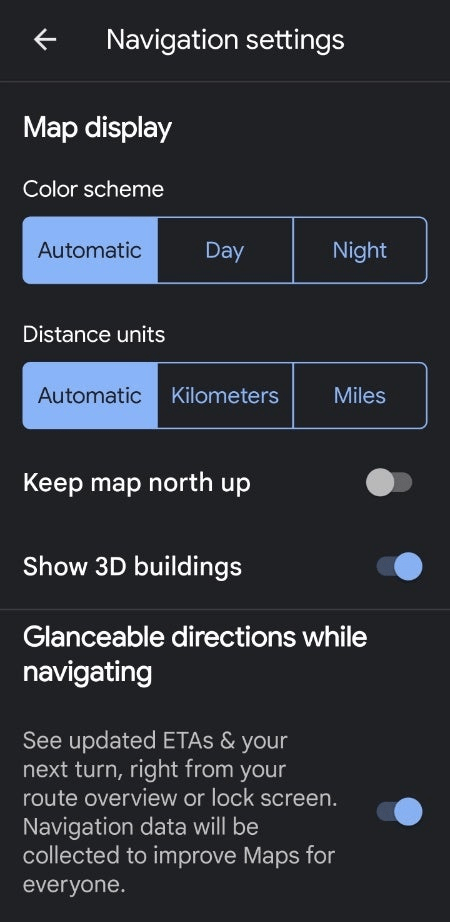
To take advantage of this revolutionary feature, it couldn't be simpler! Make sure you have the latest version of Google Maps (version 11.116.0101 or later) on your Android or iOS device. Then, follow these steps:
- Open Google Maps.
- Tap your profile icon (located in the upper right corner).
- Select " Settings " then " Navigation settings ".
- Scroll down until you find the " Visible Directions " option.
- Activate the feature by toggling the switch to " On ".
A promising future for navigation
The widespread rollout of " Visible Directions " marks a major step forward in the Google Maps navigation experience. This innovative feature offers a multitude of advantages in terms of convenience, safety, and peace of mind. We can be sure that Google will continue to explore new technologies to make navigation even more intuitive and efficient.
In conclusion, Google Maps' "Visible Directions" represent a true revolution in mobile navigation. This innovative feature offers a seamless, safe, and customizable experience for both casual drivers and experienced users.
Don't wait any longer to activate it and enjoy next-generation navigation!