
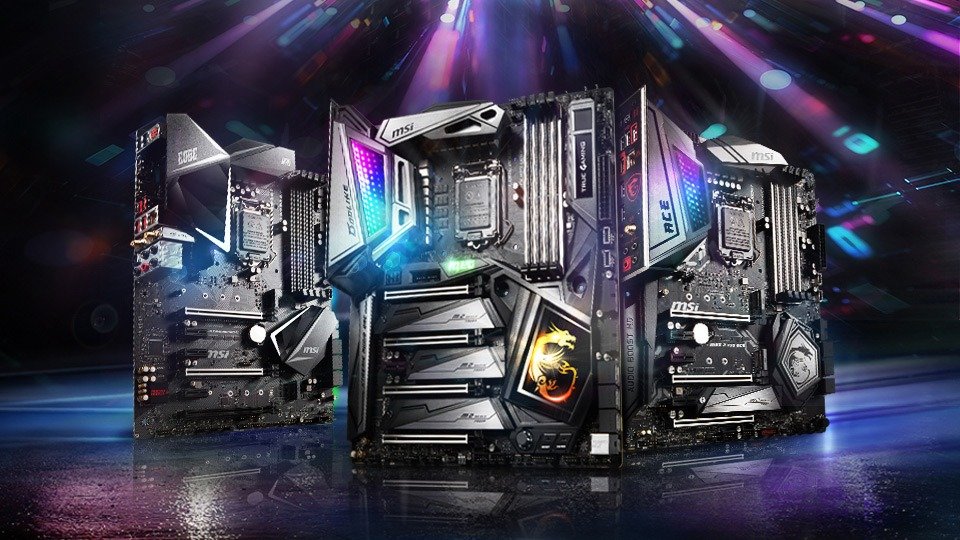
Things to know before making a purchase!
As mentioned in the introduction, the motherboard is a crucial choice in your PC configuration, so it should be chosen carefully. Here are 3 points to consider:
- X570 motherboards aren't the cheapest on the market, so you'll have to spend more when buying one. The starting price is around €170, while other models with a lower-end chipset can be found for around €70.
- However, they are suitable for gamers or professionals requiring large storage capacity and high graphics performance thanks to their numerous ports.
- Investing (because that is indeed the right word) in an x570 motherboard will allow you to take advantage of the new technologies that will be installed on the next graphics cards and PCIe 4.0 NVMe drives.
Comparison of the 10 best x570 motherboards

The cheapest
If you want to benefit from the advantages offered by an x570 motherboard but your budget doesn't allow you to splurge, you will find the best choices below.
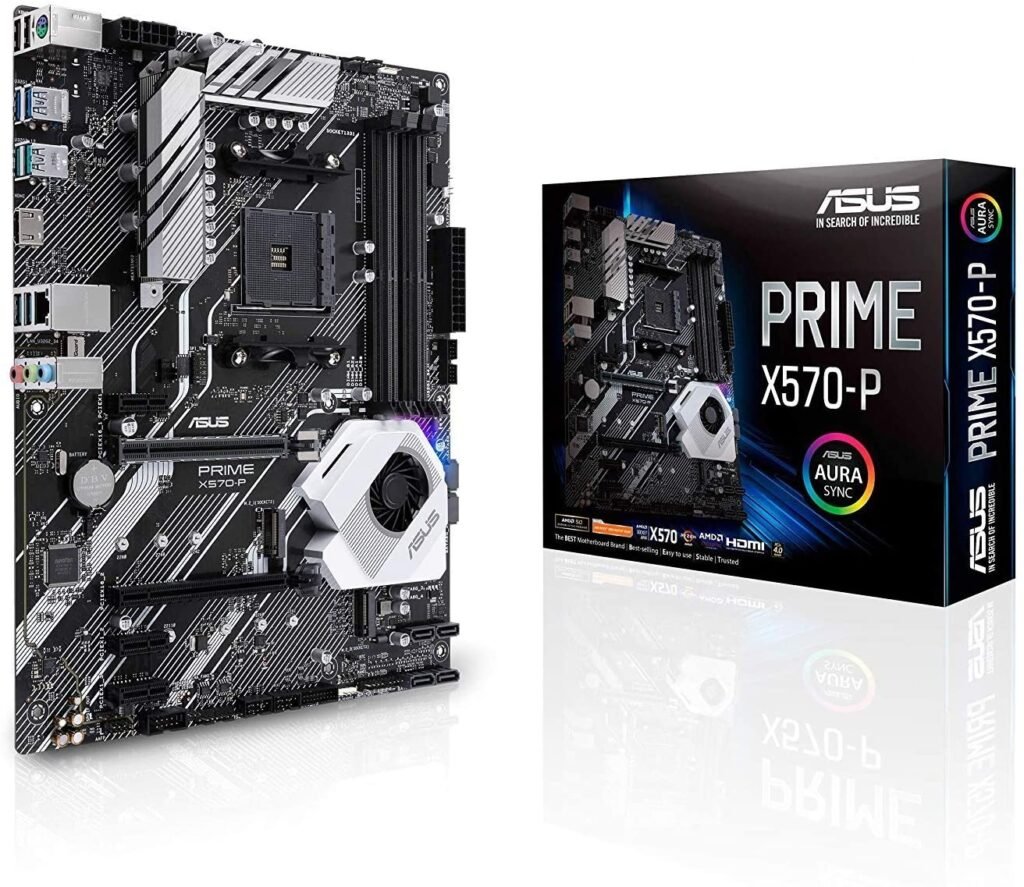
The ASUS X570-P, an affordable entry point to AM4
Features and Reviews
The ASUS x570 motherboard is a great choice for those on a budget . Compatible with 2nd and 3rd generation AMD Ryzen processors , this ATX motherboard has more than enough features for a gamer.
Among its connectivity options, we can mention its dual M.2 PCIe 4.0 slots, four USB 3.2 Gen 2 ports (and two Gen 1 ports), a Realtek L8200A Gigabit Ethernet port for wired connection, and a PS/2 port. Its power supply will provide sustained performance during your gaming sessions.
Finally, a small touch of color thanks to integrated LED lighting will give style to your setup.

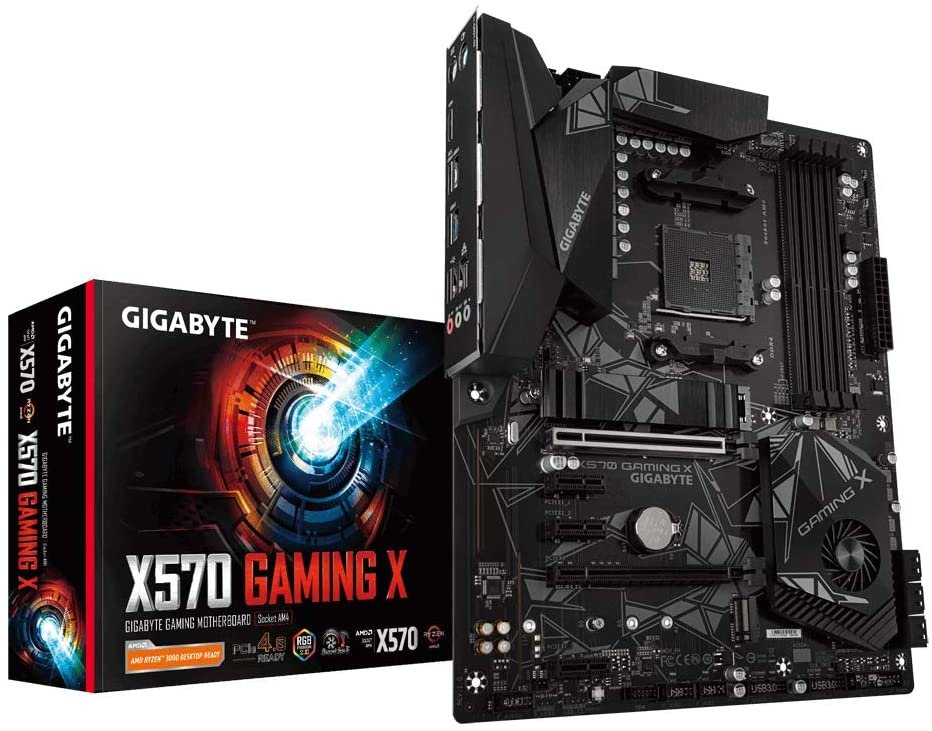
The Gigabyte X570 Gaming X, an AM4 motherboard at a low cost
Features and Reviews
The Gigabyte X570 Gaming X is a good choice for gamers who want a basic AM4-compatible motherboard. It has everything needed to connect essential peripherals and create a next-generation gaming setup.
Your components will stay cool thanks to the four hybrid fan connectors and five temperature sensors that adapt to your needs. The X570 chipset also features its own semi-passive fan to enable fast data transfer via PCI-Express 4.0.
The RGB Fusion 2.0 system offers an ergonomic interface and numerous customization options for your RGB lighting.

The ASRock x570 Phantom Gaming 4, an affordable 2-Way CrossFire

Features and Reviews
If you're looking for an affordable AMD CrossFireX compatible motherboard, the Phantom Gaming 4 is for you. With its Full Cover M.2 heatsink, you can use your motherboard for longer without worrying about overheating.
Its two NVMe SSD ports will allow you to boost the performance of your gaming PC and thus enjoy the unprecedented transfer speed of 3rd generation Ryzen.
Finally, thanks to ASRock Polychrome RGB technology, personalize your setup via 3 LED connectors.

The best value for money for gamers
Do you have a slightly larger budget? Treat yourself to AM4 motherboards with the best value for money on the market.
The MSI MPG X570 Gaming Plus, a solid mid-range option

Features and Reviews
MSI is renowned in the market for its high-quality computer components, and the brand proves it with the MPG X570 Gaming Plus. The Lightning Gen4 standard, supported by two PCI-Ex16 slots and two Lightning M.2 Gen4 ports, ensures bandwidth of up to 64 Gb/s.
The new Frozr heatsink integrated into the fan provides perfect cooling for your motherboard, adjusting to its temperature. Its superior printed circuit board and graphics card protection offer greater durability and robustness.
Finally, the Mystic Light Sync feature allows you to control the RGB lighting of your motherboard and compatible peripherals.
The ASUS TUF Gaming X570-Plus offers good compatibility

Features and Reviews
The ASUS TUF Gaming Plus motherboard will satisfy PC builders using components from various manufacturers. Through numerous partnerships, the TUF Gaming Alliance offers a wide variety of components fully compatible with this motherboard.
Whether it's PC cases, power supply , CPU coolers, or memory kits, you can easily build your PC starting with the TUF Gaming X570-Plus. The Armoury Crate utility offers numerous possibilities: adjustments to compatible RGB lighting, configuration of ROG products (including mouse and keyboard), overclocking settings, and fan speed control.
In terms of performance, the ASUS motherboard fulfills its functions, notably with a dual M.2 PCIe 4.0 slot, USB 3.2 Gen 2 ports and an Ethernet port.
The MSI MPG x570 Gaming Pro Carbon offers excellent value for money
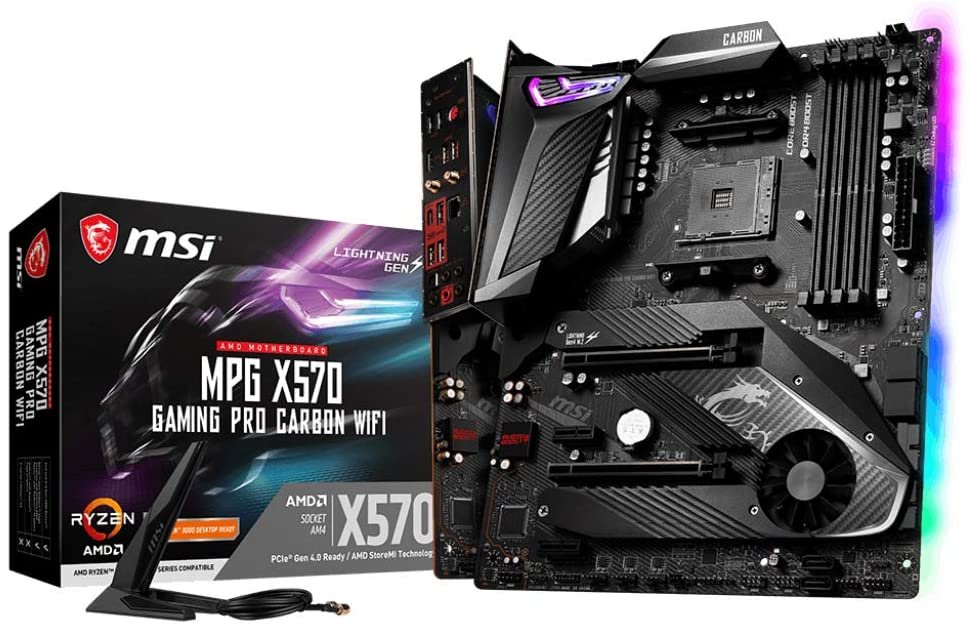
Features and Reviews
MSI continues to raise the bar in terms of value for money for its gaming products. With the MPG x570 Gaming Pro, the manufacturer offers cutting-edge technology to fully exploit the performance of the new Ryzen processors.
The two PCI-Express 4.0 slots allow you to connect two graphics cards with CrossFire compatibility. The integrated Intel Wi-Fi 6 on the motherboard provides Wi-Fi 6 (AX) support, while Bluetooth 5.0 offers seamless connectivity.
The Mystic Light Sync feature allows you to control the RGB lighting of your motherboard and compatible peripherals.

The ASUS ROG Strix X570-E Gaming, powerful overclocking
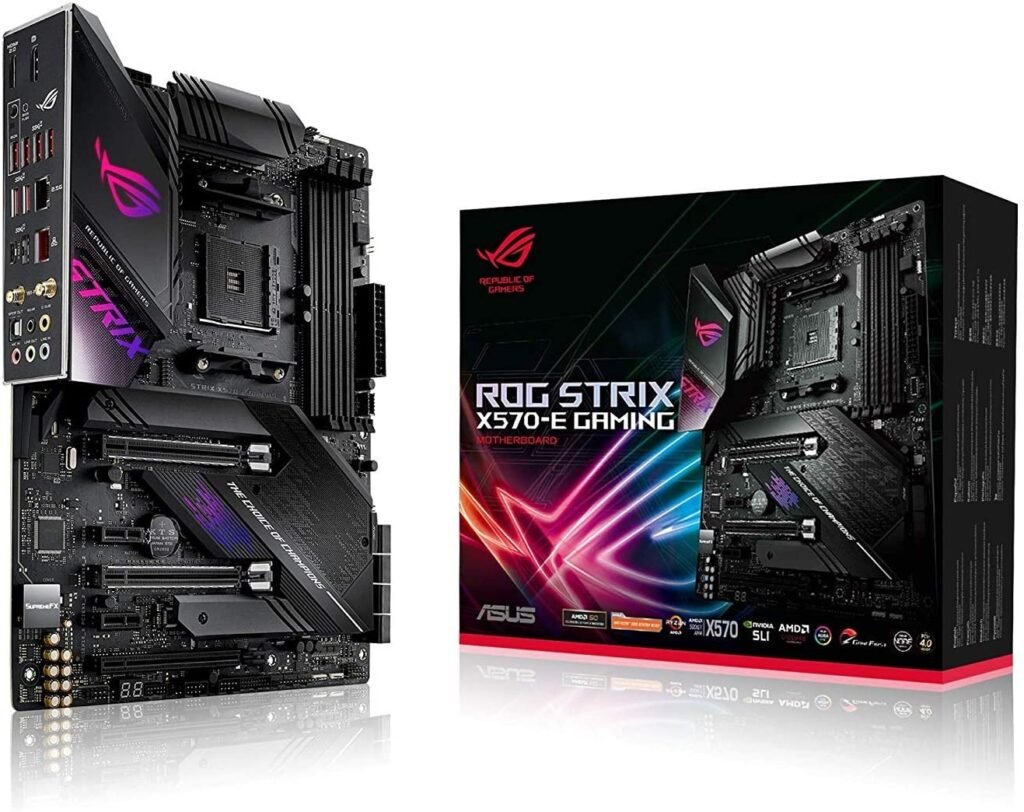
Features and Reviews
If you're looking to overclock your PC, consider the ROG Strix X570-E Gaming. Its six fan headers allow you to connect external cooling systems to complement the chipset's active cooling.
Your PC will be smarter thanks to ASUS 5-Way Optimization, which dynamically adapts your system, overclocking profiles, and cooling based on usage. For enthusiasts, Aura Sync RGB backlighting lets you personalize your gaming setup via ASUS software.

Gigabyte x570 Aorus Ultra: Performance for demanding gamers

Features and Reviews
The Gigabyte X570 Aorus Master is a perfect motherboard for gamers seeking excellent performance. Its aggressive and stylish design is matched by innovative features and enhanced durability. Take advantage of PCI-Express 4.0 with dedicated PCIe slots (for expansion cards) and M.2 slots for PCIe NVMe SSDs.
Its Smart Fan 5 system, connectable to up to seven hybrid fans, adjusts cooling according to needs thanks to nine thermal sensors distributed across the motherboard. A dedicated fan for the AMD x570 chipset in semi-passive mode facilitates high-speed data transfers.
Finally, you will be able to personalize your Aorus Master with numerous customization options for RGB Fusion 2.0 LED lighting.

The top-of-the-line option for gamers who want the very best
Do you have no budget constraints? Treat yourself to the best the market has to offer to gain a head start (and more options) on your competitors!
Gigabyte x570 Aorus Master, an upgrade to the Ultra version
Features and Reviews
In addition to all the features of the Aorus Ultra, the Master version also includes a noise meter to monitor your motherboard's noise level, a USB TurboCharger, and a socketable BIOS thanks to DualBIOS. Furthermore, thermal design is further optimized by a NanoCarbon reinforcement plate.
Finally, a PCIe 4.0 Turbo B-Block IC port is added to the PCIe 4.0 ports already present in the Ultra version.

The ASUS ROG Crosshair VIII Formula, did you need something else?

Features and Reviews
Suffice it to say, the Crosshair VIII packs a punch. You'll be able to enjoy powerful overclocking while keeping your motherboard's power consumption under control. Thanks to its ultra-efficient cooling system, your system is unlikely to overheat.
Just like the ROG Strix Gaming, 5-Way Optimization lets you fine-tune even the most complex settings with a single click. Overclocking and cooling profiles will be automatically and intelligently selected to suit your PC.
Despite its impressive performance, the Formula remains completely silent for optimal comfort. ASUS Aura Sync RGB backlighting lets you personalize your gaming setup to your liking.
Finally, the entire motherboard is made from quality components to offer maximum durability.

BUYING GUIDE for choosing your x570 motherboard

Understanding the importance of the motherboard
The motherboard is the central component in a PC configuration. It's the main component connected to all the others. Therefore, it's essential for your PC to function, because without a connection via the motherboard, your other components won't work.
Like the graphics card, the motherboard is also made up of printed circuits. However, these circuits are used to communicate information between the processor, ports, memory, and other connectors.
However, printed circuit boards are not the only components of the motherboard. There are many others, and they all have an important role to play:
- One or more electrical connectors to power it
- Connectors for RAM (between 2 and 6 depending on the model)
- Different types of input and output panels with connectors (which we will see in more detail in the third point of this guide)
- The socket that corresponds to the processor support
- Expansion slots or cards
- A clock for managing the speed of task execution
- A CMOS sensor serving as backup and emergency memory and its battery
- The BIOS, which is an interface for managing devices and processors
As you've probably gathered, the motherboard acts as a central hub for all the components of your PC. Therefore, it's important to choose it carefully. The following section outlines all the factors to consider when making your selection.
Factors to consider for an x570
As we've seen, choosing your motherboard is not something to take lightly, as it will influence your entire system configuration. If you want to build a high-performance and optimized gaming PC, make sure you make the right choice. Here are the important factors to consider when selecting an X570 motherboard:
Its compatibility
When investing in an X570 motherboard, you must ensure that your other components are compatible. In short, your entire system must work together seamlessly. Simply buying the highest-end components isn't enough to guarantee the best gaming PC; you need to understand what can (and can't) work together. Therefore, pay particular attention to your choice of RAM, graphics card, and even the case for your future PC.
Its format
Indeed, not all x570 motherboards are the same size. However, the majority of them are ATX (just like in our selection). This is a standard motherboard size, larger than micro-ATX and mini-ITX but smaller than EATX. The difference obviously lies in the size; the larger the motherboard, the more slots it has for building a truly powerful machine. However, ATX motherboards are perfectly adequate for gamers looking to build a competitive gaming PC.
Its chipset
The chipset on your motherboard will greatly influence the smoothness of communication between the microprocessor and other components. Therefore, your computer's performance will largely depend on its quality.
Acting as an "internal router" for your computer, the chipset ensures communication with the various components of your PC, connected external devices, and manages the different input/output buses.
Also ensure that your chipset has a dedicated heatsink to cool it effectively, as its use causes it to heat up.
Its longevity
By choosing a high-end X570 motherboard, you ensure you're buying a durable motherboard that will last for many years. To avoid having to replace it every year, pay attention to the quality of the materials used by the manufacturer.
His capabilities in RAM
RAM, or Random Access Memory, is what allows a computer to store processed information. If you want to get the most out of your x570 motherboard, we recommend choosing DDR4 RAM, which is currently the latest and fastest on the market.
Its ports
This is an important point to consider because depending on these connections, you will be able to connect or not your peripherals and other components. Their number and type will depend on your needs. Refer to the following section for more information!
The different types of ports
The compatibility of your components is essential in your PC build. However, your system won't be able to accommodate all the external and internal components you want. The main reason is the type of port or slot used by your internal and external components. Here's an overview of the different types and their features.
DIMM slots for memory
These slots are used to install RAM or DIMM modules. Depending on their technology and capacity, they provide the necessary power and internal memory to the motherboard. The more memory slots you have, the more RAM modules you can install. To maximize your computer's memory, you can opt for higher-performance RAM modules with more integrated memory (2GB, 4GB, 8GB, or 16GB).
The total RAM capacity is obtained by adding the individual modules together. However, for better results, it's preferable to use your modules in pairs rather than individually. For example, to obtain 16 GB of RAM in total, choose two 8 GB modules rather than a single 16 GB module.
The SATA port
The SATA port is what connects your hard drive to your motherboard. The number of SATA ports varies depending on the motherboard model, allowing you to choose one that suits your storage needs. This port is generally used to connect SSDs to benefit from fast data transfer speeds.
The PCIe 4.0 port
You may have noticed the mentions in the descriptions of the motherboards selected by our editorial team. PCI Express 4.0 ports are expansion buses with twice of the previous 3.0 version. They therefore allow you to build an ultra-high-performance gaming PC using components compatible with 3rd generation Ryzenprocessors .
USB connectors
USB connectors allow you to connect peripherals to the motherboard using this technology. Whether it's a keyboard, mouse, headset, external hard drive, or USB flash drive, these are the ports through which you can connect them to your motherboard and thus detect them on your computer. They are recognizable by their rectangular shape, housed in a pin that is thicker than the motherboard itself.
However, not all USB connectors are created equal. Different technologies offer varying data transfer speeds. The oldest is USB 1.0, but it has disappeared from newer motherboards, replaced by USB 2.0 for lower-end models. There is a difference of 59.81 MB/s in terms of throughput between the two. However, newer technologies multiply this difference by 10, 16, or 42, depending on the specific technology (3.2 Gen 1, 3.2 Gen 2, or 3.2 Gen 2x2). The higher the throughput, the faster the transfer speed. With a USB 3.2 Gen 2x2 port, for example, you can transfer data at 2.5 GB/s, which represents a significant time saving.
Audio and video connections
These are ports used to connect your monitors to your computer. Divided according to their output (audio or video), the ports will have a different shape and, more importantly, a different quality. Here are the main ones currently in use:
Audio
- Jack: Available in different diameters (2.5 / 3.5 / 6.35 mm), the jack connector is the most common audio connector on PCs. Previously divided into a microphone input and a headphone output, technological advancements have allowed for a single combined microphone/headphone jack.
Video
- SUB-D15: Used on older monitors, this type of output does not allow audio transmission. The resolution is also limited to 1280 x 1024 pixels, therefore not supporting Full HD.
- HDMI: This is the most common video output for modern monitors and televisions. It supports high-definition video and also multi-channel audio. Its evolution has continued since 2003 to display very high-resolution images such as 4K and to increase color depth, particularly with the arrival of HDR (High Dynamic Range, which improves brightness, detail, and black levels).
You'll likely find very few motherboards offering a D-sub 15 connector, with HDMI being the most common. However, pay close attention to the HDMI technology, especially if you plan to play in Ultra HD. Opt for HDMI 2.0 to take advantage of 4K (provided your monitor supports it, of course).
Glossary of technical terms
Here are some explanations about the terms used in this comparison.
The chipset
This refers to the set of components within the motherboard, integrated into the printed circuit board. It manages the various digital data flows between the motherboard and the connected components (RAM, graphics card, sound card, hard drives, keyboard, mouse, etc.). The chipset is generally divided into two chips:
- The Northbridge controls high-speed peripherals such as graphics slots (PCI Express or AGP), the processor, and memory slots.
- And the Southbridge acts as the input/output controller for ports such as SATA, USB, and Ethernet.
Take into account the chipset of the motherboard you choose, as its quality is directly correlated to the upgradeability of your PC.
Socket or CPU socket
The socket is a slot specifically designed to house a CPU, also known as a microprocessor. It also serves to provide a physical electrical interface between the microprocessor and the printed circuit board to enable data exchange.
The BIOS (Basic Input Output System)
The BIOS is located on one of the motherboard's chips. Since it's directly integrated into the motherboard without requiring installation and cannot be modified by the user, it's a type of firmware. Its common use is to detect and verify connected devices at startup in order to configure them. It also includes a diagnostic tool to check components such as memory, hard drives, and input/output ports.
According to manufacturers, the BIOS will be displayed differently with varying uses.
Frequently Asked Questions

What is CrossFire?
However, it is recommended to use the same model of graphics card or one from the same family, depending on compatibility.
Be aware, though, that using CrossFire will increase your PC's power consumption and heat output. If you want to take advantage of this technique, make sure to cool your PC effectively.
What is overclocking?
Any type of processor can be overclocked (GPU, CPU, DSP), thus boosting your default configuration. Indeed, performance can increase by 10 to 20% on most processors; however, we advise you to limit the increase to 5 to 10% to be reasonable.
While it has the advantage of increasing your computer's performance at a lower cost, overclocking has its drawbacks.
First, increasing the frequency will produce more heat, as the two are proportional to the square of the frequency. Unless you have a very efficient cooling system capable of dissipating this heat, it risks damaging your entire system. To overcome this drawback, you can opt for an air cooling (air) or liquid cooling (water, liquid nitrogen, oil) system.
Air cooling is common to all configurations, where flows of cool air push hot air out of the case using fans and radiators positioned in key locations. The increase in heat can therefore be controlled to a certain extent, limited by your cooling system.
Secondly, and most seriously, is the destruction of your processorvoltagepower supply or excessive temperature. Nowadays, all processors have a circuit breaker for normal use, but this may be unnecessary for an overclocked PC.
Thirdly, malfunctions. These can either negatively impact your experience when using your PC (tasks, calculation errors) or prevent you from using it altogether (freezing, PC failing to boot).
To avoid these problems, you must ensure that you do not push your processors too hard and, above all, ensure that you have an optimized cooling system (or systems).
Can I use an Nvidia graphics card?
Using your motherboard with WiFi or Ethernet?
Nevertheless, motherboard manufacturers are keeping up with the development of new Wi-Fi standards to offer their customers the latest innovations. Wi-Fi 6, or Wi-Fi AX, is a standard that will be released in 2021, offering speeds up to four times faster than the previous standard. This is why many x570 motherboards are already compatible with this new standard.
On the other hand, Ethernet remains the fastest and most stable solution. Currently, the transfer speed is limited to 5 Gbps, as 10 Gbps is achievable but still comes at a significant cost. Therefore, Aquantia, a networking specialist, has focused on ports compatible with a 5 Gbps speed. These devices are notably found in products from partner manufacturer ASUS. With such high speeds, you're unlikely to experience latency; the question remains whether the rest of your system can handle the load!


