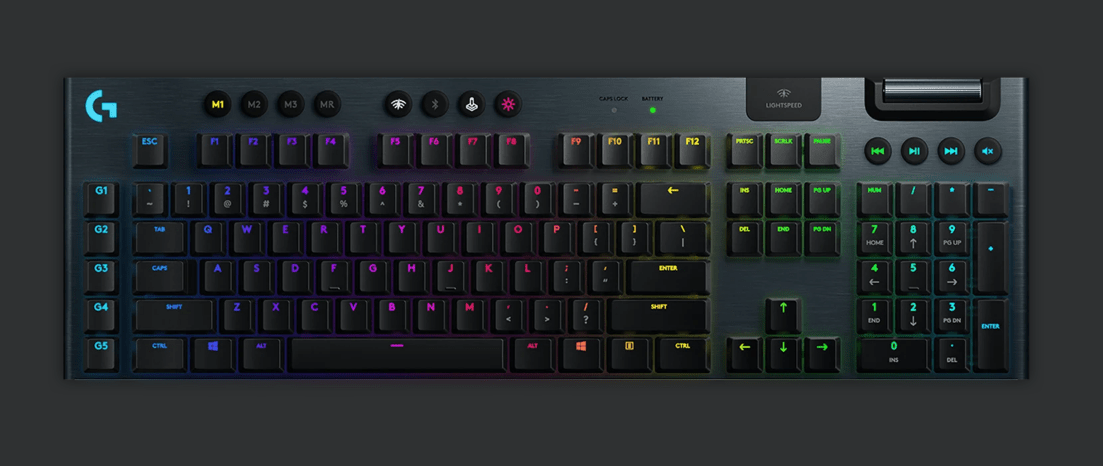
The Swiss company Logitech is known for its high-quality gaming peripherals. In this article, we'll test and review the G915 wireless keyboard. This G915 wireless gaming keyboard is available online, notably on the Logitech website, for €249.

Introducing the Logitech G915 Wireless Gaming Keyboard.
Let's start with the unboxing. In the box, we find the G915 keyboard, the Lightspeed USB receiver, a USB extension cable, a micro-USB cable and the user manual.

The G915 boasts a sleek, modern look and exceptional durability. The materials have been carefully selected to ensure a long-lasting keyboard: high-quality aluminum and plastic. The keyboard features a frameless design. The Logitech G915 is a wireless gaming keyboard measuring 475 x 150 x 150 mm (L x W x H). It weighs 1025 g. The G915 incorporates Lightspeed and RGB Lightsync. The G915 keyboard features the latest high-performance, ultra-low-profile mechanical switches.
The G915 is extremely thin. Everything has been carefully considered to provide you with a high-performance keyboard. It was designed to withstand intense gaming sessions and will accompany you to the very end of your gaming passion. If you want to position the keyboard at an angle, you can extend the keyboard's feet, which are available for this purpose. They can be positioned at a semi-incline or at their maximum height.
Multimedia buttons are included on this keyboard for direct control of your audio and video files. Play, pause, mute, previous, and next track controls, as well as a volume control wheel, are available for this purpose. Five G keys are also present on this keyboard.

Advanced configurations of the Logitech G915 Gaming
The Logitech G915 keyboard features Lightspeed technology, enabling ultra-fast 1ms wireless connectivity. This technology is used by esports gamers worldwide for its proven effectiveness in competitions. Developed specifically by the Logitech G engineering team, this technology delivers a stable, low-latency wireless connection. It's faster than most wired connections on the market. Addressing the challenges of wireless connectivity, the Logitech team rose to the occasion and revolutionized data transfer. Here's a comparison of the click response time of a Logitech wireless mouse with competing wired mice. You can switch from Lightspeed to Bluetooth as needed by pressing the Bluetooth connectivity button.
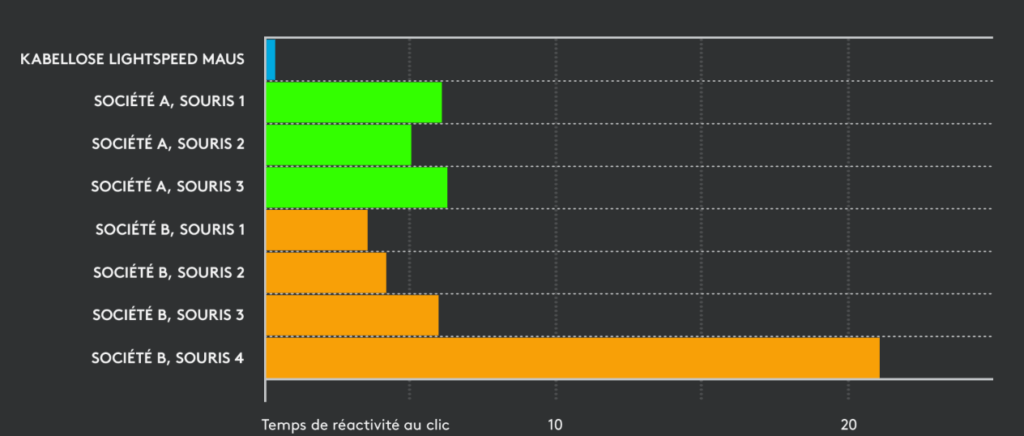
Lightspeed connectivity design truly follows a rigorous engineering process and battery of tests. The components that make up the chain process data as quickly as possible. Every step has been optimized and every circuit path studied to provide excellent wireless connectivity. This includes the antenna geometry, the components, and the firmware used to drive everything.
Logitech has thus implemented high-performance, energy-efficient hardware. Logitech's Lightspeed technology has redefined wireless and become a true benchmark in the field. It's not just wireless keyboards that feature this innovative technology. Next-generation mice such as the G604, G604 PRO , and G502 also incorporate it. On the manufacturer's website, the G604 costs €99.99, the G604 PRO is sold for €129, and the G502 for €149.

Other mice, such as the Logitech MX Master 3 Advanced, are also very popular with gamers. If you prefer a vertical mouse, Logitech hasn't forgotten you; you can opt for the Logitech MX Vertical Wireless.
The G915 Gaming features brand-new mechanical switches with a height reduced by half, offering ultra-fast, robust, and high-performance keys. A performance gain of at least 25% has been observed with this keyboard compared to standard keyboards on the market. You can choose between GL Tactile, GL Clicky, or GL Linear. If you frequently play action or MMO games, you can opt for the Linear switch. If you prefer a keyboard with very fast and precise key feedback, you can choose the Tactile switch, recommended for competitive gaming. For keys with a more pronounced click, you'll be satisfied with the Clicky switch. Extensive testing has allowed Logitech to deliver a robust and reliable mechanical keyboard. Each key can withstand over 70 million keystrokes. For a mechanical keyboard, the G915 is relatively quiet and requires minimal pressure to activate.

The G915 keyboard features Lightsync RGB technology, allowing for customizable per-key backlighting. This is a far cry from the first version with its uniform red lighting. You can choose from 16.8 million available. You can personalize your theme or select from pre-defined themes. The G HUB software lets you synchronize your lighting effects across all your Logitech G peripherals, such as your mouse, keyboard, headsets, webcam, speakers, and more.
You can record your macros and shortcuts for each game and save them for later use. This allows you to assign different macros to the F1 through F12 function keys. With G HUB, create your own game profile or download profiles from experienced users in the G HUB database.
With the Gaming Assistant, easily find lighting effects for your equipment with a list of available games. It directly offers optimized profiles for each game found on your PC. Your keyboard lighting can also be customized as desired: per key, per zone, or uniformly. Take advantage of notification keys as well. To do this, you can configure certain keys to flash when an important event occurs in the game.
Logitech is renowned for the battery life and longevity of its batteries. This wireless keyboard boasts a 30-hour battery life with maximum RGB lighting. A charging indicator and the G HUB software notify you when the battery reaches 15%. You can then recharge the G915 via USB and keep playing. No more wasting time charging your keyboard before your next game. Logitech has made everything easy so you can play with peace of mind and indulge in your passion. A full charge is achieved after 3 hours of charging.