The less than sign (<) and the greater than sign (>) are symbols used in mathematics, physics, and computer science to represent order relationships between numbers, quantities, or expressions. For example, we can write that 2 < 5 (2 is less than 5) or that x > y (x is greater than y).
But how do you type these symbols on a keyboard? There are several methods depending on the type of keyboard you're using, your computer's operating system, and the software you're using. In this article, we'll explain how to type the less than and greater than symbols on an AZERTY, QWERTY, or HP keyboard, as well as in the main word processing and code editing software.
How do I type the less than and greater than sign on an AZERTY keyboard?
An AZERTY keyboard is a keyboard whose keys are arranged according to the French alphabet. It is the most common type of keyboard in France, Belgium, and Morocco.
On an AZERTY keyboard, there are no dedicated keys for the less than or greater than symbol. To type them, you must use a key combination. Here are the different possibilities:
- Use the key next to the W: < (alone) or > (with the Shift key)
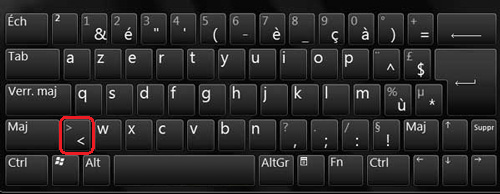

- Use the keyboard shortcut Alt Gr + < for < or Alt Gr + > for >
- Use the key combination Alt + 60 (on the numeric keypad) for < or Alt + 62 (on the numeric keypad) for >
How do you type the less than and greater than signs on a QWERTY keyboard?
A QWERTY keyboard is a keyboard whose keys are arranged according to the English alphabet. It is the most widespread type of keyboard in the world, particularly in the United States, the United Kingdom, and Canada.
On a QWERTY keyboard, there is a dedicated key for the less than and greater than symbols. It is located at the bottom left of the keyboard, next to the Z. To type them, simply press this key: < (alone) or > (with the Shift key).

How do I type the less than and greater than signs on an HP keyboard?
An HP keyboard is a keyboard designed by Hewlett-Packard for its laptops or desktop computers. It can be AZERTY or QWERTY depending on the country where it is sold.
On an HP keyboard, the method for typing the less than and greater than symbols depends on the keyboard layout. If you have an AZERTY keyboard, you can use the same key combinations described above. If you have a QWERTY keyboard, you can use the dedicated less than and greater than symbol key located in the bottom left corner of the keyboard.
How do you type the less than and greater than sign in word processing or code editing software?
Word processing and code editing software are programs that allow you to write text or computer code. Some of the best-known examples include Microsoft Word, Notepad++, Sublime Text, and Visual Studio Code.
In these programs, you can use the same methods described above to type the less than and greater than signs on your keyboard. However, there are also other ways to insert these symbols:

- Use the “Insert Symbol” function in the “Insert” or “Edit” menu. You can then choose the lower or upper symbol from a list of special characters.
- Use the “Find and Replace” function in the “Edit” or “Find” menu. You can then type the HTML code for the less than or greater than symbol and replace it with the symbol itself. For example, type < for < or > for >.
- Use the “Insert Equation” function in the “Insert” or “View” menu. You can then write a mathematical expression with the less than or greater than sign. For example, type x < y for x < y.
Conclusion
You now know how to type the less than and greater than signs on a keyboard, whether it's an AZERTY, QWERTY, or HP keyboard. You also know how to insert these symbols into word processing or code editing software. These symbols are useful for expressing relationships of order between numbers, quantities, or expressions. They are frequently used in mathematics, physics, and computer science. For example, to write a mathematical formula with exponents or subscripts, you can use the keyboard shortcut "Ctrl + M" in some software such as Word or PowerPoint.