
Do you also resort to copying and pasting from Google when you need to type accented capital letters? There are much simpler methods, though they do require a bit of memorization. In French, accents have orthographic value; using them is absolutely essential for correct writing. In this article, we'll analyze the various keyboard shortcuts that will allow you to add accents to your capital letters.
Good to know : Some shortcuts may not work on laptops. Use an external keyboard if necessary. The Logitech keyboard is recommended.

To help you understand the article, we invite you to watch this video :
THE ASCII METHOD
We invite you to use CTRL + F to find what you are looking for! There are several methods; this one is simpler to perform, but requires a little more memory.
- ALT+128: Ç (capital ç cedilla)
- ALT+144: É (capital É with acute accent)
- ALT+212: È (è capital letter with serious accent)
- Alt + 0202: Ê (capital e with circumflex accent)
- Alt + 0203: Ë (capital e with umlaut accent)
- ALT+0140: Π(capital oe joined together)
- Alt+0217: Ù (capital u with a grave accent)
- ALT 0192: To (capital A with a grave accent)
- Alt + 0194: Â (capital a with circumflex accent)
- Alt + 0196 Ä (capital A with diaeresis)
- Alt + 0206: Î (capital i with circumflex accent)
- Alt + 0207 Ï (capital i with diaeresis)
- Alt + 0212: Ô (capital o with circumflex accent)
- Alt + 0214: Ö (capital o with diaeresis)
- ALT+0140: Π(capital oe joined together)
- Alt+0217: Ù (capital u with a grave accent)
KEYBOARD SHORTCUTS
This second method for typing accented capital letters on a keyboard is more intuitive and follows a logical pattern.
The principle is simple: your keyboard is equipped with keys for typing numbers at the top. On these same keys are available letters, symbols, and accents (for example, the "7" key also contains "è" and the grave accent).
If you want to add a grave accent to a capital letter, simply press CTRL + ALT + 7 to equip the acute accent, then SHIFT + THE LETTER OF YOUR CHOICE ! For example:
- Ctrl+Alt+7 then Shift+E : È (capital e with serious accent)
- Ctrl+Alt+7 then Shift+A : À (capital A with a grave accent)
If you want to add an acute accent to a capital letter, simply press CTRL + 4 to equip the acute accent, then SHIFT + THE LETTER OF YOUR CHOICE ! For example:
- Ctrl+4 then Shift+E: É (capital e with acute accent)
- Ctrl+, then Shift+C : Ç (capital C with cedilla)
These shortcuts work for all accents! Your "2" key has the "egne" key, the Spanish accent. To type it, press CTRL + ALT + 2 , then SHIFT + the desired letter .
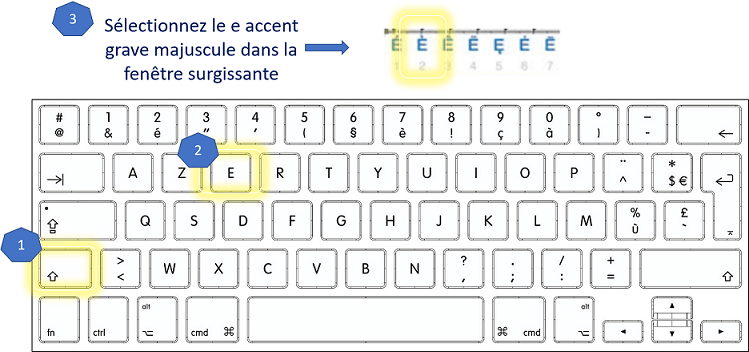
EASILY EMPHASIZE IN WORD
Word is one of the most widely used word processing programs. You can capitalize a word, a sentence, or an entire text with just two keystrokes.
Before proceeding, it's crucial to make a few adjustments, otherwise it won't work! To do this, click on File, then Options (bottom left), then Proofing. Uncheck the box "Ignore words in uppercase" and check "Accented uppercase letters in French".
While selecting the phrase you want to put in capital letters, press: SHIFT + F3 (the arrow above your CTRL key)
For example, you could change the sentence from: "in Paris, where he was currently located, he decided to annoy yet another Republican Guard"
TO: "IN PARIS, WHERE HE WAS CURRENTLY LOCATED, HE DECIDED TO ANNOY YET ANOTHER REPUBLICAN GUARD"
Here's how to type accented capital letters in Word using a keyboard, without bothering with shortcuts. This can save you a lot of time.
Are your keyboard shortcuts not working? We recommend a Logitech keyboard.