
The diaeresis (ï) is a letter in the French alphabet that is pronounced like an i. It indicates that the i is not part of a vowel group, but is pronounced separately. For example, in the word naïf, the diaeresis indicates that the i is pronounced after the a and not with it.
But how do you type an umlaut on the keyboard? It depends on the type of keyboard you're using, your computer's operating system, and the software you're using. Here are a few methods to help you type an umlaut easily.

How do I type a lowercase Ø with an umlaut on an AZERTY keyboard?
If you are using an AZERTY keyboard, that is to say a standard French keyboard, there are several ways to make an ï with a diaeresis:
1. The simplest method is to use the ^ key which is located to the right of the P key.
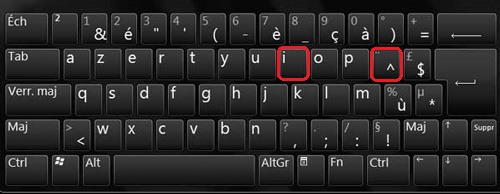
Simply press this key and then the I key to get a diaeresis ï. For example, to write naïf, type N then A then ^ then I then F.
2. Use the Alt Gr + I key combination.

Alt Gr is the key to the right of the space bar. Hold this key down and then press the I key to get an umlaut (ï). For example, to write "haïr" (to hate), type H, then A, then Alt Gr + I, then R. But what if the Alt Gr key stops working on your keyboard ? There are several solutions to this problem, such as checking your keyboard settings, disabling Sticky Keys, or reinstalling the keyboard driver.
3. Use the ASCII code for the diaeresis ï.
The ASCII code is a numerical code that corresponds to each character on the keyboard. To type an umlaut (ï) using the ASCII code, hold down the Alt key and then type the code 139 on the numeric keypad located to the right of the keyboard. For example, to type "maïs" (corn), type M, then A, then Alt + 139, then S.
How do I type a capital ð with an umlaut on an AZERTY keyboard?
To make the capital letter i with a diaeresis (Ï), there are also two possible methods
- The first method involves simultaneously pressing the ↑ Shift + ^ , then releasing and pressing the I .
- The second method involves pressing the Alt 0 2 0 7 .
How do I type an umlaut on a QWERTY keyboard?
If you are using a QWERTY keyboard, that is to say an English or American keyboard, there are also several ways to make an umlaut:
1. The simplest method is to use the " key" which is located to the right of the ; key.

Simply press this key and then the I key to get a diaeresis ï. For example, to write naïf, type N then A then » then I then F.
2. The key combination Alt + 0239.
Alt is the key to the left of the space bar. Hold this key down and then type the code 0239 on the numeric keypad to the right of the keyboard. For example, to type "haïr" (to hate), type H, then Alt + 0239, then R.
3. The keyboard shortcut Ctrl + Shift + : then I.
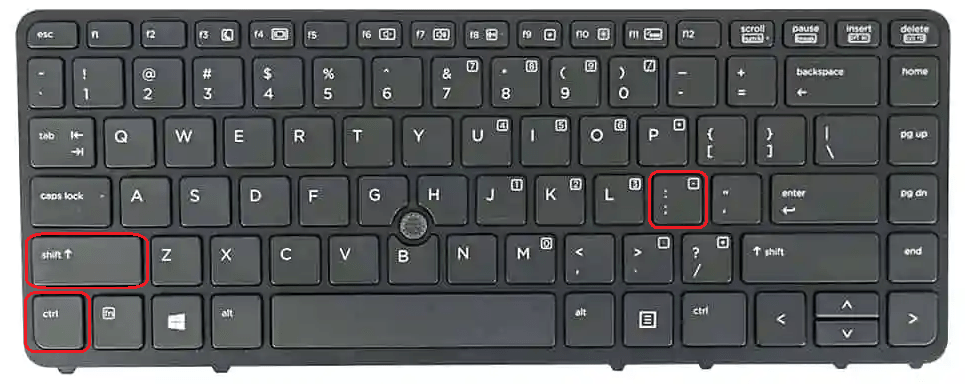
Ctrl and Shift are the keys located in the bottom left corner of the keyboard. Hold down these two keys and then press the colon (:) key, which is located to the right of the L key. Next, release the keys and press the I key to type an umlaut (ï). For example, to type "maïs" (corn), type M, then A, then Ctrl + Shift + colon (:), then I, then S.
How do I type an umlaut on a Mac?
If you are using a Mac computer, there are also several ways to type an umlaut:
The simplest method is to use the Option + U key then I.
Option is the key to the left of the space bar. Press this key and then the U key to type an umlaut. Then, release the keys and press the I key to type an umlaut. For example, to write "naïf", type Option + U, then I, then A, then F.
Another method is to use the virtual keyboard.
The virtual keyboard is a tool that displays the keyboard on the screen and allows you to click the keys with your mouse. To activate the virtual keyboard, go to the Apple menu, then System Preferences, then Keyboard, and check the box next to "Show Keyboard and Emoji Viewers in menu bar." Then, click the keyboard icon that appears in the menu bar and choose "Show Keyboard Viewer." The virtual keyboard will then appear on the screen, and you can simply press Option + U and then the I key to type an umlaut (ï).
A third method is to use the character selector.
The character selector is a tool that provides access to all the special characters available on your Mac. To activate the character selector, go to the Apple menu, then System Preferences, then Keyboard, and check the box next to "Show Keyboard and Emoji Viewers in menu bar." Then, click the keyboard icon that appears in the menu bar and choose "Show Character Selector." The character selector will then appear on the screen, and you can simply find the diaeresis character in the list and drag and drop it into your text.
How do I type an umlaut in Word?
If you use Word software to write your texts, there are also several ways to make an umlaut:
The simplest method is to use the Symbol tool.
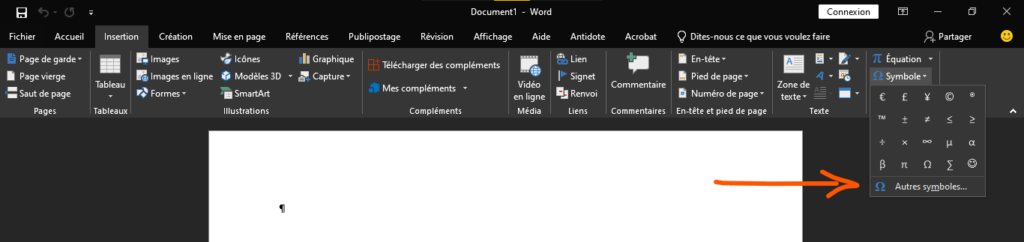
The Symbol tool is located in the Insert tab of the ribbon. Simply click on this tool and then choose More Symbols from the drop-down menu. A window will then open with a list of available symbols. Find the diaeresis symbol (ï) in this list and click on it to insert it into the text.
Another method is to use the Equation tool.
The Equation tool can also be found in the Insert tab of the ribbon. Simply click on this tool and then choose New Equation from the drop-down menu. An equation box will then appear in the text, and you must type \ddot{i} to obtain an umlaut (ï). Then, click outside the equation box to return to normal mode.
A third method is to use Word-specific keyboard shortcuts.
There are indeed keyboard shortcuts that allow you to directly insert special characters into Windows . To type an umlaut (ï) using keyboard shortcuts, hold down the Ctrl key, then press the colon (:), then release the keys and press the I key. For example, to type "naïf", type Ctrl + colon (:) then I, then A, then F.
FAQ
What is the difference between an i with a circumflex accent and an i with a diaeresis?
A circumflex accented i (^) indicates that the i is pronounced like an è or an é. It is used to mark the absence of a letter that has disappeared during the evolution of the language. For example, in the word île (island), the circumflex accented i indicates that there was once an s (isla in Latin). A diaeresis i (¨) indicates that the i is pronounced like an i. It is used to separate the i from another vowel sound. For example, in the word naïf (naive), the diaeresis i indicates that the i is pronounced after the a and not with it.
How do I type an umlaut on a smartphone or tablet?
To type an umlaut on a smartphone or tablet, you need to use the on-screen keyboard. Simply press and hold the "I" key to bring up a menu with the different variations of "i". Then, slide your finger towards the umlaut to select it and release to insert it into your text.
What French words contain a diaeresis on the letter ï?
There are several French words that contain an umlaut. Here are some examples: grandfather, aioli, ambrosia, Anaïs, bayonet, chieftain, caïeu, caïman, coincide, coitus, coincidence, coincide, coitus, brain, croaking, daemio, daiquiri, disdainful, disdainful, disdainful, disdainful, disdainful, hateful, hateful, Haitians, Haitian, Haitian, Haitian, Hawaiian, Hawaiian, Hawaiian, Hawaiian, Hawaiian, Maia, maieutics, master, mistress, mastery, to be born, birth, naive, naivety, Christmas, Noëlle, onion, to graze, peace, peacock, peacock chick, peacocking, peacocks, raïs, raïssa, saiga, saül, taël
What is the origin of the diaeresis on the ï?
The diaeresis (or umlaut) is a diacritical mark that comes from Ancient Greek. The word diaeresis means “hole” in Greek and refers to the two dots placed above a vowel to indicate that it is pronounced separately from another vowel. The diaeresis was introduced into the Latin alphabet in the Middle Ages to transcribe Greek or Latin words that contained distinct vowel sounds. For example, the word zoology comes from the Greek words zôion (animal) and logos (discourse) and was originally written zoölogie with a diaeresis over the o to indicate that it was pronounced after the z and not with it.
What is the spelling rule for the diaeresis mark on the letter ï?
The spelling rule for the diaeresis (ï) is to use it when there are two consecutive vowels, the first being an e or an a, and the second an i. The diaeresis then serves to indicate that the i is pronounced separately from the first vowel and not with it. For example, in the word *haïr* (to hate), the diaeresis on the i indicates that it is pronounced after the a and not with it. There are some exceptions to this rule, such as the words *oignon* (onion) and *paon* (peacock), which are written without the diaeresis even though they meet the condition.