

Need to type a capital letter É on your computer, whether it's Windows or Mac ? Not sure how to type this special character that isn't on your keyboard? Don't worry, there are several ways to do it, whether in Word , Google Docs , or any other word processing software. In this article, we'll explain how to type a capital letter É on Windows or Mac, using keyboard shortcuts, character maps, or browser extensions. Follow the guide!
What is a capital E and why use it?

A capital É is the letter E with an acute accent . This is a special character that does not exist in the basic Latin alphabet but is used in some languages such as French, Spanish, and Portuguese. In French, it is necessary to accent capital letters because they have orthographic value and can change the meaning of a word or phrase. For example, there is a difference between “ État ” and “ Etat ,” or between “ École ” and “ Ecole .”
If you want to know how to type accented capital letters on a keyboard , you need to know a few tricks. For example, to type a capital É on your computer, you can't simply press the E key while holding down the Shift key, as this will only produce a regular E. You therefore need to use another method to obtain this special character.
How do I type a capital E on Windows ?

On Windows, there are several methods to type a capital letter, depending on whether or not you have a separate numeric keypad to the right of your keyboard.
With a numeric keypad
If you have a numeric keypad, you can use the Alt and type a combination of numbers to get the capital letter É. Here's how:
- Press and hold Alt

- Press the numbers 0 2 0 1 or 1 4 4 on the numeric keypad
- Release the Alt
- The capital letter E appears on the screen
Without a numeric keypad
If you do not have a numeric keypad, you can use one of the following methods:
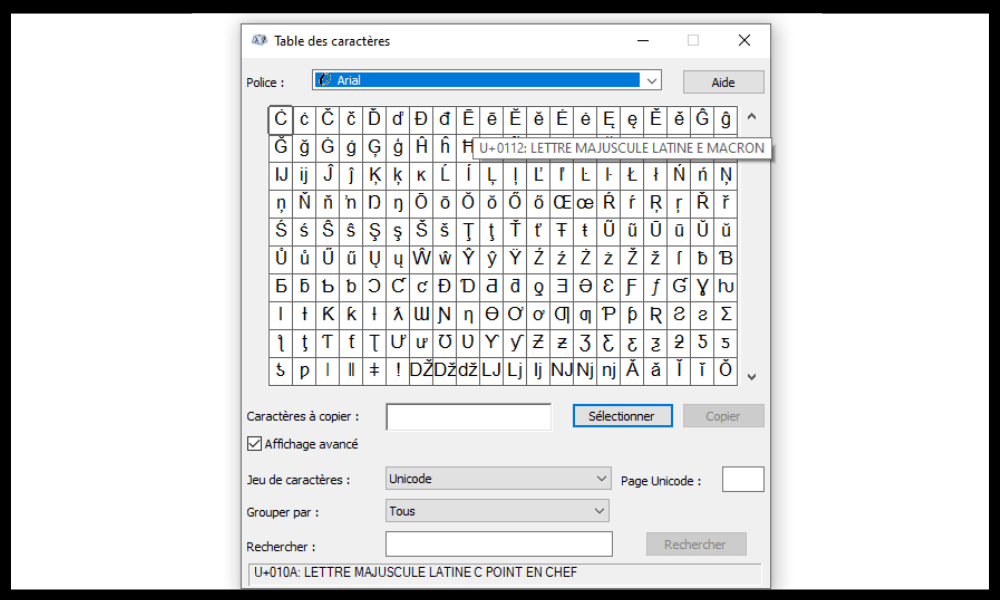
Use the character map : this tool displays all the special characters available on Windows . To access it, click the Start , search for Run , and then type charmap in the bar that appears.

You can then search for the capital letter é in the list and copy and paste it into your document.
- Use two key combinations : press Ctrl + 4 , release them, then press Shift + E. This method does not always work depending on the software used.
- Installing a French keyboard with accented capital letters : You can download a program that will provide you with a virtual keyboard with keys for accented capital letters. For example, you can use the one offered by Christophe Bertrand . Simply install it as a program, then change the keyboard in the language settings. The capital letter É can then be typed by combining the Alt + Shift + E or by pressing the 2-é in Caps Lock mode.
How do I type a capital E on a Mac?
On a Mac, it's easier to type a capital E, as you simply use and hold down the E . Here's how:
- Press and hold the Shift key

- Press and hold E
- A window appears above the letter with several accent options
- While holding down the previous keys, press the number 1 or click on the capital letter é in the window
- The capital letter E appears on the screen
You can also activate the caps lock key, then press the E and follow the same method.
How do I type a capital E in Word or Google Docs?
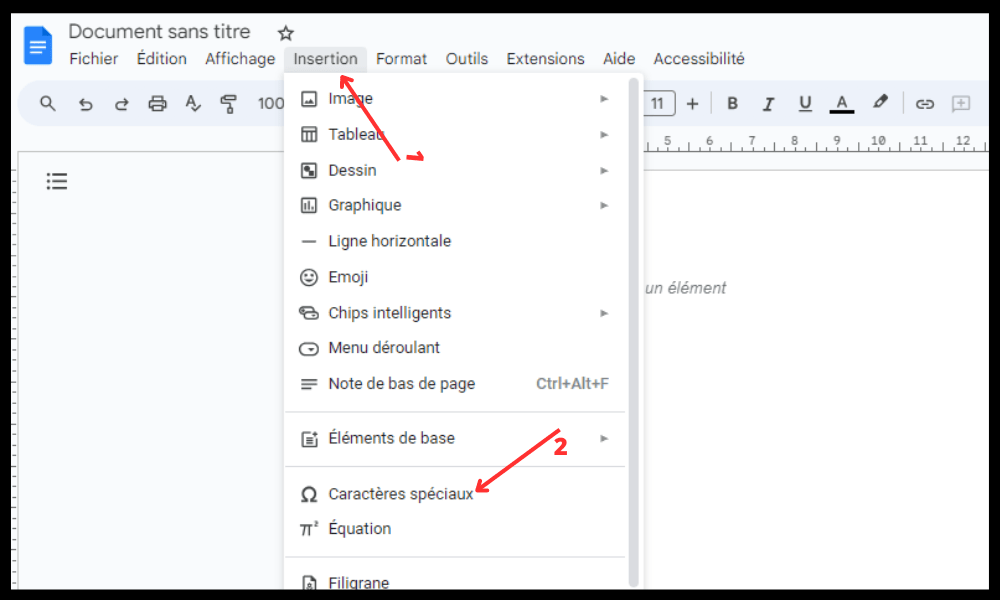
If you are using word processing software such as Word or Google Docs, you can also type a capital letter using the symbols insertion menu. Here's how:
- Click on the Insert in your software
- Click on the Symbol on the right of the screen (represented by the Omega Ω symbol)
- Select a font that allows the capital letter É to be displayed (for example, Arial)
- Find the capital letter É in the character list and click on it. In the right-hand section, you can draw the specific character you're looking for. Google Docs will then provide a list of suggestions. Choose the one you need!
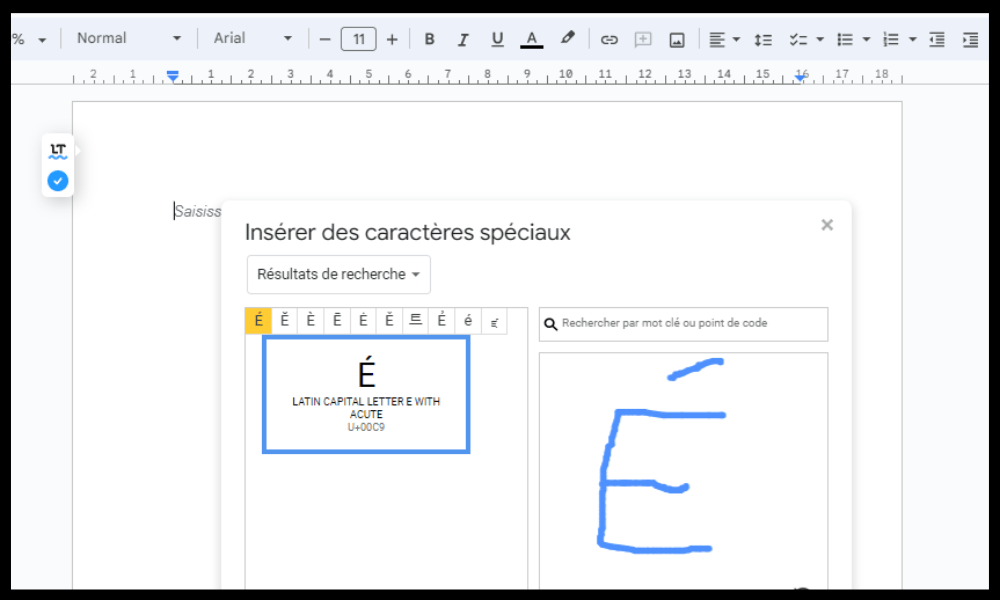
- The capital letter E is inserted into your document
How do I type a capital E in my Chrome or Firefox browser?
If you use your browser to write text online, you can also type a capital letter É using an extension that gives you easy access to special characters. For example, on Google Chrome, you can use the Special characters – Click and Paste , which allows you to copy and paste accented French letters and other common symbols.
Simply select them in the extension, then paste them into the online application of your choice ( Ctrl + V ).
FAQ
Here are some frequently asked questions about the capital letter É:
How do I type a capital E on a QWERTY keyboard?
If you have a QWERTY keyboard , you can use the same method as for an AZERTY keyboard with a numeric keypad , i.e., press Alt + 0201 or Alt + 144. Otherwise, you can change your keyboard layout to French in the language settings, or use a character map, a browser extension, or a virtual keyboard.
How do I type a capital E on iPhone or Android?
On iPhone or Android, simply press and hold the E key on the virtual keyboard , then choose the capital é from the available options.
Why isn't my capital E displaying correctly?
If your capital letter É isn't displaying correctly , it might be because you 're using a font that doesn't support it, or because the software or website you're using doesn't recognize this special character. You can try changing your font, software, or website , or copying and pasting the capital É from another source.
What is the difference between É and Ê?
É and Ê are two different letters with different pronunciations . É is pronounced like the closed [e] , as in “ été ” or “ café ”. Ê is pronounced like the [ɛ] sound , as in “ tête ” or “ fête ”.
What are the spelling rules for words beginning with É?
Words beginning with É generally follow the same spelling rules as words beginning with E. For example, we write “ un étudiant ” in the singular and “ des étudiants ” in the plural, with a final S. There are a few exceptions, such as “ un état ” in the singular and “ des états ” in the plural, with a circumflex accent on the A.
Conclusion
You now know how to type a capital É on Windows or Mac , whether in Word , Google Docs , or any other word processing software. You've also learned why it's important to use accents on capital letters in French, and what the differences are between É and Ê . We hope this article has been helpful and that you'll no longer have any trouble typing a capital É on your computer.
And if your keyboard ever gets stuck in uppercase, don't panic! There are simple solutions to unblock a keyboard stuck in uppercase. You can, for example, press the Caps Lock key, or use the key combination Ctrl + Alt + Shift . You'll find more details on these tips in our dedicated article: how to unblock a keyboard stuck in uppercase .
If you have any questions or comments, please feel free to leave them below. Thank you for reading!


