
The inverted exclamation mark , also called the reversed exclamation mark or initial exclamation mark , is a punctuation mark used in some languages , including Spanish, Catalan, Basque, and Asturian. We'll show you how to type it on your keyboard, smartphone, or with word processing software like Word!
How do I type an upside-down exclamation mark on a QWERTY keyboard?
The inverted exclamation mark is a symbol used primarily in Spanish to mark the beginning of an exclamatory or interrogative sentence. It is written ¡ and is placed before the word that begins the sentence, mirroring the regular exclamation mark which is placed at the end. For example: ¡Hola! ¿Qué tal?
To type an inverted exclamation mark on a QWERTY keyboard, there are several possible methods depending on the operating system you are using. Here are a few examples:
- On Windows You can use the key combination Alt + 0161. To do this, hold down the Alt key and type the numbers 0161 on your keyboard's numeric keypad. Then, release the Alt key and the symbol ¡ will appear.
- On a Mac Option + 1 key combination . To do this, hold down the Option (or Alt) key and type the number 1 on your keyboard. Then, release the Option key and the ¡ symbol will appear.
- On Linux : You can use the key combination Ctrl + Shift + U , followed by the hexadecimal code A1 . To do this, hold down the Ctrl and Shift keys and type the letter U on your keyboard. Then, release the Ctrl and Shift keys and type the code A1 (in uppercase or lowercase). Finally, press the Enter key and the symbol ¡ will appear.
If you have a QWERTY keyboard, you can easily type an inverted exclamation mark by pressing the " Alt Gr" and the "1 " key simultaneously. This will produce the symbol:

This article might interest you : Changing your keyboard layout from QWERTY to AZERTY on Windows
How do I type an upside-down exclamation mark on an AZERTY keyboard?
The inverted exclamation mark can also be used on an AZERTY keyboard, which is the most common type of keyboard in French-speaking countries.
However, it is not directly accessible on this type of keyboard, unlike the regular exclamation mark which is located on the 8 key. Therefore, methods similar to those used for the QWERTY keyboard must be employed. Here are a few examples:
On Windows :
If you have an AZERTY or other keyboard layout, you can use ASCII code to type an inverted exclamation mark. ASCII is an encoding system that assigns a number to each character . To type an inverted exclamation mark, you must use the code 0161. Here's how:
- Press the Num Lock to activate the numeric keypad.
- Hold down the Alt and type 0161 on the numeric keypad.
- Release the Alt and the upside-down exclamation mark will appear on the screen.
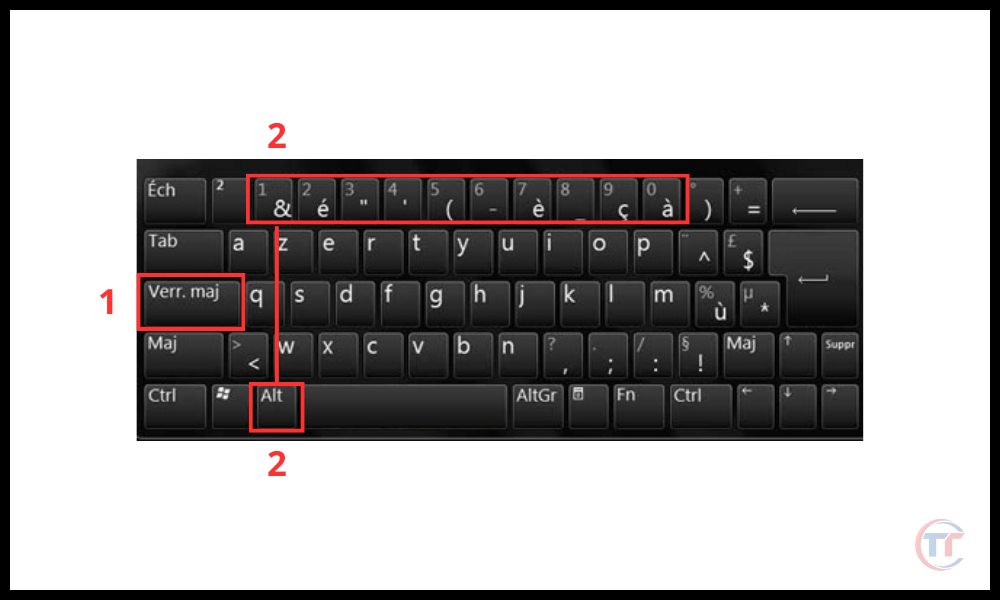
You can also use Unicode to create an inverted exclamation mark. Unicode is another encoding system that allows for more characters than ASCII . To create an inverted exclamation mark, you must use the code U+00A1 . Here's how:
- Press the Num Lock key [1] to activate the numeric keypad.
- Hold down the Ctrl and Alt keys and type 00A1 on the numeric keypad .
- Release the Ctrl and Alt keys and you will see the ¡ symbol appear.

On Mac
You can use the same key combination as for the QWERTY keyboard, i.e. Option + 1. The only difference is that you must press the Shift key at the same time as the Option key to access the number 1 on your keyboard.
On Linux
You can use the same key combination as for the QWERTY keyboard, that is, Ctrl + Shift + U , followed by the hexadecimal code A1 . The only difference is that you must press the Alt Gr key at the same time as the Ctrl and Shift keys to access the letter U on your keyboard.
Good to know : There are other key combinations, keyboard shortcuts, to insert other symbols and special characters .
How do I type an upside-down exclamation mark on a smartphone?
If you're using a smartphone with an Android or iOS system , you can easily type an inverted exclamation mark using the virtual keyboard . Here's how:
- Open the application where you want to write the symbol ¡ , for example a message, an email, or a note.
- Press the ?123 key to access the symbols .
- Swipe your finger to the left to display more symbols.
- Press the ¡ key to insert the symbol into your text.

You can also change the language of the virtual keyboard to access the ¡ symbol more easily. Here's how:
- your smartphone settings Language and input section .
- Tap Virtual Keyboard and select the keyboard you are using , for example Gboard or SwiftKey.
- Tap on Languages and add Spanish or another language that uses the symbol ¡.
- Open the application where you want to write the ¡ symbol and press the globe key to change the language.
- Press the ! to insert the ¡ into your text.
How do I type an upside-down exclamation mark in a word processor?
If you use word processing software like Word, LibreOffice, or Google Docs, you can create an inverted exclamation mark using the special character insertion function . Here's how:
- Open the word processing software and go to the document where you want to write the symbol ¡.
- Click on the Insert menu and select Special Characters or Symbol depending on the software you are using.
- Look for the symbol ¡ in the list of available characters or type its name (inverted exclamation mark) or its code (U+00A1) in the search bar.
- Click on the ¡ symbol to insert it into your document.
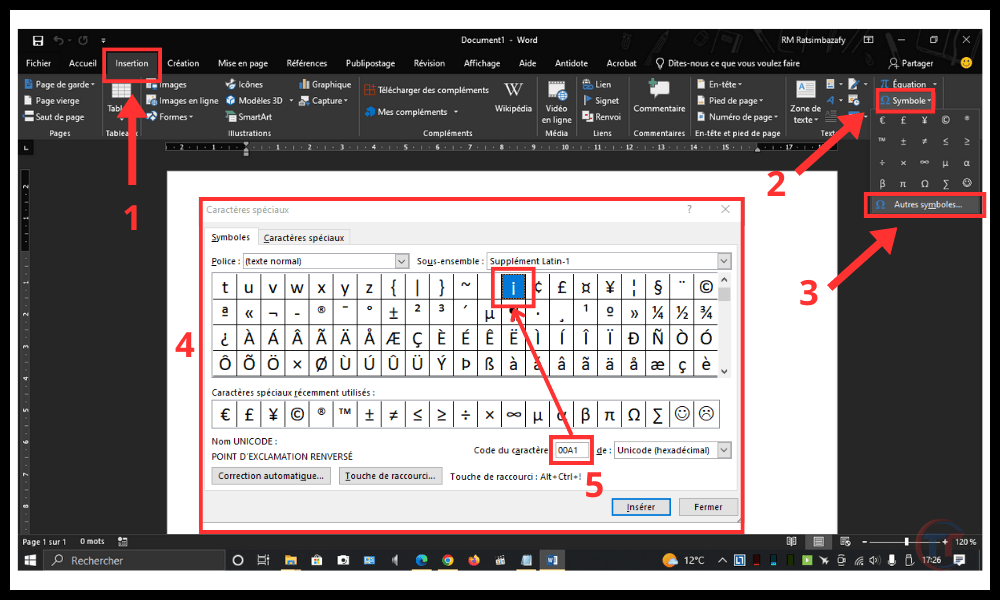
You can also use the keyboard shortcuts we saw earlier to type an inverted exclamation mark in a word processor. Simply use the ASCII or Unicode code with the Alt or Ctrl+Alt keys.
How do you write an exclamation mark backwards on social media?
On social media platforms like Facebook, Twitter, and Instagram, you can type an inverted exclamation mark using the same methods we've seen previously for keyboards, smartphones, web browsers, and word processors. Simply choose the method that best suits your device.
You can also copy and paste the ¡ from a website that offers special characters .
Conclusion
The inverted exclamation mark is a punctuation mark that indicates the beginning of an exclamatory or interrogative sentence in some languages. It is placed before the first word of the sentence and is combined with a regular exclamation mark at the end . It helps to emphasize the intonation and meaning of the sentence from the outset, making the text easier to read and understand.