You have headphones and you want to enjoy your music, games, or calls without being disturbed by outside noise. But there's a problem: you can hear yourself talking in your headphones, and it bothers you. What causes this and how can you fix it? That's what we'll explore in this article.
What are the possible causes of the problem?
There are several reasons why you might hear yourself in your headphones. Here are the most common:
- Incorrect sound settings
- A connection problem
- A problem with the quality of the helmet
How to solve the problem?

To stop hearing yourself in your headphones , there are several possible solutions.
Solution 1: Check the sound settings
The first thing to do is to check that your headset is properly configured in your device settings . To do this, follow these instructions depending on the type of device you are using:
On Windows
- Right-click on the speaker icon in the bottom right corner of the screen and click on “ Sound ”.
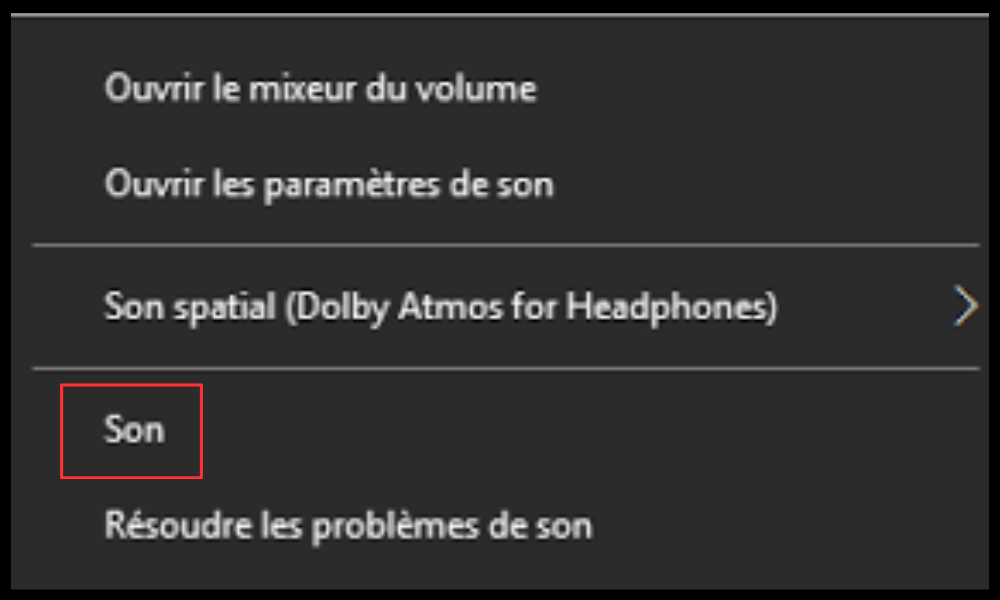
- In the window that opens, go to the “ Playback ” tab and select your headphones.
- Right-click on it and click on “ Properties ”.
- In the “ Levels ” tab, lower the microphone volume if necessary.
- In the “ Listen ” tab, uncheck the “Listen to this device” box if it is checked.
On Mac
- Click on the apple icon in the top left corner of the screen and click on “ System Preferences ”.
- Click on “ Sound ” and go to the “ Output ” tab.
- Select your headphones and adjust the volume to your preference.
- Next, go to the “ Input ” tab and select the microphone you want to use.
- Lower the input volume if necessary.
On Android
- Go to your phone's settings and click on “ Sounds and vibrations ”.
- Click on “ Volume ” and adjust the volume of media, calls and notifications according to your preferences.
- Next, click on “ Sound quality and effects ” and disable options that may alter the sound of your headphones, such as Dolby Atmos or the equalizer.
On iOS
- Go to your iPhone or iPad settings and click on “ Sounds ”.
- Adjust the volume of ringtones and alerts according to your preferences.
- Next, click on “ Music ” and disable options that may alter the sound of your headphones, such as maximum volume or equalizer.
Solution 2: Check the headset connection
The second thing to do is to check that your headphones are properly plugged in or connected to your device. To do this, follow these instructions depending on the type of headphones you are using:
A wired headset
- Make sure the headphone cable is properly inserted into the jack socket of your device.
- If you are using an adapter, check that it is compatible with your device and that it works properly.
- If you are unsure, try with another cable or adapter.
- If the problem persists, your headphones may be damaged or the jack on your device may be faulty.
Wireless headphones
- Make sure your headset is properly paired with your device via Bluetooth or Wi-Fi .
- If you are having a connection problem, try turning Bluetooth or Wi-Fi off and on again on your device and on your headset.
- If that doesn't work, try removing the headset from the list of paired devices and reconnecting it.
If the problem persists, your headset may need to be recharged or it may be defective.
Solution 3: Choose a helmet suited to your needs
The third thing to do is choose a headset that meets your needs and preferences. To do this, you must consider several criteria, such as:
The type of helmet
If you're looking to choose Bluetooth headphones , you first need to understand the two main types: open-back and closed-back . Open-back headphones allow sound to escape both in and out, resulting in a more natural and airy sound, but also making them more susceptible to ambient noise. Closed-back headphones isolate sound both in and out, providing a more powerful and immersive sound, but also one that can be more muffled and tiring.
The shape of the helmet
There are also two main types of headphones: circumaural and supra-aural . Circumaural headphones completely enclose the ears with padded earcups, providing greater comfort and sound isolation, but also resulting in a larger size and greater weight. Supra-aural headphones rest on the ears with thinner earcups, offering greater lightness and portability, but also less comfort and less sound isolation.
The sound quality
There are also different levels of sound quality depending on the headphone model. To evaluate sound quality , you need to consider several parameters, such as frequency response, impedance, sensitivity, distortion, and signal-to-noise ratio. These parameters are often listed in the technical specifications of the headphones or in reviews conducted by specialized websites.
Comparative table of the best headphones on the market
To help you choose the best headset for you , here is a comparison table of the best headsets on the market according to user and expert reviews.
| Model | Kind | Shape | Sound quality |
| Sony WH-1000XM4 | Farm | Circum-aural | Excellent |
| Bose QuietComfort 35 II | Farm | Circum-aural | Very good |
| Sennheiser HD 660 S | Open | Circum-aural | Excellent |
| JBL Tune 500BT | Farm | Supra-aural | Good |
| Apple AirPods Pro | Farm | Intra-aural | Very good |
FAQ: Frequently asked questions about the problem of hearing yourself in your headphones
To conclude this article, here are some frequently asked questions you may have about the problem of hearing yourself in your headphones and the answers we can provide.
Why can I hear myself in my headphones when I play on the console?
You might hear yourself through your headset while playing on the console due to incorrect sound settings or a connection problem. To resolve this, you can try adjusting the microphone and headset volume in the console settings, checking that your headset is properly plugged in or connected to the console, or trying a different headset if yours is faulty.
Why can I hear myself in my headphones when I record my voice?
You might hear yourself in your headphones while recording your voice due to incorrect sound settings or a connection problem. To resolve this, you can try adjusting the microphone and headphone volume in your recording software settings, checking that your headphones and microphone are properly plugged in or connected to your computer, or replacing your equipment if it is faulty.
How to avoid hearing yourself in your headphones?
- To avoid hearing yourself in your headphones , you can follow these tips:
- Check the sound settings and disable the “ listen to this device ” option if it is enabled.
- Check the headset connection and make sure it is properly plugged in or connected to your device.
- Choose headphones suited to your use and preferences, favoring closed and circumaural headphones for better sound isolation.
What is the best headset for not hearing yourself?
The best headphones for noise cancellation depend on your needs and preferences. If you're looking for headphones that offer excellent sound quality , good noise cancellation, and great comfort, we recommend the Sony WH-1000XM4 . If you're looking for more affordable and lighter headphones, we recommend the JBL Tune 500BT . If you're looking for wireless and discreet headphones, we recommend the Apple AirPods Pro. You can also opt for the Logitech G Pro X: the gaming headset, currently on sale at Amazon .
Conclusion
Now you know why you hear yourself in your headphones and how to fix it. We hope this article was helpful and that you found the right headphones for you. If you have any questions or comments, please leave them below. We'd be happy to answer and help. Thanks for reading, and see you soon!