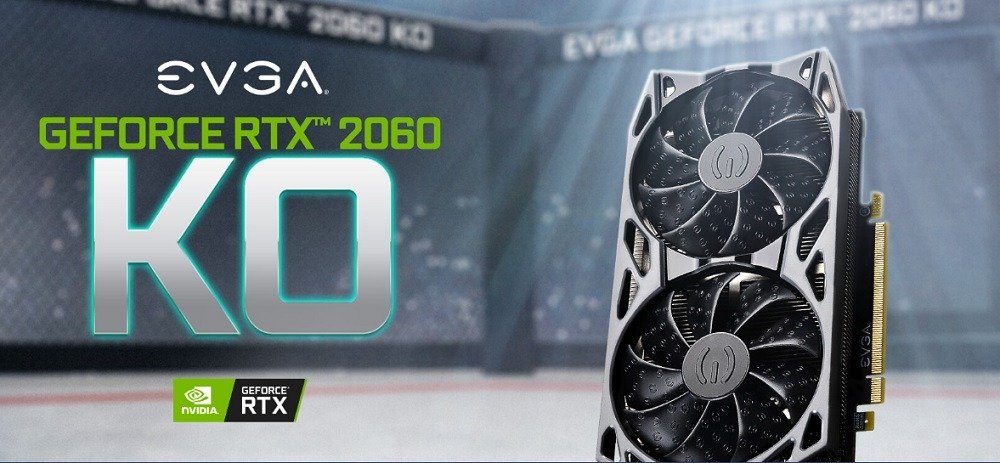
The RTX 2060 KO features NVIDIA Turing. This card supports ray tracing , a true graphics revolution. It is available online for approximately €370.

RTX 2060 KO Gaming Card Specifications
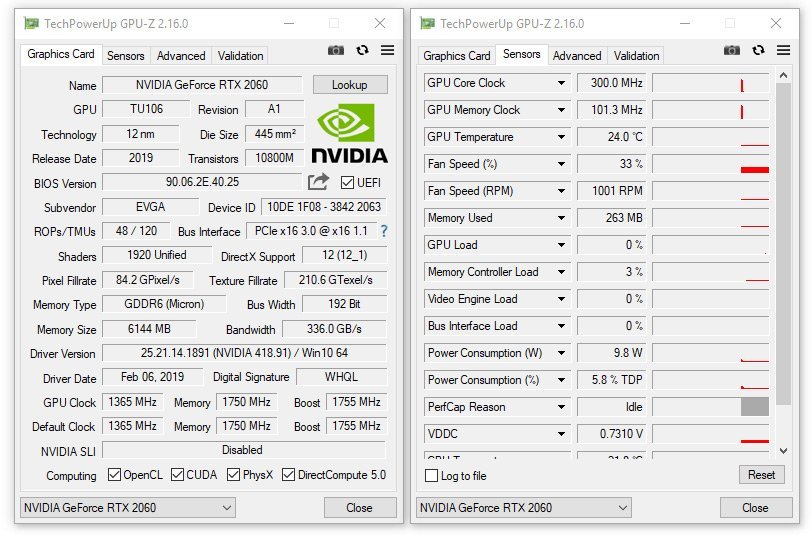
The RTX 2060 KO graphics card features a GPU with a boost clock speed of 1.68 GHz and 6 GB of GDDR6 memory capable of transferring data at 14 Gbps. The memory has a bandwidth of 336 GB per second on a 192-bit bus. The TU106 GPU comprises 1920 CUDA cores . The TU106, measuring 445 m² , is manufactured using a 12-nanometer process . This graphics card can process 5 giga-rays per second with its base clock speed of 1.365 GHz.
It should be noted, however, that some EVGA RTX 2060 KO cards feature a TU104-150 GPU. The performance difference is negligible in these cases.
The RTX 2060 KO Gaming supports a host of features such as ray tracing, Nvidia DSLL 2.0, Nvidia GeForce Experience, Nvidia Ansel, G-Sync, Microsoft DirectX 12 Ultimate, the Vulkan API, Nvidia GPU Boost, VR Ready, and Nvidia Encoder (NVENC). For display, the RTX 2060 KO Gaming has four video output connectors: one DisplayPort, one HDMI, one USB-C , and one DVI-DL. This card can therefore support four simultaneous displays for a maximum resolution of 7680 x 4320.It measures 112.6 mm x 228.6 mm, occupying two PCIe slots horizontally. The card weighs 1.21 pounds, or approximately 550 grams. Since the RTX 2060 KO consumes 160 Watts, it is recommended to have a minimum power power supply of 500 Watts.
The features that make the difference
The new features supported by the latest generation of Nvidia 2000 series graphics cards all contribute to their improved performance. However, some features are particularly crucial. Ray tracing is a true revolution in graphics processing. It allows for the calculation of shadow and lighting effects for each pixel in reverse: from the camera's position to each object, and then to the various light sources in the game scene. This results in a more realistic game.

's GPU Boost, supported by the RTX 2060, allows for better GPU performance based on workload, available power, and, most importantly, chip temperature. Furthermore, Nvidia has enabled users to overclock via Nvidia Scanner. This feature is available through partner software such as MSI's Afterburner or EVGA's Precision X1. Nvidia allows users to define the maximum stable frequency. Users can also set the maximum TDP power consumption and the maximum operating temperature.
The DSLL 2.0 brings numerous advantages to the RTX 2060 graphics card. Deep Learning and supersampling technology enable real-time rendering, optimized by Artificial Intelligence. Frame rates are accelerated by the Tensor Cores and the GPU's AI processor. This optimizes ray tracing and delivers superior image quality with unparalleled sharpness. DSLL 2.0 distinguishes itself from its predecessor by providing higher image resolution, utilizing a single AI network for a wider range of games, and allowing customization of output image quality (quality, versatility, performance).
Thus, with DSLL enabled, with the RTX 2060, we can, for example, go from 41.8 FPS to 68.1 FPS on an image resolution of 1920 x 1080.

With Nvidia GeForce Experience, enjoy the latest drivers and features. It also lets you easily share your gameplay videos on your favorite social networks (YouTube, Facebook, Twitch, etc.) without impacting the performance of the game you're playing. You can also apply customizations to your games in post-processing, such as custom filters. If you want to capture scene photos with your RTX 2060, you can use Nvidia Ansel. This allows you to take 360° Super Resolution screenshots in HDR/Stereo.
The RTX 2060 graphics card also supports Microsoft DirectX 12 Ultimate. With this, several advantages are gained, including DXR and VRS. DXR enables realistic lighting, shadows, and reflections. The RT cores deliver billions of rays per second and can increase frame rates by up to three times in DXR-compatible games and applications. As for VRS ,this feature accelerates graphics frequencies, which vary depending on the area of the scene being rendered. For example, the sky and walls don't require frequent frame refreshes. The processing power is thus directed towards areas requiring greater detail.
RTX 2060 Specifications and Performance
The fact that the TU106 was manufactured using a 12nm process instead of the 16nm process used for the previous generation allows for 10.8 billion transistors to be packed into a 445 mm²chip . For comparison, the GeForce GTX 1060 chip contains 4.4 billion transistors in a 200 mm² space . This doesn't justify a significant increase in density. In fact, each transistor in the RX 2000 series requires more space than one in the RX 1000 series.
The 1920 computing units are accompanied by 48 rendering units, 120 texture units, 30 RT units for Ray tracing and 240 tensor units.
RTX 2060 Benchmarking
When testing the RTX 2060 card on G3DMark, it obtained a score of 14,050. It performs better than the GeForce GTX 1070 (G3DMark score 13,309); but less well than the AMD Radeon RX 5700 XT , which achieved a score of 16,710. Here is a comparative graph of different cards on G3DMark.

The RTX 2060 delivers impressive frame rates for games at QHD resolution and below. In Fortnite, it achieves an average frame rate of 72.5 FPS at QHD 1440p. Results are even better at lower resolutions: 105 FPS at UHD 1080p, 245 FPS at HD 720p. At 4K, we obtained an average frame rate of 13 FPS.

If we compare the performance of the RTX 2060 on different benchmarking platforms such as 3DMark, Passmark and SPECViewperf with the closest competing cards, the RTX 2060 is 0.05% faster than the GForce RTX 1070 Ti and -2.96% less powerful than the Radeon RX 5700.
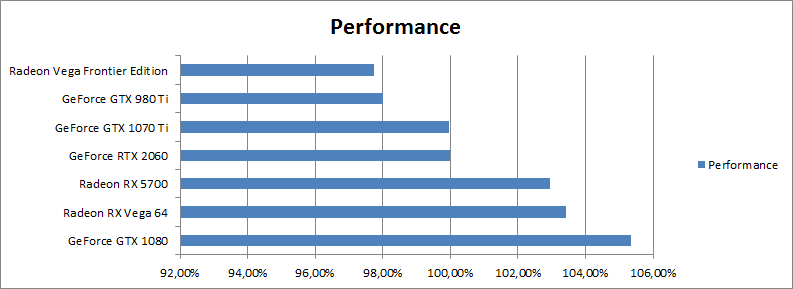
In terms of overall performance, the RTX 2060 delivers a commendable result. It is indeed 56.01% faster than the fastest card in our tests: the GeForce RTX 3090.
In short, the RTX 2060 is a high-end graphics card that delivers good performance. Its main advantage lies in its support for new technologies such as ray tracing and DLSS. The price of this card continues to rise. It is available online for around €370.