When it comes to graphics cards, the selection is vast, and it's not always easy to find your way around. Two manufacturers compete in the market: AMD-ATI and Nvidia. While Nvidia is the most sought-after graphics card supplier, AMD is not far behind.
This brand offers a wide range of graphics cards. Whether you need an entry-level, mid-range, or high-end card, you'll find the perfect fit. To provide a more user-friendly experience, the brand designs increasingly innovative models. And with its ever-expanding product line, choosing the best AMD Radeon graphics card can be challenging. That's why we've compiled this comparison of the best Radeon graphics cards of 2020. A buyer's guide, available at the bottom of this article, will also help you select a graphics card that suits your needs and budget.
Best AMD Radeon graphics cards: our top 5
1. MSI Radeon RX 570 Armor 8G OC: our favorite

Features and Reviews
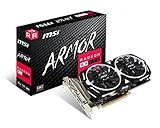
AMD is focusing its marketing efforts on this product, in part, on its affordable price. This graphics card features a very compelling GPU, ideal for those with 1080p monitors. The RX 570 Amor 8G OC will also allow you to play titles like Tom Clancy's The Division 2, Devil May Cry, and Resident Evil 2. It's worth noting that it comes with 8GB of memory, making it a perfect graphics card for gaming without significant compromises at full HD resolution.
However, you'll need to lower some graphics settings if you're playing a demanding game. Furthermore, you'll also benefit from AMD FreeSync™ and HDR with this graphics card. Gamers will experience remarkably smooth gameplay across almost all frame rates. And because HDR technology is integrated, you'll enjoy unparalleled contrast and color clarity.
Overall, you'll be able to enjoy high-quality games at an affordable price with this Radeon RX 570 Amor 8G OC graphics card. So, if you're looking to invest in a graphics card without breaking the bank, this is a great option. In terms of architecture, it features the highly sought-after NAVI technology, along with the GTX 1660 and 1660Ti GPUs. Its key advantage lies in its design, which is quite different from other gaming graphics cards.
2. Radeon RX Vega 64: for 4K gaming
Features and Reviews
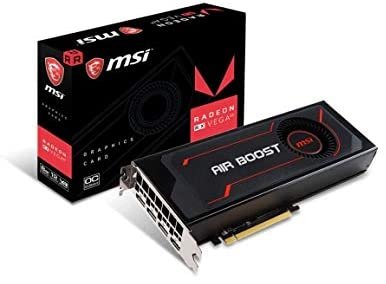
The Vega 64 graphics card offers similar overall performance to the GTX 1080. It provides a decent 4K gaming experience. While Nvidia is known in the market for its high-end models, that doesn't mean AMD isn't pulling out all the stops to establish itself. And the Vega 64 is a prime example.
Powered by its Vega 10 chip and clock speed of up to 1156 MHz, this graphics card will, of course, allow you to take full advantage of 4K gaming while enjoying excellent performance. In terms of graphics, you can achieve up to 60 fps in Star Wars Battlefront. In BioShock Infinite, the frame rate can reach up to 80 fps, which is quite impressive for a graphics card in this category. However, games like Batman: Arkham Origins and Hitman: Absolution will drop you to between 22 and 23 fps. It's therefore best to start with a lower resolution where the frame rate can reach 60 fps.
However, the GPU's performance will slow down. It's also a noisy and power-hungry model. Your PC could reach temperatures as high as 85°C due to an underperforming fan. At this point, the graphics card's performance drops by 6%, coupled with a 9% decrease in its GPU frequency. That said, if the GPU starts at 1533 MHz, it will drop to 1401 MHz if its temperature reaches its maximum.

3. MSI Radeon RX 560 Aero ITX 4G OC: the best value for money
Features and Reviews
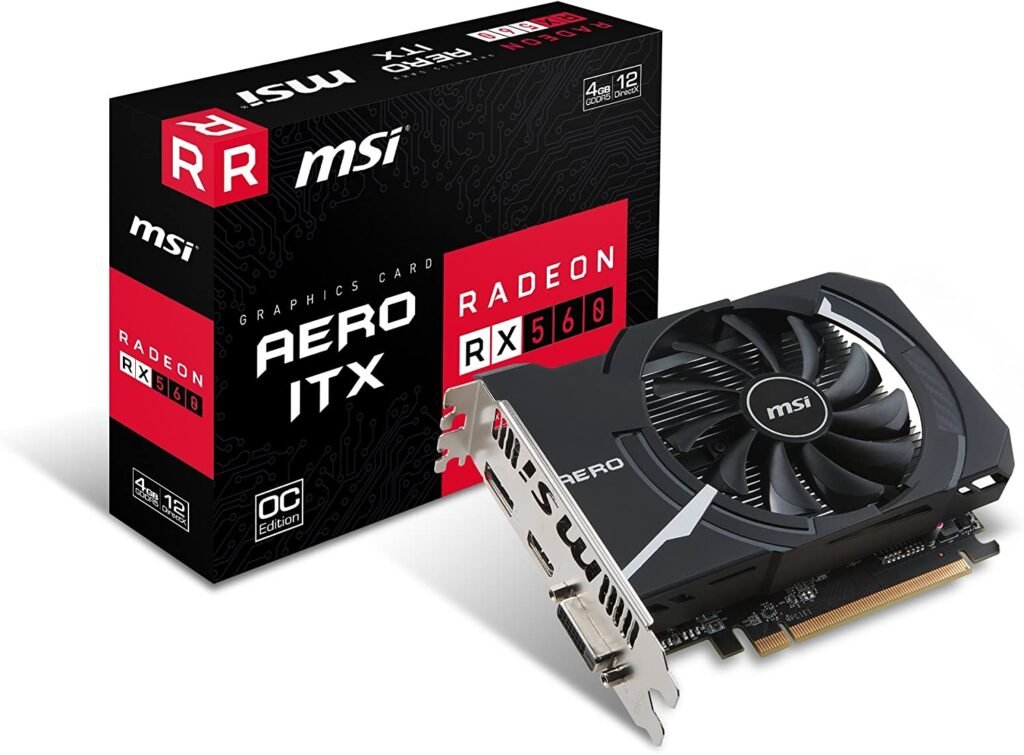
We particularly like the AMD Radeon RX 560 Aero ITX graphics card because it works equally well on PCs and Macs. However, it's the one to prioritize if you have a desktop Mac. It has enough power to handle 3D games, making it ideal for casual gamers.
As a reminder, this is a variant of the AMD Radeon RX 500 series. In fact, the RX 560 ITX graphics card is based on the AMD Polaris architecture. It was designed to give you access to the widest range of PC games. With a price that undercuts the competition, this graphics card will allow you to play esports titles as well as AAA games, all while enjoying unprecedented smoothness.
Equipped with Liquid VR technology, you can use it to experience complete immersion in virtual reality games. The card boasts exceptional features with a clock speed of up to 1196 MHz. It's equipped with 4 GB of GDDR5 memory for a more than comfortable gaming experience. One of the things we particularly appreciated compared to previous models is that this card is quite quiet and very energy efficient.

4. XFX AMD Radeon RX 5700: a card suited to Full HD and QWHD resolution

Features and Reviews
Barely arrived in the Radeon collection, the RX 5700 graphics card is already making waves. It's a perfect graphics card for 4K and Full HD gaming. In terms of energy efficiency, it delivers impressive performance, utilizing cutting-edge technologies. With this graphics card, you'll be able to enjoy your gaming sessions without having to compromise on processing power. It's worth noting that it features state-of-the-art processor technology and a very recent computing unit.
This feature allows it to deliver crisp and precise image quality. What distinguishes the RX 5700 graphics card from previous models is its promise of fast rendering. Indeed, it boasts a bandwidth of 448 GB/second, a feature that has more than doubled compared to older models. This results in perfectly smooth gameplay, reducing the risk of unexpected stuttering that could interrupt your gaming experience.
Furthermore, it's worth noting that the graphics card features optimal GDDR6 memory. This allows it to offer ultra-high bandwidth, supported by 1440p performance for even the most demanding games. On the back, you'll find a heat dissipation system to ensure fast and efficient cooling of your computer's graphics card.
As you've probably gathered, with this graphics card, AMD has clearly gone all out with a GPU architecture optimized for video games. Currently, the manufacturer doesn't offer hardware acceleration for ray tracing.
5. Sapphire Radeon VII 16GB HBM2/PCI: High performance added to a smooth gaming experience

Features and Reviews
If you're looking for a graphics card that delivers top performance with comprehensive effects while providing a smooth gaming experience, the Sapphire Radeon VII 16GB HBM2/PCI is for you. It promises a seamless, uninterrupted gaming experience with high-precision resolution.
The Radeon VII graphics card was specifically designed for popular esports and 3A games. It has pushed the graphics industry to an unprecedented level of performance. It also boasts 16GB of HBM2 memory, allowing the graphics card to handle even the most demanding games. Its 1TB/s bandwidth ensures ultra-high-resolution textures, high dynamic range, and ultra-realistic visuals.
With the Radeon VII graphics card, you can enjoy smooth, tear-free HDR gaming at 1080p, 1440p, and 4K resolutions. You can also render your favorite photos and videos with the most advanced graphics software on the 8K display. Advanced Radeon software helps professional users create customized content experiences with diverse gaming setups.

What is a graphics card?

The graphics card is a computer component that ensures the image quality on your monitor. It's also called a video card or graphics accelerator. It's thanks to the graphics card that you can see the image currently displayed on your screen. As you might have guessed, the better your graphics card, the better the image quality displayed on your monitor. It's as simple as that. High-performance graphics cards are the preferred choice for video game enthusiasts and those specializing in graphic and video editing.
On the market, there are two main types of graphics cards: integrated and discrete. As its name suggests, the integrated graphics card is located within the motherboard. No expansion is required in this case. It can be installed in both desktop and laptop computers. The discrete graphics card, on the other hand, is installed on a separate motherboard and is a separate component. It's the perfect card for those who need to upgrade their system.
How does a video card work?
To understand how a graphics card works, you will need to know its main components.
Like Nvidia graphics cards, AMD graphics accelerators share the same components. These are primarily the GPU, which is to graphics what the central processing unit (CPU) is to a computer. GPU, or Graphics Processing Unit, is the cornerstone of a graphics card. It's important to understand that not all GPUs are created equal. They differ in their model and specifications. The GPU's role is to translate the data coming from the GPU into an image.
Besides the GPU, there are expansion slots. There are PCI, AGP, and PCI-E slots, which offer higher bandwidth. AMD's CrossfireX expansion slot allows you to improve your computer's performance. FPS, or Frames Per Second, is also a crucial characteristic of a graphics card.
How to choose your AMD Radeon graphics card?
Choosing an AMD Radeon graphics card is not a decision to be taken lightly. There are many selection criteria to consider when choosing an AMD Radeon graphics card. These include thermal performance, connectivity, memory, and more.
If you'd like to see other brands, check out our comparison of the best graphics cards for gamers !
Thermal design and GPU
Thermal design and GPU quality are the main factors you should consider when choosing your graphics card. With a discrete GPU, you risk having a power-hungry graphics card. Therefore, before upgrading your PC, make sure it can support the GPU you intend to install. Indeed, like any electrically powered device, the GPU generates a lot of heat and thus requires sufficient ventilation for optimal performance.
The combination of the amount of power a GPU draws and the amount of heat it generates is known as the Thermal Design Power, or TDP. This measurement is given in watts, and it's the number you'll see in a graphics card's specifications. The higher the TDP, the more power is required to operate the GPU, and the more heat the GPU produces. This can be important in both desktop and laptop computers, where thermal management becomes a high priority due to space constraints.
Memory
Graphics cards require a specific type of memory to store the data needed to display information on the screen. Integrated into the graphics card, this memory helps the GPU store its calculations. Before choosing memory for your graphics card, you must ensure it is perfectly compatible with your GPU. The choice depends on the amount of memory required, of course.
There are 1GB, 2GB, and 4GB memory modules, the latter being more common in high-end models, as well as modules larger than 5GB suitable for surround gaming. For this type of memory, you'll need a high-powered GPU.
This type of memory is suitable for CAD or modded games. If you want to play light games like Batman Origins, Grid 2, Metro Last Night, or Bioshock, 1GB of memory is more than enough. However, you'll need 2GB of memory for games like Company of Heroes, Call of Duty: Ghosts, etc. Furthermore, you should know that there are several types of memory: GDDR2n, GDDR3, GDDR4, and GDDR5. The higher the number, the faster your memory.
Cooling capacity
As soon as you switch to multi-monitor mode, engage in 3D games, or connect a VR headset, the video card becomes essential equipment. In these situations, you will encounter heat. Heat dissipation requires a ventilation system to manage the heat.
However, to ensure optimal performance of your computer's fan, it's best to keep it completely dust-free to guarantee maximum airflow to your computer case. Free software downloadable from the internet can help you determine the temperature level of your computer's main components.
Therefore, if your graphics card is overheating, you can get a new fan and install more efficient cooling devices. Water cooling can be useful if you are a very demanding user in this regard.
FPS: we're aiming for a minimum of 50 FPS
As mentioned earlier, FPS is also an important factor to consider when choosing a graphics card. The quality of the frame per second ensures smooth gameplay. A high FPS will provide a fast, bug-free experience. Conversely, a low FPS will give you the feeling of being stuck in what's known in gaming jargon as a point-and-click adventure. To avoid this issue, it's best to aim for a minimum of 50 FPS. In any case, you'll be able to adjust the resolution and graphics settings to your liking.
Which graphics card for which use?

Tell me about your graphics card, and I'll tell you who you are. That's exactly right. The graphics card you use determines the type of PC user you are. There are all kinds of graphics cards on the market, from the most basic models to the most advanced.
If you only use it for video editing or are simply a film enthusiast, there's no need to spend €1400 on a graphics card. A good performance processor will do the job just fine.
At the same time, it's best to opt for a high-quality, expensive processor to get improved image quality and undeniable smoothness. However, you can also find an AMD Radeon graphics card for around 100 euros.
Those looking for high-quality hardware to enjoy top performance and high-definition video can turn to AMD Radeon gaming graphics cards. Prices can reach up to €1300 for high-end models offering 4K resolution.
Which resolution should I choose: Full HD, WQHD or 4K?
Full HD is the standard for graphics card resolution. It typically reaches 1080p. With this resolution, many games can run with high-performance graphics without frame rate drops. Alternatively, you can forgo this resolution and opt for higher resolutions. This will allow you to enjoy sharper images, such as WQHD (1440p), 4K, or even 5K.
With or without a backplate?
Graphics cards are becoming increasingly powerful on the market. Over the years, we've seen graphics cards become larger and heavier. To better support these larger cards, manufacturers are constantly innovating.
These mid-range and high-end models feature a component known as a backplate. Made entirely of metal, the backplate is mounted on the back of the graphics card's PCB. This reinforces the graphics card's rigidity, improves its support within the system, and makes it more resistant to vibrations caused by transport.